
Hide Activity Details (+ Tweaks) for Trello
Hides activity details on Trello cards. Can now also be set to hide completed checklist items
As of May 2026, Hide Activity Details (+ Tweaks) for Trello has 1,000 users and a 4.75/5 rating from 16 reviews in the Workflow & Planning category.
Usersno change0%
1.0K
1,000
Ratingno change0%
4.75
16 reviews
Reviewsno change0%
16
Version
3.3.1
Manifest V3
History
1 snapshotsTracking since Apr 29, 2026.
View as table
| Date | Users | Rating | Reviews | Version |
|---|---|---|---|---|
| Apr 29, 2026 | 1.0K | 4.75 | 16 | 3.3.1 |
| Now | 1.0K | 4.75 | 16 | 3.3.1 |
Permissions & access
- Permissions
- storage
- Host access
- None declared
Screenshots

About
Hide Activity Details

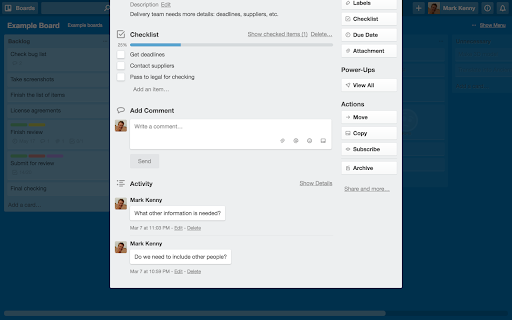
When viewing a card, everything that was ever done to that card is displayed at the bottom. This is far more much information than most people care about, and it cluttered it so that comments were swamped. You can hide this by clicking “Hide Details”, but Trello doesn’t always remember your choice. You can set this extension to click that link for you every time you open a card. Activity details are always there, if you need them. Just click “Show Details”.

Please note: this extension does not stop Trello tracking activity.

Hide Completed Items

I use checklists all the time, and only want to see the items I have left to do. You can hide completed items by clicking “Hide completed items” above the checklist, but Trello doesn’t hide them by default. You can set this extension to click that link for you every time you open a card. Your completed items don’t go anywhere, just click “Show checked items” to see them again. They’ll be hidden the next time you open the card.

Show or Hide Card Label Text

In list view, card labels are shown as a strip of colour. If you have given the label a name, this can also be displayed. This was always a hidden feature in Trello, and lately it appears Trello has removed this functionality. This option brings it back — switch it on display card label text, switch it off to hide it.

Place Cursor in Two Factor Auth field

If you have two factor authentication enabled, this option will place the cursor in the field when it appears.

This extension is only tested in the the most recent version of Chrome. If reporting a problem, please try to be as specific as possible (e.g. what is not working and where, in which circumstances, etc).
Technical
- Version
- 3.3.1
- Manifest
- V3
- Size
- 54.94KiB
- Min Chrome
- 88
- Languages
- 1
- Featured
- Yes
Metadata
- ID
- hcgmjpjodnakphfpegldpbcajlmpfipa
- Developer ID
- ucb684576102f70822f1d2b528461b88a
- Developer Email
- [email protected]
- Created
- May 11, 2016
- Last Updated (Store)
- Dec 14, 2023
- Last Scraped
- May 26, 2026
- Website
- https://beingmrkenny.co.uk/
- Support URL
- —
Similar extensions
Alternatives to Hide Activity Details (+ Tweaks) for Trello, ranked by description similarity.

Trello Improvements
An add-on to improve your life and work with trello
813
★ 5.0

Trello plugin all-in-one - Truello
Tired of having too many extensions for Trello? Add missing features in ONE Chrome extension: Card age, number, count and lable name
8.0K
★ 3.5

Trello Add Card Redux
Add cards to Trello boards from anywhere
139
★ 3.7

TredoList
Turn Trello into a convenient todolist tool, with new list layouts and dynamic color themes
601
★ 4.3
Amazing Fields for Trello
Extension to update Trello UI when using Amazing Fields
1.0K

Trello Enhancements
Enhances Trello with private notes, card ID badges, configurable links, and per-key shortcut suppression
5

Checklist Hider for Trello
Checklist Hider for Trello adds a simple toggle to collapse or expand all checklist items inside Trello cards.
6
★ 5.0

One-Click Trello
Instantly create a new Trello card with a link to the current page in just one click!
3.0K
★ 3.8
Data sourced from the Chrome Web Store · last verified May 26, 2026.