
Canopy — Squarespace Publisher
Publish AI-generated articles to your Squarespace site in one click, and install Canopy Styles on your blog.
As of June 2026, Canopy — Squarespace Publisher has 6 users in the Developer Tools category.
Usersup 200.0 percent+200.0%
6
6
Ratingno change0%
—
— reviews
Reviewsno change0%
—
Version
1.7.17
Manifest V3
90-day change · In the last 90 days this extension 4 version updates, changed permissions.
History
9 snapshotsTracking since Apr 14, 2026.
View as table
| Date | Users | Rating | Reviews | Version |
|---|---|---|---|---|
| Apr 14, 2026 | 2 | — | — | 1.0.0 |
| Apr 21, 2026 | 2 | — | — | 1.0.0 |
| Apr 26, 2026 | 5 | — | — | 1.2.1 |
| May 4, 2026 | 4 | — | — | 1.2.1 |
| May 9, 2026 | 3 | — | — | 1.3.1 |
| May 14, 2026 | 5 | — | — | 1.3.1 |
| May 27, 2026 | 5 | — | — | 1.3.13 |
| Jun 3, 2026 | 5 | — | — | 1.7.17 |
| Jun 9, 2026 | 7 | — | — | 1.7.17 |
| Now | 6 | — | — | 1.7.17 |
Changelog
- May 27, 2026description
Canopy SEO is an AI-powered content strategy and publishing tool built specifically for Squarespace site owners. This companion Chrome extension connects your Canopy SEO account to your Squarespace admin panel, letting you publish finished articles with a single click.

How it works:
• Log in to your Canopy SEO account from the extension's side panel
• Navigate to your Squarespace admin panel in Chrome
• Browse your articles that are marked "Ready to publish"
• Click Publish — the extension creates the post with proper formatting, SEO metadata, tags, categories, and excerpt, then takes you to the live page

Features:
• One-click publishing directly to Squarespace from Chrome's side panel
• Preserves all article formatting, tags, categories, SEO title, meta description, and URL slug
• Unpublish and reset articles if you need to make changes
• Automatic Google indexing request after publishing
• Secure authentication via your existing Canopy SEO account

Requirements:
• An active Canopy SEO account (canopyseo.com)
• A Squarespace site with a blog page
• You must be logged into your Squarespace admin panel for publishing to work

This extension is the publishing companion for Canopy SEO. Article writing, content strategy, and SEO analysis happen in the Canopy SEO web app — this extension handles the final step of getting your content live on Squarespace.
Canopy SEO is an AI-powered content strategy and publishing tool built specifically for Squarespace site owners. This companion Chrome extension connects your Canopy SEO account to your Squarespace admin panel, letting you publish finished articles with a single click.

How it works:
• Log in to your Canopy account from the extension's popup window
• Navigate to your Squarespace admin panel in Chrome
• Browse your articles that are marked "Ready to publish"
• Click Publish — the extension creates the post with proper formatting, SEO metadata, tags, categories, and excerpt, then takes you to the live page

Features:
• One-click publishing directly to Squarespace from the extension's popup window
• Preserves all article formatting, tags, categories, SEO title, meta description, and URL slug
• Optional one-click install of Canopy Styles — a small stylesheet added to your site's Code Injection and Custom CSS so tables, inline code, and summaries render cleanly (nothing existing is removed or overwritten)
• Unpublish and reset articles if you need to make changes
• Secure authentication via your existing Canopy SEO account

Requirements:
• An active Canopy SEO account (canopyseo.com)
• A Squarespace site with a blog page
• You must be logged into your Squarespace admin panel for publishing to work
• Installing Canopy Styles requires a Squarespace plan that includes Code Injection (Business/Core and above)

This extension is the publishing companion for Canopy. Article writing, content strategy, and SEO analysis happen in the Canopy web app — this extension handles the final step of getting your content live on Squarespace.
- May 27, 2026short_description
Publish AI-generated blog articles to your Squarespace site with one click.
Publish AI-generated articles to your Squarespace site in one click, and install Canopy Styles on your blog.
- Apr 21, 2026permissions
activeTab, sidePanel, storage, scripting
activeTab, storage, scripting, tabs, system.display
Permissions & access
- Permissions
- activeTabstoragescriptingtabssystem.display
- Host access
- https://*.squarespace.com/*, https://app.canopyseo.com/*
Screenshots
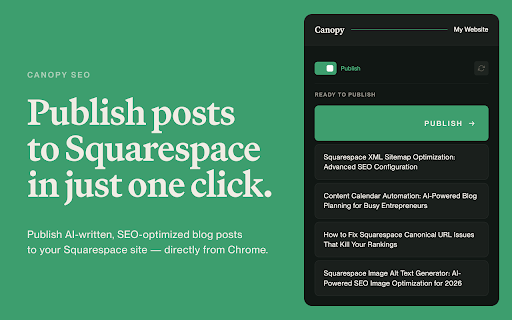
About
Canopy SEO is an AI-powered content strategy and publishing tool built specifically for Squarespace site owners. This companion Chrome extension connects your Canopy SEO account to your Squarespace admin panel, letting you publish finished articles with a single click.

How it works:
• Log in to your Canopy account from the extension's popup window
• Navigate to your Squarespace admin panel in Chrome
• Browse your articles that are marked "Ready to publish"
• Click Publish — the extension creates the post with proper formatting, SEO metadata, tags, categories, and excerpt, then takes you to the live page

Features:
• One-click publishing directly to Squarespace from the extension's popup window
• Preserves all article formatting, tags, categories, SEO title, meta description, and URL slug
• Optional one-click install of Canopy Styles — a small stylesheet added to your site's Code Injection and Custom CSS so tables, inline code, and summaries render cleanly (nothing existing is removed or overwritten)
• Unpublish and reset articles if you need to make changes
• Secure authentication via your existing Canopy SEO account

Requirements:
• An active Canopy SEO account (canopyseo.com)
• A Squarespace site with a blog page
• You must be logged into your Squarespace admin panel for publishing to work
• Installing Canopy Styles requires a Squarespace plan that includes Code Injection (Business/Core and above)

This extension is the publishing companion for Canopy. Article writing, content strategy, and SEO analysis happen in the Canopy web app — this extension handles the final step of getting your content live on Squarespace.
Technical
- Version
- 1.7.17
- Manifest
- V3
- Size
- 46.91KiB
- Min Chrome
- 88
- Languages
- 1
- Featured
- No
Metadata
- ID
- hcdkfobaclkppkhmmhmjggmmpmidcjbb
- Developer ID
- u449b4b330fad737e5f8696e8006bc2c7
- Developer Email
- [email protected]
- Created
- Apr 11, 2026
- Last Updated (Store)
- May 24, 2026
- Last Scraped
- Jun 9, 2026
- Website
- canopyseo.com
- Support URL
- —
- Privacy Policy
- https://canopyseo.com/privacy
Data sourced from the Chrome Web Store · last verified Jun 9, 2026.