
Automatio AI
AI chat assistant in your browser sidebar - powered by automatio.ai
As of June 2026, Automatio AI has — users in the Workflow & Planning category.
Usersno change0%
—
—
Ratingno change0%
—
— reviews
Reviewsno change0%
—
Version
1.1.0
Manifest V3
History
1 snapshotsTracking since Jun 11, 2026.
Not enough history yet for this metric — the chart fills in as we collect more snapshots.
View as table
| Date | Users | Rating | Reviews | Version |
|---|---|---|---|---|
| Jun 11, 2026 | — | — | — | 1.1.0 |
| Now | — | — | — | 1.1.0 |
Permissions & access
- Permissions
- sidePanelstoragecontextMenustabsnotificationsscriptingclipboardWrite
- Host access
- https://automatio.ai/*, https://*.automatio.ai/*, <all_urls>
Screenshots


About
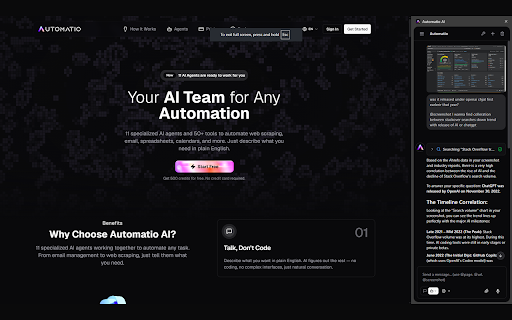
Automatio AI puts a powerful AI assistant right in your browser's side panel — one click away, on any page.

Chat with AI agents that don't just talk, they act:
• Read & summarize any page — ask about the article, PDF, or site you're on
• Search the web, Reddit, YouTube, and X/Twitter with sourced answers
• Automate websites — click, fill forms, scroll, and extract data on the sites you choose
• Gmail, Google Calendar & Sheets — triage email, schedule events, update spreadsheets
• Generate images, write code, analyze crypto, run SEO checks
• Voice input — dictate your prompt and get instant transcription
• Choose your model — the latest from Google, OpenAI, Anthropic, and more

How it works:
Open the side panel, type or speak what you want, and Automatio routes your request to the right agent. Use @page to pull in the current page, @url to read a link, or @screenshot to show the assistant what you see.

Your account, your control:
Automatio AI connects to your existing automatio.ai account — no separate login. The assistant only reads a page or acts on it when you ask it to.

Get started free at automatio.ai.
Technical
- Version
- 1.1.0
- Manifest
- V3
- Size
- 3.94MiB
- Min Chrome
- 88
- Languages
- 1
- Featured
- No
Metadata
- ID
- hcddmblognfpgibfphefklidneocajab
- Developer ID
- ubc06dc4fff313ad47e8c3e390ccd297d
- Developer Email
- [email protected]
- Created
- Jun 10, 2026
- Last Updated (Store)
- Jun 10, 2026
- Last Scraped
- Jun 11, 2026
- Website
- automatio.ai
- Support URL
- https://support.automatio.ai
- Privacy Policy
- https://automatio.ai/privacy
Data sourced from the Chrome Web Store · last verified Jun 11, 2026.