
Bookmark All Tabs
Save all open tabs to a bookmarks folder.
As of June 2026, Bookmark All Tabs has 4,000 users and a 4.06/5 rating from 33 reviews in the Functionality & UI category.
Usersdown 20.0 percent−20.0%
4.0K
4,000
Ratingno change0%
4.06
33 reviews
Reviewsno change0%
33
Version
2.6
Manifest V3
90-day change · In the last 90 days this extension lost 1.0K users.
History
3 snapshotsTracking since Apr 6, 2026.
View as table
| Date | Users | Rating | Reviews | Version |
|---|---|---|---|---|
| Apr 6, 2026 | 5.0K | 4.06 | 33 | 2.6 |
| Apr 17, 2026 | 4.0K | 4.06 | 33 | 2.6 |
| Apr 27, 2026 | 4.0K | 4.06 | 33 | 2.6 |
| Now | 4.0K | 4.06 | 33 | 2.6 |
Permissions & access
- Permissions
- bookmarkstabsstorage
- Host access
- None declared
Screenshots
About
𝗪𝗵𝗮𝘁 𝗶𝘀 𝗕𝗼𝗼𝗸𝗺𝗮𝗿𝗸 𝗔𝗹𝗹 𝗧𝗮𝗯𝘀?
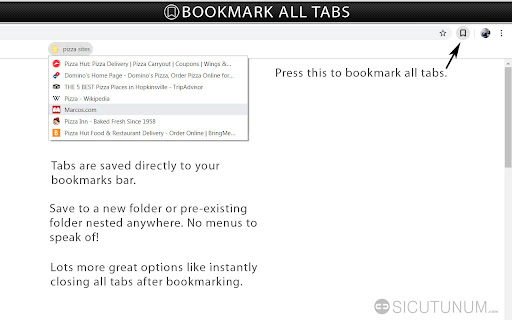
Save all tabs to any bookmarks folder anywhere at the press of a button. No annoying menus, popups or questions asking you to name things when bookmarking. Save bookmarks to an auto generated folder using values like the active page title you were on when saving, the current date, day, time etc. nested under any folder you want. Auto generate a “Recent” folder to quickly access your most frequently used bookmarks. Plus tons more features to tweak for whatever your workflow…


𝗔𝗱𝗱𝗶𝘁𝗶𝗼𝗻𝗮𝗹 𝗙𝗲𝗮𝘁𝘂𝗿𝗲𝘀
• Store bookmarks into an existing folder nested anywhere on button press.

• Save using date, day, time, current tab and more as nested sub folders.

• Auto generate “Recent” bookmarks folder of most used bookmarks.

• Auto exclude pinned tabs when bookmarking all tabs.

• Option to bookmark the active tab only.

• Option to auto close everything bookmarked after bookmarking.

• Option to auto exclude duplicate bookmarks when adding.

• Option to auto sort bookmarks when adding.

• Delete all bookmarks in folder.

• Delete all duplicate bookmarks in a folder.

• Sort all bookmarks in a folder.

© Seth Fentress
Technical
- Version
- 2.6
- Manifest
- V3
- Size
- 642KiB
- Min Chrome
- 88
- Languages
- 1
- Featured
- No
Metadata
- ID
- hbmahfbhinihjghbipldimiaoboebidn
- Developer ID
- u253aa94af96c168e813559cdcfcf3e22
- Developer Email
- [email protected]
- Created
- Jul 20, 2019
- Last Updated (Store)
- Jan 27, 2026
- Last Scraped
- Jun 10, 2026
- Website
- sethfentress.com
- Support URL
- —
- Privacy Policy
- —
Similar extensions
Alternatives to Bookmark All Tabs, ranked by description similarity.

Bookmarks Speed - Instant access to bookmarks
Instant bookmark access on every new tab. Filter by folder, sort, edit, and drag to reorder.
213
★ 5.0

Bookmark Keep
View and manage your bookmarks in a convenient sidebar.
56

Bookmark+
Enhanced bookmark management with tags, advanced search, and folder organization
3

Mini bookmarks for the browser (reading list)
Create a list for reading visited sites in the browser and saving sessions
8

Bookmarks Glance
A minimal new tab page to view your bookmarks.
10
★ 5.0

Bookmark Manager - Windows File Explorer Style
A Windows 11-style bookmark manager extension with sidebar and tab support.
22
★ 5.0

Gridmarks: New Tab Bookmarks
Replaces your new tab with a fast, customizable grid of grouped bookmarks. Auto‑fetch icons, drag to reorder, and import/export.
27
★ 3.0

Better New Tab
A clean, modern, and personalized new tab page for your browser.
25
★ 5.0
Data sourced from the Chrome Web Store · last verified Jun 10, 2026.