
Download Kinemaster for PC, Windows, Mac
Get Kinemaster for PC, Windows, and Mac extension to bring an amazing video editor with just one click.
As of May 2026, Download Kinemaster for PC, Windows, Mac has 50,000 users and a 3.46/5 rating from 28 reviews in the Productivity category.
Usersup 25.0 percent+25.0%
50.0K
50,000
Ratingup 1.8 percent+1.8%
3.46
28 reviews
Reviewsup 12.0 percent+12.0%
28
Version
1.0.0
Manifest V3
90-day change · In the last 90 days this extension gained 10.0K users.
History
2 snapshotsTracking since Apr 29, 2026.
View as table
| Date | Users | Rating | Reviews | Version |
|---|---|---|---|---|
| Apr 29, 2026 | 40.0K | 3.40 | 25 | 1.0.0 |
| May 26, 2026 | 50.0K | 3.41 | 27 | 1.0.0 |
| Now | 50.0K | 3.46 | 28 | 1.0.0 |
Permissions & access
- Permissions
- None declared
- Host access
- None declared
Screenshots
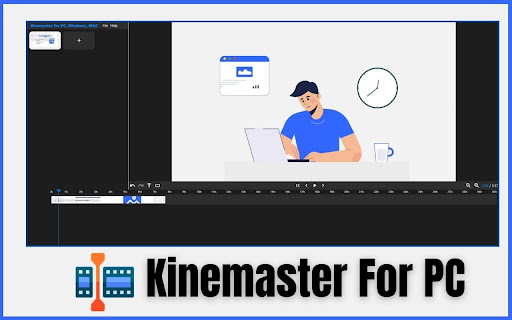

About
Get the Power of KineMaster on PC, Windows, and Mac.  Now, you can access KineMaster's video editing magic on your PC, Windows, and Mac computers with our easy-to-use extension. Whether you're a beginner or a pro, editing videos has never been this straightforward. Enjoy the simplicity of editing right from your web browser. Explore KineMaster for PC, Windows, and Mac today and make your videos shine.


✔️Kinemaster Extension Features:

- Video Editor Panel
- Rotation Option
- Video Duplicate
- Split Option
- Delete Option
- Volumn
- Opacity
- Triming Option
- Save Option
- Expot Option
- Video Settings


✔️Keyboard Shortcuts:

These commands can be used as shortcuts for specific functions.

Play/Pause: Spacebar

Zoom In: = or + (if your keyboard has such a key)

Zoom Out: -

Undo: Ctrl + Z

Redo: Ctrl + Shift + Z or Ctrl + Y

Delete Selected Keys: Delete

Close Modal: Esc

Seeking:

Left Arrow: Go back a second
Right Arrow: Go forward
Holding Shift while using arrows: Jump by 10 seconds
Holding Alt while using arrows: Jump by 0.1 seconds
Additional Points:

Previous Point: Ctrl + Left Arrow
Next Point: Ctrl + Right Arrow
Beginning: Ctrl + Shift + Left Arrow
End: Ctrl + Shift + Right Arrow


✔️How to Use:

Step 1: Add the KineMaster for PC, Windows, and Mac extension to your Google Chrome browser.
Step 2: Click on the extension icon, and you will see the KineMaster Video Editor in your browser.
Step 3: Click the Plus (+) icon to add your video, then drag the video to the Video Timeline.
Step 4: You can use options like Split, Duplicate, and Delete video from the timeline. In the "File" menu, you can save and export the edited video. You can also adjust Video Settings from this menu. Click on the timeline video name to access options like video rotation, opacity, volume, and more.
Step 5: Enjoy!


KineMaster for PC, Windows, and Mac is your straightforward solution for hassle-free video editing. With this extension, you can easily access KineMaster's features from your web browser. Whether you're a newbie or a pro, it simplifies video editing, letting you create impressive videos effortlessly. Elevate your video projects by giving KineMaster a try on your desktop or laptop today!


Disclaimer:

Please note that "KineMaster for PC, Windows, and Mac" Chrome Extension is an independent product and is not associated, affiliated, or endorsed by the PicsArt Android app or its developers. We respect intellectual property rights and make no claim to any copyrights associated with the KineMaster Android app.
Technical
- Version
- 1.0.0
- Manifest
- V3
- Size
- 326KiB
- Min Chrome
- 88
- Languages
- 1
- Featured
- No
Metadata
- ID
- hbhpmkpkbhplmjbnkdpfehieedljphed
- Developer ID
- u84a01191178c14b852db85097a6ceb3f
- Developer Email
- [email protected]
- Created
- Oct 7, 2023
- Last Updated (Store)
- Oct 7, 2023
- Last Scraped
- May 26, 2026
- Website
- kinemaster-for-pc-extension.blogspot.com
- Privacy Policy
- —
Similar extensions
Alternatives to Download Kinemaster for PC, Windows, Mac, ranked by description similarity.

APPRO -Simple Edit and create movies
APPRO -Simple Edit and create movies is a professional and leading video editing software. Edit and create movies
759
★ 2.7

Bandlab For PC, Windows, and Mac Download
Get Bandlab for PC, Windows, and Mac extension to bring an amazing audio editor with just one click.
4.0K
★ 3.0

CaptureKit – Video Editor & Screen Recorder
Multi-track video editor: cut, trim, text, shapes. Record screen or import videos. Export MP4/WebM. No sign-up, no watermarks.
76
★ 5.0

FlipaCreate: Flipaclip For PC
FlipaCreate: Flipaclip For PC – Create Flipaclip-style animations on your PC. Download the extension and start animating now!
8.0K
★ 2.9

Poindeo - Record Screen with Auto Zoom
Record your screen with auto-zoom, making polished, highlighted shots that capture your audience's attention.
721
★ 5.0

Mac Screen Recorder
Use Mac Screen Recorder – handy software for video recording. Learn how to record screen on Mac or Windows with ease.
152

CapBxB Video Editor Pro
Professional video editor with URL upload support
3.0K
★ 3.6

Screen Recorder Pro
A reliable screen recorder with camera and audio options.
21
★ 3.3
Data sourced from the Chrome Web Store · last verified May 26, 2026.