
DeepL Translator
Translate web pages using DeepL API
As of May 2026, DeepL Translator has 1,000 users and a 2.60/5 rating from 5 reviews in the Productivity category.
Usersno change0%
1.0K
1,000
Ratingno change0%
2.60
5 reviews
Reviewsno change0%
5
Version
1.0
Manifest V3
Permissions & access
- Permissions
- storageactiveTabcontextMenusscriptingnotifications
- Host access
- <all_urls>, https://api-free.deepl.com/*
Screenshots
About
# DeepL Free Translator

A Firefox add-on that translates web pages using the DeepL API.

## Features

- Full webpage translation
- Dark mode support
- DeepL API key management
- Automatic language detection

## Getting a DeepL API Key

1. Visit [DeepL API Free](https://www.deepl.com/pro-api) and sign up for a free account
2. After registration, go to your [Account Summary](https://www.deepl.com/account/summary)
3. Your API key will be displayed under the "Authentication Key for DeepL API" section
4. Copy this key and paste it into the extension's settings

Note: The free DeepL API has a limit of 500,000 characters per month. You can check your usage in your DeepL account dashboard.


## Usage

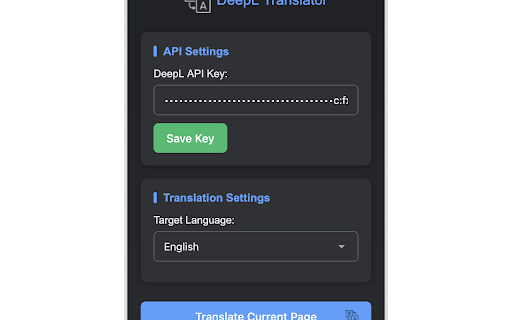
1. Click on the extension icon to open the popup
2. Enter your DeepL API key and save it
3. Select your target language
4. Click "Translate Current Page" to translate the visible content
5. The extension will translate content as you scroll through the page
Technical
- Version
- 1.0
- Manifest
- V3
- Size
- 62.68KiB
- Min Chrome
- 88
- Languages
- 1
- Featured
- No
Metadata
- ID
- hafdbcklefhgidhbdflehejkomnjimom
- Developer ID
- u86942988acf76067168ec6688c1402d1
- Developer Email
- [email protected]
- Created
- Mar 18, 2025
- Last Updated (Store)
- Mar 18, 2025
- Last Scraped
- May 25, 2026
- Website
- —
- Support URL
- —
- Privacy Policy
- https://ether-moon.github.io/PRIVACY-POLICY
Similar extensions
Alternatives to DeepL Translator, ranked by description similarity.

DeepFlow Translator
Translate web pages with DeepL API - see character count before translating
7
★ 2.0

Adara Translate
Instantly translate text on any website using DeepL AI. Right-click to translate or use the popup for superior accuracy.
4
★ 5.0

DeepL Переводчик
Перевод между английским и русским языками через DeepL API
89

Free Web Translator
Automatically translates web pages to your chosen language
128
★ 3.0

LightPDF Translator - Free AI Translator
Free AI-powered translator for any word, phrase, and sentence across multi-language as you browse the web.
4.0K
★ 4.4

Web Translation Assistant
Display a translation input box next to web input fields, automatically translate and fill in content
8
★ 1.0

DeepL Pro Unlimited – Long Texts Without Limits
Translate unlimited long texts with DeepL. Automatically split content into blocks, batch translate, and download results.
334
★ 5.0

Subly.xyz - AI Web Translator
Translate webpages with human-like quality using AI models like Gemini and Claude.
—
★ 5.0
Data sourced from the Chrome Web Store · last verified May 25, 2026.