
ClickPilot AI
Rewrite, summarize and refine any selected text from your browser
As of June 2026, ClickPilot AI has 3 users and a 5.00/5 rating from 1 reviews in the Workflow & Planning category.
Usersup 200.0 percent+200.0%
3
3
Ratingno change0%
5.00
1 reviews
Reviewsno change0%
1
Version
1.0.0
Manifest V3
History
7 snapshotsTracking since Apr 1, 2026.
View as table
| Date | Users | Rating | Reviews | Version |
|---|---|---|---|---|
| Apr 1, 2026 | 1 | — | — | 1.0.0 |
| Apr 17, 2026 | 1 | — | — | 1.0.0 |
| Apr 27, 2026 | 3 | 5.00 | 1 | 1.0.0 |
| May 5, 2026 | 3 | 5.00 | 1 | 1.0.0 |
| May 10, 2026 | — | 5.00 | 1 | 1.0.0 |
| May 22, 2026 | 3 | 5.00 | 1 | 1.0.0 |
| May 28, 2026 | 4 | 5.00 | 1 | 1.0.0 |
| Now | 3 | 5.00 | 1 | 1.0.0 |
Permissions & access
- Permissions
- contextMenusactiveTabstoragescripting
- Host access
- https://api.openai.com/*, https://api.gumroad.com/*
Screenshots
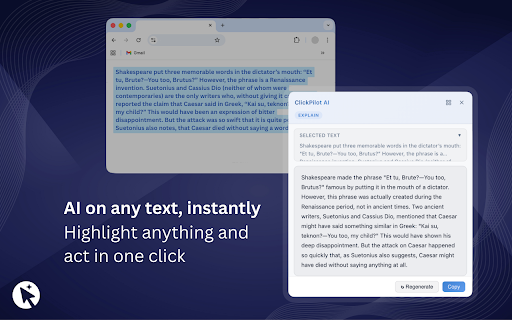


About
**ClickPilot AI helps you write better on any website, right where you type.**
It’s an AI writing assistant for Chrome that works directly inside text fields, so you can fix, rewrite, summarize, and translate without copy-paste or tab switching.

**Advanced AI writing support**
- Fix grammar instantly
- Rewrite text in different tones and styles
- Summarize long content into clear key points
- Translate text quickly
- Improve clarity and flow in seconds
- Use AI directly inside website text fields

**Built for real workflows**
ClickPilot AI is built for everyday browser work, not separate editors.

Works on:
- Gmail
- LinkedIn
- Twitter / X
- Notion
- Most websites

Note: some platforms, including Google Docs, may have limited support.

**Custom AI Shortcuts**
Create your own prompts and save them as reusable shortcuts.
Use them to apply your preferred tone, structure, or writing format with one click.

With Custom AI Shortcuts, you can:
- Standardize repeated writing tasks
- Reuse high-performing prompts
- Adapt the assistant to your personal or team workflow

**How it works**
1. Install ClickPilot AI from the Chrome Web Store.
2. Open a supported site and click into any text field.
3. Choose an action: fix, rewrite, summarize, translate, or a custom shortcut.
4. Apply the result and keep writing.

**What’s included?**
**Free plan**
- Limited daily actions
- Core AI writing features

**Pro**
- Unlimited usage
- All features unlocked
- 7-day free trial
- No subscription
- One-time Lifetime license: **$19 on Gumroad** (ClickPilot AI Lifetime)

**Who is it for?**
- Professionals writing emails and updates
- Marketers and creators producing social content
- Founders and teams working across multiple platforms
- Students and frequent writers who want speed and clarity

**Why users choose ClickPilot AI**
- Works directly inside websites
- No copy-paste between tools
- No need to open ChatGPT in another tab
- Custom AI Shortcuts for repeatable quality
- Lightweight and fast
- Transparent pricing with a one-time Lifetime option

**Privacy and control**
- You choose when AI runs
- You decide what text to improve
- You stay in control of edits before applying them

**Get started**
Install ClickPilot AI, use the free plan, and upgrade when ready with a one-time **ClickPilot AI Lifetime ($19) on Gumroad**.
Technical
- Version
- 1.0.0
- Manifest
- V3
- Size
- 70.46KiB
- Min Chrome
- 88
- Languages
- 1
- Featured
- No
Metadata
- ID
- haampmmjkjahplfoelcnjjhncbacgehb
- Developer ID
- u7d9238be5ca84e463789139365c9b7e3
- Developer Email
- [email protected]
- Created
- Mar 23, 2026
- Last Updated (Store)
- Mar 23, 2026
- Last Scraped
- Jun 10, 2026
- Website
- —
- Support URL
- —
Data sourced from the Chrome Web Store · last verified Jun 10, 2026.