
Lightweight Blocker
A lightweight and secure site blocker, which respects your privacy.
As of June 2026, Lightweight Blocker has 33 users and a 5.00/5 rating from 2 reviews in the Workflow & Planning category.
Usersup 6.5 percent+6.5%
33
33
Ratingno change0%
5.00
2 reviews
Reviewsno change0%
2
Version
1.4.0
Manifest V3
History
6 snapshotsTracking since Apr 1, 2026.
View as table
| Date | Users | Rating | Reviews | Version |
|---|---|---|---|---|
| Apr 1, 2026 | 31 | 5.00 | 2 | 1.4.0 |
| Apr 18, 2026 | 27 | 5.00 | 2 | 1.4.0 |
| Apr 28, 2026 | 30 | 5.00 | 2 | 1.4.0 |
| May 10, 2026 | 26 | 5.00 | 2 | 1.4.0 |
| May 22, 2026 | 29 | 5.00 | 2 | 1.4.0 |
| Jun 5, 2026 | 32 | 5.00 | 2 | 1.4.0 |
| Now | 33 | 5.00 | 2 | 1.4.0 |
Permissions & access
- Permissions
- storagetabs
- Host access
- None declared
Screenshots
About
A minimalist, lightweight site blocker extension for Google Chrome, with privacy and security in mind, for productivity.

- minimalist: the UI and the feature set are extremely basic. The blocker needs to do one thing and do it well: blocking unwanted pages.

- lightweight: the extension must be extremely fast, ensuring no noticeable delay when loading pages.

- private: the extension doesn't collect any data.

- secure: there should be no security holes and security issues with the application.

To ensure these quadruple attributes, we avoid using any third-party libraries and prioritize simplicity and effectiveness in every aspect.
In that way, we can ensure that the extension doesn't have security holes or doesn't collect any
private data.

The whole extension is open source, under MIT license, at: https://github.com/SiGe11/Lightweight-Blocker-Extension

---

How to use?

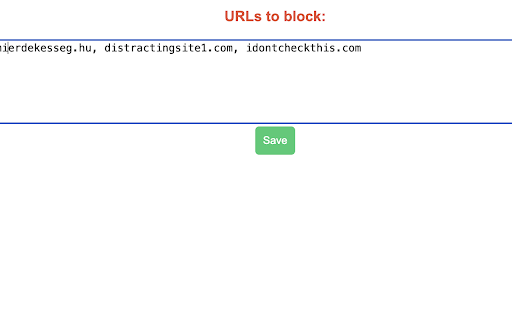
You can configure which pages to block from the Options menu (accessed by right-clicking the extension's icon).
You can list the pages to be blocked in the text area. These can be separated with spaces, commas or semicolons. The blocker distinguishes between subdomains. You should specify all subdomains, even 'www'.

By default, the blocker is inactive. You can activate it by left-clicking on the icon of the extension and clicking on the
extension's current status.

---

FAQ

Why do I see the loaded page for some seconds before it is blocked?

To ensure the speed the extension checks the pages for blocking asynchronously. This way it has a quasi-zero impact on pages where
that should be blocked.
---

Changelog

https://github.com/SiGe11/Lightweight-Blocker-Extension/releases
Technical
- Version
- 1.4.0
- Manifest
- V3
- Size
- 13.65KiB
- Min Chrome
- 88
- Languages
- 1
- Featured
- Yes
Metadata
- ID
- gppkhppnogcgodjackcgcfoepdngfcpm
- Developer ID
- uc8613246a4342ea646fbda36c362243e
- Developer Email
- [email protected]
- Created
- Jun 21, 2022
- Last Updated (Store)
- Oct 21, 2025
- Last Scraped
- Jun 5, 2026
- Website
- —
- Support URL
- —
- Privacy Policy
- —
Similar extensions
Alternatives to Lightweight Blocker, ranked by description similarity.

Privacy Focused Website Blocker (by Avrodh.com)
Website blocker with a focus on privacy. Block unlimited websites with schedules, password protection, and custom blocked pages
270
★ 4.8

Blockberry - Focus Booster
Simple, privacy-focused, open-source extension that blocks websites based on a your list. Does not track or collect your data.
25
★ 5.0

Simple Content Blocker - S.C.B
With Simple Content Blocker you will be able to block Notifications, Popups, Images, Cookies, Camera, Microphone and Location access
60

Advanced Ad Blocker
Block ads, trackers, and unwanted content with advanced filtering capabilities
1.0K
★ 5.0

Site Blocker
Block distracting websites and show a clean focus page.
3
★ 5.0

Focus Blocker
Block distracting websites to boost productivity while browsing.
—

Ad Blocker
Declutter any page: hide ads, sponsored zones, and paint elements to remove. Local-first, lightweight.
3

JustBlock Security – Ad Blocker, Malware & Phishing Protection
Block ads, trackers, malware, phishing & scams with MV3 rules. No data collection. Lightweight, fast, easy to use.
70.0K
★ 3.9
Data sourced from the Chrome Web Store · last verified Jun 5, 2026.