
Math Suite
A suite of famous mathematical libraries for JavaScript!
As of June 2026, Math Suite has 171 users in the Productivity category.
Usersdown 3.4 percent−3.4%
171
171
Ratingno change0%
—
— reviews
Reviewsno change0%
—
Version
0.2.0
Manifest V3
History
8 snapshotsTracking since Apr 1, 2026.
View as table
| Date | Users | Rating | Reviews | Version |
|---|---|---|---|---|
| Apr 1, 2026 | 177 | — | — | 0.2.0 |
| Apr 11, 2026 | 183 | — | — | 0.2.0 |
| Apr 21, 2026 | 173 | — | — | 0.2.0 |
| Apr 26, 2026 | 184 | — | — | 0.2.0 |
| May 3, 2026 | 173 | — | — | 0.2.0 |
| May 11, 2026 | 172 | — | — | 0.2.0 |
| May 29, 2026 | 165 | — | — | 0.2.0 |
| Jun 7, 2026 | 155 | — | — | 0.2.0 |
| Now | 171 | — | — | 0.2.0 |
Permissions & access
- Permissions
- storage
- Host access
- None declared
Screenshots



About
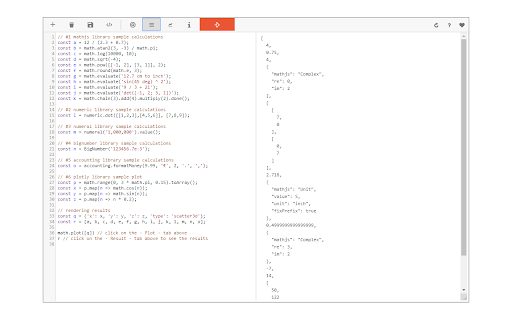
Math Suite is an extension that enables users to perform complex math operations that involve symbolic computations, complex numbers, matrices, and more.

It supports all JavaScript commands in its editor. Simply type any Math or JavaScript command that you would like in the add-on's console and then press on the - Execute - button at the top toolbar. Please note that, each math engine has a separate documentation. Please read individual documentations available in the add-on's support page before using the add-on. There is a - Sample - button in the add-on's top toolbar which you can use to insert a sample math code in the console. Moreover, you can import your desired code to the add-on (.txt format). Please click on the (+) button in order to open the file input window. The file needs to be in a plain text format.

Note: for the plot function, this add-on uses the Plotly library. You can either use the "Plotly.newPlot" function directly or the simplified "math.plot" function provided. If you want to use the - Plotly - function, please put "output-plot" as the first argument which is the id for plot container in the app UI. "math.plot" uses this id in the background.

If you have a feature request, or found a bug to report, please fill the bug report form in the add-on's homepage (https://mybrowseraddon.com/mathematics-suite.html).
Technical
- Version
- 0.2.0
- Manifest
- V3
- Size
- 1.75MiB
- Min Chrome
- 88
- Languages
- 1
- Featured
- No
Metadata
- ID
- gpoofaiiodmdnpdhcklilijfiejhggmc
- Developer ID
- u945d559d572e22612b859d592da9a903
- Developer Email
- [email protected]
- Created
- Nov 27, 2018
- Last Updated (Store)
- Jan 27, 2026
- Last Scraped
- Jun 7, 2026
- Website
- —
Similar extensions
Alternatives to Math Suite, ranked by description similarity.

JS Calculator
A versatile scientific calculator extension for Chrome powered by js libraries, inspired by Google Calculator & Cloudy Calculator.
112
★ 5.0

CalcMagic — a convenient and functional calculator
A feature-rich calculator extension for Chrome. Perform calculations, view history, and enjoy a user-friendly interface.
220
★ 4.9

Smart MathCalc
A floating math calculator with WolframAlpha support.
3
★ 5.0

MathPad
Fast offline calculator for basic math operations. Quick access from your browser by AIO.com.ai
—

Calculator
Calculate expressions and solve equations in your browser with history and one-click copy.
51

LaTeX to TI-Nspire
Translate your LaTeX math expression to TI-Nspire's format using one keyboard shortcut.
527

Scientific Calculator
A scientific calculator Chrome extension
16

AutoMath Symbols
Type shortcuts and press Tab to get math symbols instantly. Simple, fast, and works on most websites.
21
Data sourced from the Chrome Web Store · last verified Jun 7, 2026.