
TabTOC - Vertical Tab Sidebar
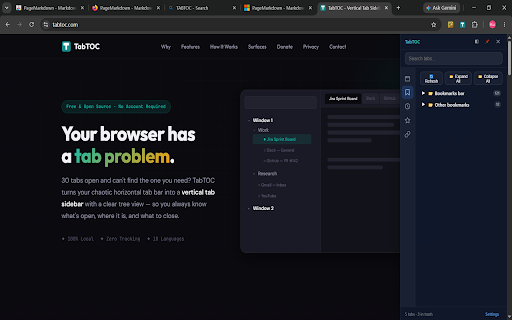
Vertical tab sidebar with tab group sync, quick search, drag-and-drop sorting, and multi-window management.
As of June 2026, TabTOC - Vertical Tab Sidebar has — users in the Workflow & Planning category.
Usersno change0%
—
—
Ratingno change0%
—
— reviews
Reviewsno change0%
—
Version
1.0.2
Manifest V3
History
1 snapshotsTracking since Jun 12, 2026.
Not enough history yet for this metric — the chart fills in as we collect more snapshots.
View as table
| Date | Users | Rating | Reviews | Version |
|---|---|---|---|---|
| Jun 12, 2026 | — | — | — | 1.0.2 |
| Now | — | — | — | 1.0.2 |
Permissions & access
- Permissions
- tabstabGroupsstoragebookmarkshistoryalarmscommandssidePaneltopSitessearch
- Host access
- <all_urls>
Screenshots



About
TabTOC is a vertical tab sidebar that turns your messy browser tabs into a clear, organized panel. Manage tabs in a floating overlay, native side panel, or custom new tab page.

🔑 Key Features

• Vertical Tab Sidebar — Organizes tabs by window, group, and status in a clear vertical panel
• Tab Group Sync — Reads and syncs browser native tab groups (title, color, collapsed state)
• Multi-Window View — See and manage tabs across all browser windows in one place
• Search & Filter — Instantly find tabs by title or URL across all windows
• Drag & Drop — Reorder tabs and move them between groups with drag and drop
• Tab Suspend — Suspend tabs to free memory while keeping them recoverable
• Auto Suspend — Automatically suspend idle tabs based on configurable rules
• Trash & Recovery — Deleted tabs go to trash with auto-cleanup and manual restore
• Saved URLs — Save frequently used URLs in a personal shelf with custom groups
• Batch URL Open — Paste multiple URLs and open them all at once, optionally grouped
• Bookmark Export — Export any tab structure directly to browser bookmarks
• Bookmark Integration — Browse and search your browser bookmarks within the workspace
• History Integration — Search browsing history and reopen pages without leaving the workspace
• Custom New Tab — Replace the new tab page with a full workspace dashboard
• 3 Workspace Modes — Floating overlay, native side panel, or new tab page
• Dark & Light Themes — Adapts to system or browser theme automatically
• Keyboard Shortcuts — Alt+T for popup, Alt+Shift+T to toggle workspace
• Multi-Language — Available in 18 languages

📋 How It Works

• Install and open tabs as usual — TabTOC builds the sidebar automatically
• Press Alt+Shift+T to open the floating workspace overlay
• Or use the browser's native side panel for a persistent docked view
• Search, filter, drag, suspend, or close tabs from the sidebar
• Open a new tab to see the full workspace dashboard

🎯 Perfect For

• Developers with dozens of docs, repos, and tools open simultaneously
• Researchers managing multiple reference windows and search results
• Power users who want a structured overview instead of a cramped tab bar
• Anyone who regularly has 20+ tabs open and struggles to find the right one

🌐 Multi-Language Support

Available in 18 languages: English, 简体中文, 繁體中文, 日本語, 한국어, Deutsch, Français, Español, Português, Italiano, Русский, Nederlands, Polski, Türkçe, العربية, ไทย, Tiếng Việt, Bahasa Indonesia

🔒 Privacy First

TabTOC collects zero personal data. All processing happens locally in your browser. No accounts required. No tracking. No external API calls. Your tabs, bookmarks, and history never leave your device.

💡 Support Development

TabTOC is free to use. If you find it helpful, consider supporting its development at tabtoc.com/donate/
Technical
- Version
- 1.0.2
- Manifest
- V3
- Size
- 201KiB
- Min Chrome
- 88
- Languages
- 18
- Featured
- No
Metadata
- ID
- gpoeknemdldoghgbljpgndafaieffalj
- Developer ID
- u42cdd6df2ee5bdb27a2794a62622805f
- Developer Email
- [email protected]
- Created
- Jun 11, 2026
- Last Updated (Store)
- Jun 11, 2026
- Last Scraped
- Jun 12, 2026
- Website
- tabtoc.com
- Support URL
- https://tabtoc.com/contact/
- Privacy Policy
- https://tabtoc.com/privacy/
Data sourced from the Chrome Web Store · last verified Jun 12, 2026.