
TabNest
Save multiple tabs for later and reopen them with a single click.
As of May 2026, TabNest has 709 users and a 4.67/5 rating from 6 reviews in the Workflow & Planning category.
Usersup 8.7 percent+8.7%
709
709
Ratingno change0%
4.67
6 reviews
Reviewsno change0%
6
Version
1.1.2
Manifest V3
History
3 snapshotsTracking since Apr 1, 2026.
View as table
| Date | Users | Rating | Reviews | Version |
|---|---|---|---|---|
| Apr 1, 2026 | 652 | 4.67 | 6 | 1.1.2 |
| May 1, 2026 | 660 | 4.67 | 6 | 1.1.2 |
| May 30, 2026 | 698 | 4.67 | 6 | 1.1.2 |
| Now | 709 | 4.67 | 6 | 1.1.2 |
Permissions & access
- Permissions
- tabsstoragetabGroups
- Host access
- None declared
Screenshots
About
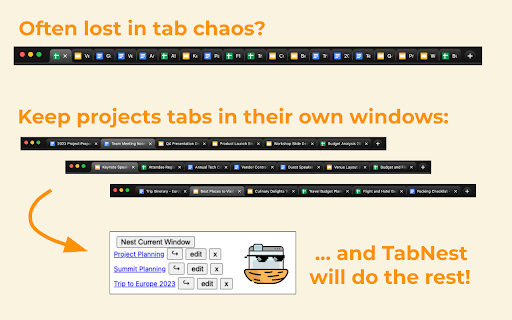
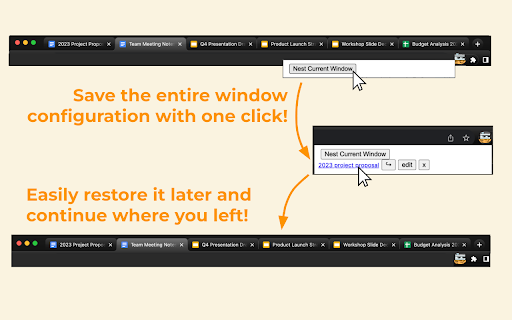
TabNest is a minimalistic, open-source, productivity-boosting Chrome extension designed to enhance multitasking. It allows you to save all the tabs in a window for later use. With just one click, TabNest saves all tabs and groups in the window, then closes it—reducing clutter and freeing up system resources. You can easily access and reopen the saved tabs, making the switch between projects or tasks seamless.

Features:

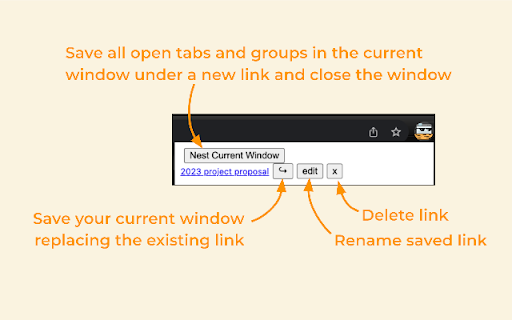
- Save all open tabs in the current window for later use and close the window.
- Reopen saved tabs in a new window with a single click. TabNest saves and restores the exact tab and group configurations from when they were saved, including group name, color, collapse status, and active tab.
- Update, rename, and delete saved links.
- Sync saved tabs across devices using Chrome account storage.

GitHub: https://github.com/tokedo/TabNest
Technical
- Version
- 1.1.2
- Manifest
- V3
- Size
- 13.14KiB
- Min Chrome
- 88
- Languages
- 1
- Featured
- Yes
Metadata
- ID
- gplhcnbpmokcnjhhcbhfjgdnpdjgoadk
- Developer ID
- u432b4283232bc3cc8d02aae361368d65
- Developer Email
- [email protected]
- Created
- Jul 11, 2023
- Last Updated (Store)
- Aug 14, 2023
- Last Scraped
- May 30, 2026
- Website
- —
- Support URL
- —
- Privacy Policy
- —
Similar extensions
Alternatives to TabNest, ranked by description similarity.

Tab Organizer Extension
Organize and save your browser tabs efficiently.
1

Nest — Smart Tab Manager with Groups, Snooze, Sessions & Notes
Organize tabs into groups, snooze distractions, save sessions, and keep notes tied to any page.
206
★ 5.0

Beludia - Save All Open Tabs
Save all currently open tabs, and reopen them on restart!
143
★ 5.0

Nav-Tabs
Effortlessly control tabs and windows at your fingertips.
6
★ 5.0

Tab Manager
Manage your tabs by organizing them into projects.
60
★ 5.0

Remember My Tabs
Save and restore your current window's tabs. Choose which tabs to save, restore them later, and manage your saved sessions locally.
20

Tab Tuck
Tuck your tabs away and focus on the task at hand.
6
★ 4.8

TabNestor : Tab Management, Saving, and Restoration Tool
Manage and save your browser tabs
128
★ 5.0
Data sourced from the Chrome Web Store · last verified May 30, 2026.