
CSS Master: Style Extractor
Extract colors, fonts, and styles from any webpage with one click. Export to Tailwind CSS config.
As of June 2026, CSS Master: Style Extractor has 19 users and a 5.00/5 rating from 1 reviews in the Developer Tools category.
Usersup 90.0 percent+90.0%
19
19
Ratingno change0%
5.00
1 reviews
Reviewsno change0%
1
Version
1.0.2
Manifest V3
History
8 snapshotsTracking since Apr 1, 2026.
View as table
| Date | Users | Rating | Reviews | Version |
|---|---|---|---|---|
| Apr 1, 2026 | 10 | 5.00 | 1 | 1.0.2 |
| Apr 11, 2026 | 13 | 5.00 | 1 | 1.0.2 |
| Apr 22, 2026 | 14 | 5.00 | 1 | 1.0.2 |
| May 2, 2026 | 13 | 5.00 | 1 | 1.0.2 |
| May 10, 2026 | 14 | 5.00 | 1 | 1.0.2 |
| May 19, 2026 | 15 | 5.00 | 1 | 1.0.2 |
| May 28, 2026 | 13 | 5.00 | 1 | 1.0.2 |
| Jun 6, 2026 | 16 | 5.00 | 1 | 1.0.2 |
| Now | 19 | 5.00 | 1 | 1.0.2 |
Permissions & access
- Permissions
- activeTabstoragescriptingsidePanel
- Host access
- None declared
Screenshots
About
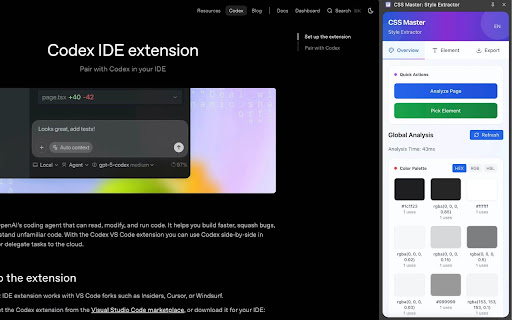
CSS Master is a powerful style extraction tool that helps developers and designers quickly analyze and extract colors, fonts, and CSS styles from any webpage with just one click.

Key Features: • 🎨 Extract color palettes from any website
• 📝 Analyze typography and font families
• 🔍 Pick individual elements to inspect their styles
• 📋 Copy CSS properties with one click
• 🌐 Multi-language support (English/Chinese)
• 📱 Clean, modern sidebar interface
• ⚡ Fast analysis and real-time results
• 🎯 Export to Tailwind CSS configuration

Perfect for:

- Web developers building responsive designs
- UI/UX designers seeking color inspiration
- Frontend developers working with CSS frameworks
- Anyone who wants to understand website styling
Simply click the extension icon, analyze any webpage, and get instant access to all styling information. No more guessing colors or hunting through developer tools!
Technical
- Version
- 1.0.2
- Manifest
- V3
- Size
- 326KiB
- Min Chrome
- 88
- Languages
- 1
- Featured
- No
Metadata
- ID
- gpihooppmipjpfpjmcbejanbkddbmgpd
- Developer ID
- ucd6527a4f7e73587b6df189fc831da85
- Developer Email
- [email protected]
- Created
- Jan 5, 2026
- Last Updated (Store)
- Jan 5, 2026
- Last Scraped
- Jun 6, 2026
- Website
- —
- Support URL
- —
Similar extensions
Alternatives to CSS Master: Style Extractor, ranked by description similarity.

Web Style Analyzer
Extract the Style, Enhance Your Design!
66

Style Inspector Pro
A powerful Chrome extension for inspecting and extracting styles from web pages with advanced color and font analysis
88
★ 5.0

View CSS
A Chrome extension to view the CSS of any website.
1.0K
★ 4.7

CSS Analyzer AI
Revolutionary CSS analyzer with AI-powered: CSS Analyzer, Spaces Agent, Assets Extract, X Color AI, Hover elements & Capture
59

ChromaScope
Herhangi bir web sayfasındaki yazı tiplerini, CSS renklerini ve baskın renk paletini anında analiz edin ve kopyalayın.
3

CSS Inspector
Click the extension icon or press Cmd+Shift+C to activate, then hover any element to inspect its computed CSS.
14

CSS Extractor Pro - Extract Clean CSS Code & Color Palettes
Extract clean CSS code from any webpage element & generate complete color palettes. Essential developer tool.
908
★ 3.0

CSS Extractor — Extract CSS from Any Website
Instantly extract clean, ready-to-use CSS for any element on any webpage. Stop digging through stylesheets manually.
183
★ 5.0
Data sourced from the Chrome Web Store · last verified Jun 6, 2026.