Text Editor
Text and code file editor for Google Drive
As of May 2026, Text Editor has 90,000 users and a 3.46/5 rating from 1,413 reviews.
Usersdown 10.0 percent−10.0%
90.0K
90,000
Ratingno change0%
3.46
1.4K reviews
Reviewsdown 0.1 percent−0.1%
1.4K
Version
4.0
90-day change · In the last 90 days this extension lost 10.0K users.
History
2 snapshotsTracking since May 1, 2026.
View as table
| Date | Users | Rating | Reviews | Version |
|---|---|---|---|---|
| May 1, 2026 | 100.0K | 3.46 | 1.4K | 4.0 |
| May 30, 2026 | 100.0K | 3.46 | 1.4K | 4.0 |
| Now | 90.0K | 3.46 | 1.4K | 4.0 |
Permissions & access
- Permissions
- None declared
- Host access
- None declared
Screenshots
About
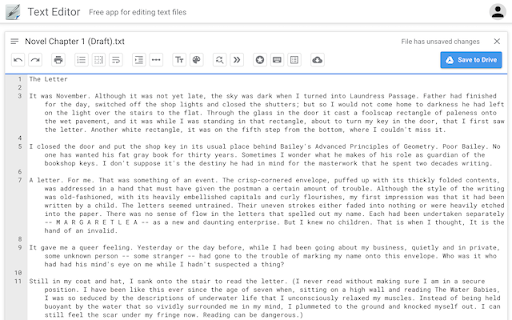
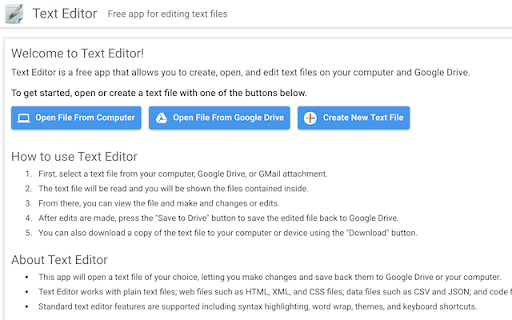
Text Editor is a free app that allows you to create, open, and edit text files on your computer and Google Drive.

All standard text editor features are supported, including syntax highlighting, font size, word wrap, tabs and spaces, printing, undo/redo, keyboard shortcuts, and more.

How to use Text Editor
* First, select a text file from your computer, Google Drive, or GMail attachment.
* The text file will be read and you will be shown the files contained inside.
* From there, you can view the file and make and changes or edits.
* After edits are made, press the "Save to Drive" button to save the edited file back to Google Drive.
* You can also download a copy of the text file to your computer or device using the "Download" button.

About Text Editor
* This app will open a text file of your choice, letting you make changes and save back them to Google Drive or your computer.
* Text Editor works with plain text files; web files such as HTML, XML, and CSS files; data files such as CSV and JSON; and code files such as C++, Java, Python, and JSON.
* Standard text editor features are supported including syntax highlighting, word wrap, themes, and keyboard shortcuts.
* Text Editor is a pure Javascript web app. All processing is done locally in your web browser and on your computer.
Technical
- Version
- 4.0
- Manifest
- —
- Size
- 67.42KiB
- Min Chrome
- —
- Languages
- 1
- Featured
- No
Metadata
- ID
- gpgjomejfimnbmobcocilppikhncegaj
- Developer ID
- ud1d6c6a5fb6a9db9f00b465accb08c09
- Developer Email
- [email protected]
- Created
- Jun 24, 2012
- Last Updated (Store)
- Feb 7, 2020
- Last Scraped
- May 30, 2026
- Website
- texteditor.co
- Support URL
- —
- Privacy Policy
- —
Similar extensions
Alternatives to Text Editor, ranked by description similarity.

Text Editor for Drive
A powerful and lightweight Text editor, extractor for Google Drive. It allow you to edit the Text file, Extract text from file.
10.0K
★ 3.7

Anyfile Notepad
Anyfile Notepad is a Google Drive compatible app that let's you open any type of files on Google Drive and Dropbox.
8.0K
★ 3.6

HTML Editor for Drive
HTML WYSIWYG editor that provides you with an extended designing workspace to help you create your web pages(HTML,HTM) easily.
6.0K
★ 2.5
HTML Editey
HTML Editor for Google Drive
20.0K
★ 3.4

CSS Editey
CSS Editor for Google Drive
7.0K
★ 3.8

TeX, LaTex Viewer and Editor
Free LaTeX viewer, editor for your browser. It allows you to create and manage LaTeX file directly on browser and generate a PDF.
10.0K
★ 3.4

Markdown Viewer and Editor
Full featured Markdown editor with live preview, syntax highlighting, TeX, Flowchart. Useful for both beginners and experts alike.
29
★ 2.3

Text Editor
Edit text in the browser with Text Editor 👌
Features:
- Import files from your device
- Export files to your device
- Save files…
283
★ 2.8
Data sourced from the Chrome Web Store · last verified May 30, 2026.