
Neptune's Pride Agent
Enhance NP Triton UI with intel.
As of May 2026, Neptune's Pride Agent has 438 users and a 4.75/5 rating from 8 reviews in the fun category.
Usersdown 1.8 percent−1.8%
438
438
Ratingdown 5.0 percent−5.0%
4.75
8 reviews
Reviewsup 14.3 percent+14.3%
8
Version
2.2.0
Manifest V3
History
3 snapshotsTracking since Apr 1, 2026.
View as table
| Date | Users | Rating | Reviews | Version |
|---|---|---|---|---|
| Apr 1, 2026 | 446 | 5.00 | 7 | 2.2.0 |
| May 1, 2026 | 434 | 5.00 | 7 | 2.2.0 |
| May 29, 2026 | 445 | 4.75 | 8 | 2.2.0 |
| Now | 438 | 4.75 | 8 | 2.2.0 |
Permissions & access
- Permissions
- scripting
- Host access
- https://np.ironhelmet.com/*
Screenshots



About
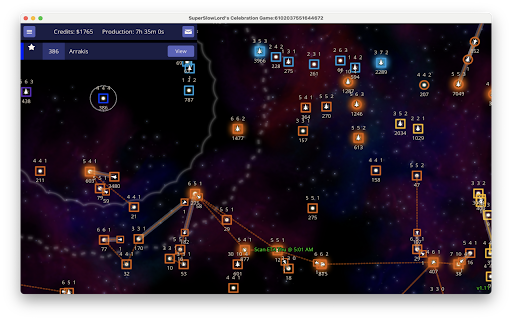
This extension adds a HUD and reporting features to Neptune's Pride (Triton).

The HUD displays an arrival calculator for the first leg of all fleet movements, when you select a fleet. It also displays scanning range time in green when you select an enemy star if that enemy cannot already see your carrier, and in grey if that enemy can see your carrier.

[[Fleet Name]] text in messages now links to the fleet, so that when the message recipient clicks on the fleet you're referring to their map view is navigated to show it, the same way that [[Star Name]] or [[Player Number]] works in the unextended game. In addition, when you type [[#] into the message field, autocomplete shows you which player you have referenced to make it easy to avoid errors.

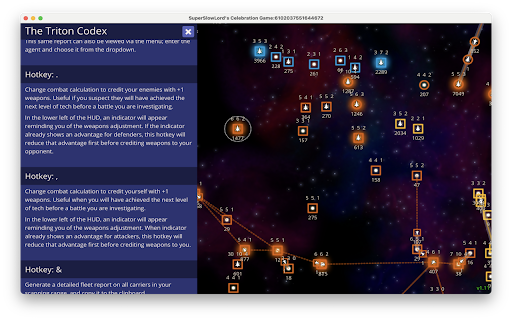
Much of the extension's capabilities is accessed through hotkeys, the help for which can be triggered by pressing '?' any time you're not in a message text field.

The hotkey '*' copies a summary of all the scanning data for stars you can see into your clipboard. You can then paste this into a message to share the scan info or any subset of it or any edit of it with another player.

You can also share scan data via API keys. The link text [[api:SOMEONES_KEY]] will translate into two links for the recipient, one that lets them view the game as the other player, and another that merges the other player's scan data into the current player's view.

If you type '^', a summary of all the scanning data for fleets that are in motion is put into your clipboard, ordered by ETA.

If you type '&', a summary of all fleet movements including crude battle predictions is placed on your clipboard, ordered by ETA. This isn't 100% accurate because fleets that arrive on the same tick are not merged together but it still gives a good sense of the outcomes of many situations.

If you type '%' all instances of relative times change to absolute times, making it easier to determine when a multi-hop fleet will arrive at a particular star, for example.

For more hotkeys check the online help.
Technical
- Version
- 2.2.0
- Manifest
- V3
- Size
- 180KiB
- Min Chrome
- 88
- Languages
- 1
- Featured
- Yes
Metadata
- ID
- gpcdekpemhpdcacfnafnflnlakelfefh
- Developer ID
- u4ce5fb60316e51745ae1d826dc9b194b
- Developer Email
- [email protected]
- Created
- Nov 17, 2021
- Last Updated (Store)
- Feb 1, 2023
- Last Scraped
- May 29, 2026
- Website
- —
- Support URL
- —
- Privacy Policy
- —
Similar extensions
Alternatives to Neptune's Pride Agent, ranked by description similarity.

Stoned Ape Tools
Tools that only a stoned ape could use.
102
★ 5.0

Star Citizen CCU Game
Get a quick overview over all your ships/upgrades in your hangar and buyback, plan optimal upgrade chains.
70.0K
★ 4.6

Haxball All-in-one Tool
Tools for searching rooms, auto refreshing and joining rooms, admin kick/ban shortcuts, and local-muting of other players
7.0K
★ 4.4

Ogame Fleet Counter
No more asking your friends to spy and tell you your fleet points!
1.0K
★ 4.3

IkaEasy V3
The extension significantly improves and simplifies the interface of the online browser game ikariam.com
10.0K
★ 4.3

Worldhaven Asset Viewer
Display Worldhaven Game Assets
731
★ 5.0

D1e Asset Viewer
Display Descent First Edition Game Assets
8

OGame UI++
[EN][FR][ES][TR][DE] Improves the OGame interface by adding elements and menu entries.
8.0K
★ 3.7
Data sourced from the Chrome Web Store · last verified May 29, 2026.