SmartForm Assistant
A tool for aiding the debugging of Nintex SmartForms
As of May 2026, SmartForm Assistant has 77 users and a 5.00/5 rating from 1 reviews in the Developer Tools category.
Usersdown 11.5 percent−11.5%
77
77
Ratingno change0%
5.00
1 reviews
Reviewsno change0%
1
Version
2.0.0.0
Manifest V3
History
3 snapshotsTracking since Apr 1, 2026.
View as table
| Date | Users | Rating | Reviews | Version |
|---|---|---|---|---|
| Apr 1, 2026 | 87 | 5.00 | 1 | 2.0.0.0 |
| May 1, 2026 | 84 | 5.00 | 1 | 2.0.0.0 |
| May 29, 2026 | 86 | 5.00 | 1 | 2.0.0.0 |
| Now | 77 | 5.00 | 1 | 2.0.0.0 |
Permissions & access
- Permissions
- storagewebNavigationcontextMenusscripting
- Host access
- https://*.sfassist.com/*, <all_urls>
Screenshots

About
Nintex provides business automation strategies and recently acquired K2, a competitor in the same space. K2 has developed SmartForms as a solution for citizen developers to build low code web pages which guide the workflow process and provide a data entry platform.

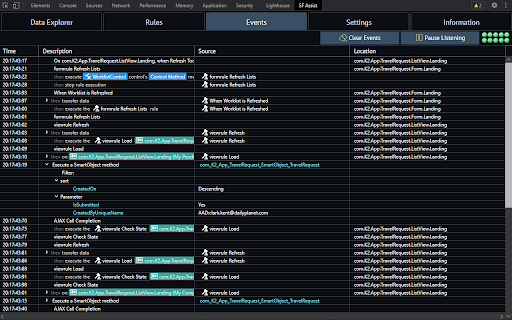
Simple K2 SmartForms are very easy to build but complex SmartForms trigger cascading events and are exceptionally difficult to debug - a complex form may fire 150 events just to load a the first screen of data. Debugging is limited to an XML output filled with Guids which is almost impossible to decipher.

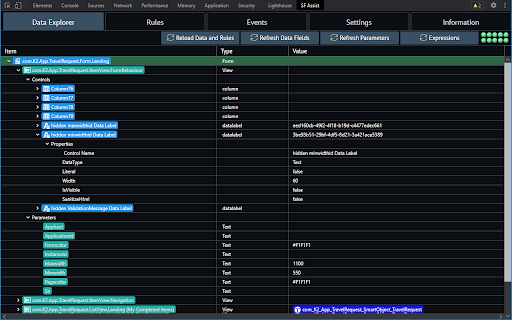
The SmartForm Assistant adds a custom tab in Dev Tools to aid debugging. This is exactly the same concept as the VueJS and Angular Dev Tool extensions.

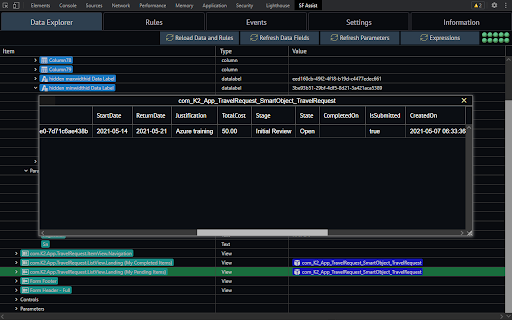
The SmartForm Assistant reads two files in a running SmartForm, translates the one into a representation of all the objects on a SmartForm, the second is passed, to a service to convert it into a human readable form, of the rules used to run the form. The custom dev tools panel displays these inputs and the third tab displays an output of the events as they happen. The event listing is the primary benefit of the extension.
Technical
- Version
- 2.0.0.0
- Manifest
- V3
- Size
- 8.2MiB
- Min Chrome
- 88.0
- Languages
- 1
- Featured
- No
Metadata
- ID
- gofkomdjofigdlgfedgedbibbachbacb
- Developer ID
- ub38c5f1334436bca0616bc7ad359d8b6
- Developer Email
- [email protected]
- Created
- Jun 16, 2021
- Last Updated (Store)
- Mar 28, 2023
- Last Scraped
- May 29, 2026
- Website
- sfassist.com
- Support URL
- https://sfassist.com/submit-ticket/
- Privacy Policy
- https://sfassist.com/privacy-policy/
Similar extensions
Alternatives to SmartForm Assistant, ranked by description similarity.

Dynamics 365 Form Debugger
Debug and test Dynamics 365 Marketing forms by disabling cache. View form details including form ID and field count.
21

Dynamics Dev +
Performs quick actions in Dynamics 365
159
★ 5.0

Formily DevTools (v3)
Formily DevTools (v3) for debugging application's state changes.
919

D365 Finance & Operations Dev Tools
Dynamics 365 Finance & Operations Developer Tools to open table browser, run class, or open form by their name
1.0K
★ 4.0

FormFlow: Smart Data Filler
The ultimate developer tool to fill forms with smart, realistic dummy data instantly.
2

SF Dev Toolkit
Salesforce Developer Toolkit - SOQL Runner, Field Inspector with Translation Editor, Quick Navigation
6

PowerCRM SideKick 365
Enhance your Microsoft Dynamics 365 experience with a custom side panel built for devs and testing.
1.0K
★ 5.0

APEX Shortcuts
Shortcuts: Ctrl+I (inputs), Ctrl+S (save), Ctrl+D (run). Enter confirms and closes Designer dialogs.
18
Data sourced from the Chrome Web Store · last verified May 29, 2026.