
Free » Custom Robots txt Generator for Blogger
Create a perfect custom robots.txt file for Blogger Free ✔️ Optimize your blog for search engines in 2025
As of May 2026, Free » Custom Robots txt Generator for Blogger has 228 users and a 4.91/5 rating from 43 reviews in the Developer Tools category.
Usersdown 6.9 percent−6.9%
228
228
Ratingup 0.2 percent+0.2%
4.91
43 reviews
Reviewsup 4.9 percent+4.9%
43
Version
3.0
Manifest V3
History
5 snapshotsTracking since Apr 1, 2026.
View as table
| Date | Users | Rating | Reviews | Version |
|---|---|---|---|---|
| Apr 1, 2026 | 245 | 4.90 | 41 | 3.0 |
| Apr 21, 2026 | 266 | 4.90 | 41 | 3.0 |
| May 6, 2026 | 238 | 4.90 | 42 | 3.0 |
| May 17, 2026 | 238 | 4.91 | 43 | 3.0 |
| May 31, 2026 | 241 | 4.91 | 43 | 3.0 |
| Now | 228 | 4.91 | 43 | 3.0 |
Permissions & access
- Permissions
- storagealarms
- Host access
- None declared
Screenshots
About
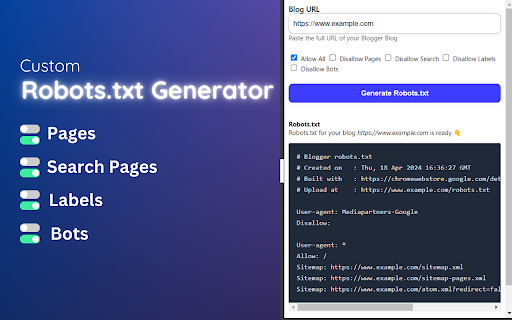
Custom Robots.txt Generator for Blogger [Sitemap Generator for Blogger] is a powerful Chrome extension designed to simplify the process of generating custom robots.txt files for Blogger websites.

Robots txt is a crucial file that tells search engine crawlers which pages or sections of a website should be crawled or indexed, helping website owners control their site's visibility and ranking in search engine results.

✅ How to Generate Custom Robots.txt for Blogger using this Extension:
1. Install the Custom Robots.txt Generator for Blogger extension from the Chrome Web Store.
2. Click on the extension icon in the browser toolbar to open the popup.
3. Enter the URL of your Blogger blog in the provided input field.
4. Select the desired options, such as allowing/disallowing homepage, pages, search, labels, and blocking specific bots.
5. Click the "Generate Robots.txt" button to generate the custom robots.txt file.
6. Copy the generated robots.txt content using the "Copy to Clipboard button".

✔️ How to Update Robots.txt of Blogger using Custom Robots.txt Generator for Blogger Extension:
1. After generating the custom robots.txt file using the extension, copy the generated content.
2. Log in to your Blogger account with your Gmail account.
3. From the left menu, click on "Settings."
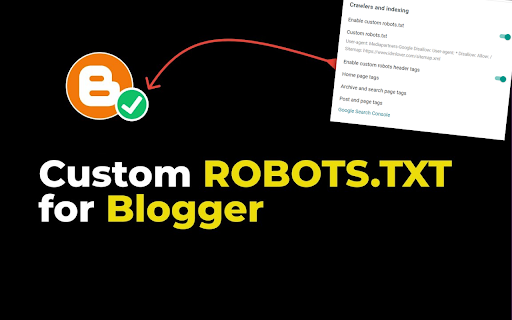
4. Navigate to the "Crawlers and indexing" section.
5. Enable the "Custom robots.txt" toggle button.
6. Click on "Custom robots.txt" and Paste the copied robots.txt content into the provided text area.
7. After adding the code, click on "Save."

Custom Robots.txt Generator for Blogger [Free Sitemap Generator for Blogger] extension offers a user-friendly interface and advanced features to help Blogger users effectively manage their site's crawling and indexing directives. Improve your site's search engine visibility and SEO performance with ease using this handy extension!
Technical
- Version
- 3.0
- Manifest
- V3
- Size
- 16.77KiB
- Min Chrome
- 88
- Languages
- 1
- Featured
- No
Metadata
- ID
- godmaealnfgfnpimbficamaaoebpdgoo
- Developer ID
- u971d8ba91c8c76bdbed6dd312b250f7d
- Developer Email
- [email protected]
- Created
- Apr 19, 2024
- Last Updated (Store)
- Jul 2, 2025
- Last Scraped
- May 31, 2026
- Website
- robotstxtgenerator.xyz
- Privacy Policy
- https://www.robotstxtgenerator.xyz/p/privacy-policy.html
Similar extensions
Alternatives to Free » Custom Robots txt Generator for Blogger, ranked by description similarity.

Sitemap Explorer
This extension helps you find, inspect, export, and view XML Sitemap files for any site you navigate in a browser.
8.0K
★ 4.0

robots.txt viewer
A Chrome extension to view robots.txt content.
104
★ 5.0

Sitemap Generator
Generate sitemap for any website with one click
76

Live robots.txt Checker
Vérifie et teste le robots.txt d'un site en direct
22
★ 5.0

Robots.txt Checker - cmlabs SEO Tools
Robots.txt Checker is an essential tool designed to ensure the efficiency, accuracy, and validity of a website's robots.txt file.
159
★ 5.0

Blog Live Reload
Automatically reload the blog when saving in Blogger's theme editor.
21

Cute Slug Generator
Convert your article title into an SEO-friendly slug instantly.
—

Smart Blog Ranker - AI SEO Copilot
AI-powered SEO copilot: audit blogs, analyze competitors, optimize keywords, and generate ranking improvements.
3
★ 5.0
Data sourced from the Chrome Web Store · last verified May 31, 2026.