
Clipsidian
Clipsidian lets you capture in-browser selected content and send it directly to your Obsidian vault.
As of May 2026, Clipsidian has 324 users and a 5.00/5 rating from 1 reviews in the Workflow & Planning category.
Usersup 13.7 percent+13.7%
324
324
Ratingno change0%
5.00
1 reviews
Reviewsno change0%
1
Version
1.0.0
Manifest V3
History
3 snapshotsTracking since Apr 1, 2026.
View as table
| Date | Users | Rating | Reviews | Version |
|---|---|---|---|---|
| Apr 1, 2026 | 285 | 5.00 | 1 | 1.0.0 |
| May 1, 2026 | 283 | 5.00 | 1 | 1.0.0 |
| May 29, 2026 | 289 | 5.00 | 1 | 1.0.0 |
| Now | 324 | 5.00 | 1 | 1.0.0 |
Permissions & access
- Permissions
- contextMenustabsstorageactiveTabscripting
- Host access
- None declared
Screenshots

About
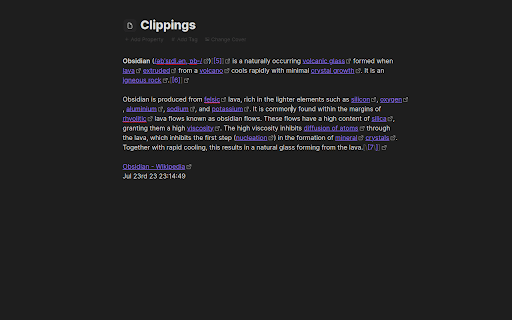
Copy selected web page content to your Obsidian notes:
    - In your web browser, select the content you want to add to your Obsidian vault.
    - Right-click on the highlighted content.
    - From the context menu, select a clipping action. Obsidian should open (if it isn't already open) and your clipping should be saved!

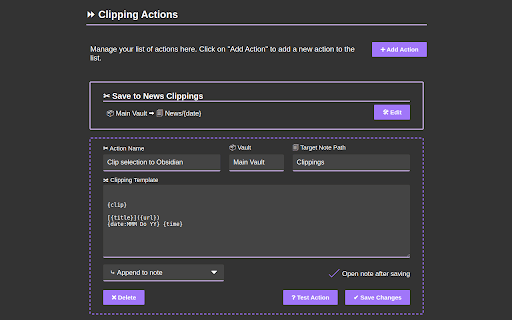
Configure your clipping actions:
    - Open the Clipsidian extension options in your browser and set up as many clipping actions as you need. Choose where to save each clipping, append them to existing notes or create new ones dynamically with placeholders like {date}.

Key Features:

Customizable Web Clipping:
    - Easily collect clippings and keep them organized. Define your own clipping actions with Clipsidian, precisely choosing the destination for every web clipping within your many vaults.

Dynamic Target Note Paths:
    - With the ability to use placeholders like {title}, {date}, and {time} in your target note paths, Clipsidian allows for seamless organization of your clippings. This dynamic functionality enables you to save clips to specific notes based on the clipped page or time of clipping.

Enriched Clipping Templates:
    - Auto-embed valuable metadata with placeholders like {date}, {time}, page {title} and page {url} with every web clipping.

Flexible Date and Time Formatting:
    - Customize how the {date} and {time} placeholders appear in your clippings. Clipsidian let's you change the format of your dates and times, including setting the locale to match your language.
    - Example: {date:LLLL dd, yyyy} turns into January 1st, 2000
Technical
- Version
- 1.0.0
- Manifest
- V3
- Size
- 308KiB
- Min Chrome
- 88
- Languages
- 1
- Featured
- Yes
Metadata
- ID
- godifeadkmaeijlkpplkdofmohbnlhod
- Developer ID
- u47b0c3514b57c2706dc5cb39cc750762
- Developer Email
- [email protected]
- Created
- Jul 28, 2023
- Last Updated (Store)
- Jul 28, 2023
- Last Scraped
- May 29, 2026
- Privacy Policy
- —
Similar extensions
Alternatives to Clipsidian, ranked by description similarity.

Obsidian Web Clipper
Save and highlight web pages in a private and durable format that you can access offline. The official extension for Obsidian.
800.0K
★ 4.8

Clipsidian — AI Web Clipper for Obsidian
AI web clipper for Obsidian. Save pages with AI summaries, smart tags, and vault intelligence. BYOK.
8

Unofficial Obsidian Web Clipper
A clipping extension to create notes in Obsidian.
2.0K
★ 4.0

Obsidian Clipper
Obsidian Web Clipper Chrome Extension to save articles and pages from the web in Obsidian
561
★ 3.8

Obsidian clipper
Easy to clip web content and paste into your obsidian vault
663
★ 3.7

Obsidian Easy Clipper
Clip web content to Obsidian with auto YouTube subtitle transcription and one-click saving for X (Twitter) and Reddit posts.
894
★ 4.5

Vault Web Clipper
Clip web pages and PDFs to Obsidian
7

ObsidianMark
Clip web content to Obsidian
15
Data sourced from the Chrome Web Store · last verified May 29, 2026.