
Semantic Navigator
Navigate and interact with web pages through their semantic tree structure. Experience the web the way assistive technology does.
As of June 2026, Semantic Navigator has 2 users in the Developer Tools category.
Usersno change0%
2
2
Ratingno change0%
—
— reviews
Reviewsno change0%
—
Version
0.1.4
Manifest V3
90-day change · In the last 90 days this extension 2 version updates.
History
4 snapshotsTracking since May 2, 2026.
View as table
| Date | Users | Rating | Reviews | Version |
|---|---|---|---|---|
| May 2, 2026 | — | — | — | 0.1.2 |
| May 8, 2026 | — | — | — | 0.1.2 |
| May 19, 2026 | 2 | — | — | 0.1.3 |
| Jun 7, 2026 | — | — | — | 0.1.3 |
| Now | 2 | — | — | 0.1.4 |
Changelog
- Jun 7, 2026description
Semantic Navigator replaces the visual browser rendering with an interactive DOM and accessibility tree. It's built for developers, QA engineers, and accessibility consultants who need to experience a page the way assistive technology does.

What you can do:

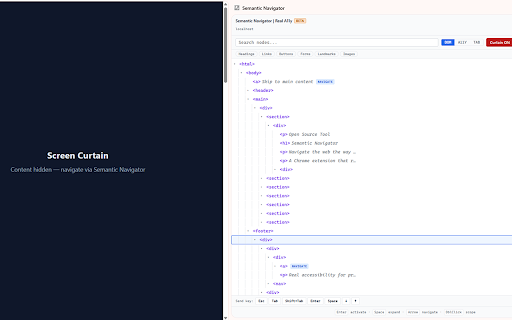
- Explore the DOM tree or the computed accessibility tree in a side panel
- Click, navigate, focus, submit, and toggle through the tree — no mouse on the page required
- Watch the page's real focus highlighted live as you tab through it
- Scope down to a single dialog, form, or landmark
- Filter by role (links, buttons, headings, form fields, landmarks)
- Inspect the tab order and catch missing or out-of-order focus targets
- "Curtain" the page to audit purely from the semantic tree

Built on the open-source Real A11y engine. The same tree extraction also powers our testing library, React hooks, and Storybook addon — see https://real-a11y.dev.

Privacy: runs entirely in your browser. No data leaves your machine.
Most accessibility problems don't look like problems — until you remove the visual layer. Real screen reader testing catches them, but the cost is real: install NVDA or VoiceOver, learn another keyboard model, parse audio output. Most teams put it off, then ship bugs they would have caught earlier with a faster loop.

Semantic Navigator is that faster loop. It opens any page as its accessibility tree in a Chrome side panel and lets you complete real tasks through the tree alone — click, fill, submit, expand menus. If you can complete the task through the tree, your users probably can too. If you can't, that's the bug.

In the panel:

- DOM, A11y, and TAB views — raw structure, accessibility tree, or tab order.
- Screen curtain — blacks out the viewport while the tree stays interactive. Fastest way to test a flow with no visual fallback.
- Cross-iframe merging — embedded widgets, payment forms, third-party flows all stitch into the parent tree at the correct depth.
- Keyboard bar + element picker — drive real keyboard input from the panel, or click any element on the page to jump to its tree row.

Not a replacement for NVDA, JAWS, or VoiceOver. Semantic Navigator exposes the same raw material — the semantic tree — so structural bugs (missing names, broken tab order, incorrect roles) are findable in your dev workflow. Then test with real AT before you ship.

Open source, MIT licensed. The same engine powers a Storybook addon, a React inline panel, and a testing library. See https://real-a11y.dev. Runs entirely in your browser — no analytics, no accounts.

BETA (v0.1).
Permissions & access
- Permissions
- activeTabsidePanelwebNavigation
- Host access
- None declared
Screenshots



About
Most accessibility problems don't look like problems — until you remove the visual layer. Real screen reader testing catches them, but the cost is real: install NVDA or VoiceOver, learn another keyboard model, parse audio output. Most teams put it off, then ship bugs they would have caught earlier with a faster loop.

Semantic Navigator is that faster loop. It opens any page as its accessibility tree in a Chrome side panel and lets you complete real tasks through the tree alone — click, fill, submit, expand menus. If you can complete the task through the tree, your users probably can too. If you can't, that's the bug.

In the panel:

- DOM, A11y, and TAB views — raw structure, accessibility tree, or tab order.
- Screen curtain — blacks out the viewport while the tree stays interactive. Fastest way to test a flow with no visual fallback.
- Cross-iframe merging — embedded widgets, payment forms, third-party flows all stitch into the parent tree at the correct depth.
- Keyboard bar + element picker — drive real keyboard input from the panel, or click any element on the page to jump to its tree row.

Not a replacement for NVDA, JAWS, or VoiceOver. Semantic Navigator exposes the same raw material — the semantic tree — so structural bugs (missing names, broken tab order, incorrect roles) are findable in your dev workflow. Then test with real AT before you ship.

Open source, MIT licensed. The same engine powers a Storybook addon, a React inline panel, and a testing library. See https://real-a11y.dev. Runs entirely in your browser — no analytics, no accounts.

BETA (v0.1).
Technical
- Version
- 0.1.4
- Manifest
- V3
- Size
- 42.63KiB
- Min Chrome
- 88
- Languages
- 1
- Featured
- No
Metadata
- ID
- gnnepgbbecnlomngfemkadnbeaopleom
- Developer ID
- ucc9ccd65de1bd233ce1db32aa26ed59f
- Developer Email
- [email protected]
- Created
- May 1, 2026
- Last Updated (Store)
- Jun 2, 2026
- Last Scraped
- Jun 7, 2026
- Website
- real-a11y.dev
- Privacy Policy
- https://real-a11y.dev/privacy
Data sourced from the Chrome Web Store · last verified Jun 7, 2026.