
Duplicate Tabs Closer
Duplicate Tabs Closer
As of June 2026, Duplicate Tabs Closer has 9,000 users and a 4.34/5 rating from 107 reviews in the Workflow & Planning category.
Usersup 12.5 percent+12.5%
9.0K
9,000
Ratingdown 0.2 percent−0.2%
4.34
107 reviews
Reviewsup 0.9 percent+0.9%
107
Version
4.2.4
Manifest V3
90-day change · In the last 90 days this extension gained 1.0K users, 1 version update.
History
2 snapshotsTracking since Jun 11, 2026.
View as table
| Date | Users | Rating | Reviews | Version |
|---|---|---|---|---|
| Jun 11, 2026 | 8.0K | 4.35 | 106 | 4.1.3 |
| Jun 23, 2026 | 8.0K | 4.35 | 106 | 4.1.3 |
| Now | 9.0K | 4.34 | 107 | 4.2.4 |
Changelog
- Jun 23, 2026description
Duplicate Tabs Closer detects and closes duplicate tabs automatically, or displays them in a panel for manual review.

WHAT IT DOES

When you open a URL that is already open in another tab, Duplicate Tabs Closer can close it immediately or show it in the panel so you decide. A badge on the extension icon always tells you how many duplicate tabs are currently open.

TWO WAYS TO WORK

Auto-close mode: the duplicate tab is closed the moment it is detected. The original tab can be activated automatically, moved to the position of the closed tab, or left as-is.

Manual mode: duplicate tabs are listed in the panel. You close them individually or all at once.

SMART DETECTION

The extension compares tabs based on their URL, but you can adjust what counts as a match:

Ignore case in the URL
Ignore the www prefix in the domain
Ignore the hash part of the URL
Ignore the query string
Ignore the entire path (compare only the domain)
Compare by page title instead of or in addition to the URL
Set a title similarity threshold for fuzzy title matching
Define URL pattern rules: any two tabs matching the same wildcard pattern are treated as duplicates, even if their full URLs differ
Define title pattern rules: same idea, applied to page titles
PRIORITY RULES

When a duplicate is detected, you control which tab is kept:

Keep the older tab (default) or the newer tab
Keep the tab with HTTPS when one is HTTP and one is HTTPS
Always keep the pinned tab
Keep and reload the older tab with the newer URL (useful for redirects)
WHITELISTED URLs

Tabs matching a whitelist pattern are never auto-closed. They still appear in the duplicate list with an indicator, but the extension leaves them open.

SCOPE

Search for duplicates only in the active window, or across all open windows. On Firefox with Multi-Account Containers, you can also limit detection to tabs in the same container.

POPUP PANEL

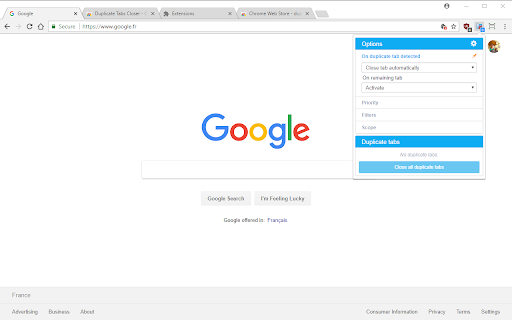
The popup shows the current list of duplicate tabs. Click a tab to jump to it. Close individual tabs or all at once. The panel can be collapsed to show only the duplicate list, and sections can be pinned to stay visible in compact mode.

CUSTOMIZATION

Visual themes: Sky, Sage, Rose, Amber, Slate, Violet, Ocean Night, Charcoal, Midnight Purple, Dark Teal, OLED Black
Custom badge colors for duplicate and no-duplicate states
Option to open the popup automatically when a new duplicate is detected
Option to close the popup after clicking Close All
KEYBOARD SHORTCUTS

No default shortcuts are set to avoid conflicts with browser built-ins. You can assign shortcuts for:

Close all duplicate tabs
Toggle between auto-close and manual mode
INTENTIONAL DUPLICATES

Tabs opened on purpose using the browser's built-in Duplicate Tab command are never auto-closed.

PRIVACY

The extension operates entirely locally. No data is collected, transmitted, or stored outside your browser.

RELEASE NOTES

https://github.com/Peuj/duplicate-tabs-closer/releases

BUG REPORTS AND FEATURE REQUESTS

https://github.com/Peuj/duplicate-tabs-closer/issues
Duplicate Tabs Closer detects and closes duplicate tabs automatically, or displays them in a panel for manual review.

WHAT IT DOES

When you open a URL that is already open in another tab, Duplicate Tabs Closer can close it immediately or show it in the panel so you decide. A badge on the extension icon always tells you how many duplicate tabs are currently open.

TWO WAYS TO WORK

Auto-close mode: the duplicate tab is closed the moment it is detected. The original tab can be activated automatically, moved to the position of the closed tab, or left as-is.

Manual mode: duplicate tabs are listed in the panel. You close them individually or all at once.

SMART DETECTION

The extension compares tabs based on their URL, but you can adjust what counts as a match:

Ignore case in the URL
Ignore the www prefix in the domain
Ignore the hash part of the URL
Ignore the query string
Ignore the entire path (compare only the domain)
Compare by page title instead of or in addition to the URL
Set a title similarity threshold for fuzzy title matching
Define URL pattern rules: any two tabs matching the same wildcard pattern are treated as duplicates, even if their full URLs differ
Define title pattern rules: same idea, applied to page titles

PRIORITY RULES

When a duplicate is detected, you control which tab is kept:

Keep the older tab (default) or the newer tab
Keep the tab with HTTPS when one is HTTP and one is HTTPS
Always keep the pinned tab
Prioritize the active window: when duplicates span multiple windows, keep the tab in the currently focused window even if age-based priority would close it (requires Scope set to All windows)
Keep and reload the older tab with the newer URL (useful for redirects)

WHITELISTED URLs

Tabs matching a whitelist pattern are never auto-closed. They still appear in the duplicate list with an indicator, but the extension leaves them open.

SCOPE

Search for duplicates only in the active window, or across all open windows. On Firefox with Multi-Account Containers, you can also limit detection to tabs in the same container.

POPUP PANEL

The popup shows the current list of duplicate tabs. Click a tab to jump to it. Close individual tabs or all at once. Toggle a grouped view to see duplicate tabs organized by URL. The panel can be collapsed to show only the duplicate list, and sections can be pinned to stay visible in compact mode.

CUSTOMIZATION

Visual themes: Sky, Sage, Rose, Amber, Slate, Violet, Ocean Night, Charcoal, Midnight Purple, Dark Teal, OLED Black
Custom badge colors for duplicate and no-duplicate states
Option to open the popup automatically when a new duplicate is detected
Option to close the popup after clicking Close All

KEYBOARD SHORTCUTS

No default shortcuts are set to avoid conflicts with browser built-ins. You can assign shortcuts for:

Close all duplicate tabs
Toggle between auto-close and manual mode
Pause or resume duplicate tab monitoring

INTENTIONAL DUPLICATES

Tabs opened on purpose using the browser's built-in Duplicate Tab command are never auto-closed.

PRIVACY

The extension operates entirely locally. No data is collected, transmitted, or stored outside your browser.

RELEASE NOTES

https://github.com/Peuj/duplicate-tabs-closer/releases

BUG REPORTS AND FEATURE REQUESTS

https://github.com/Peuj/duplicate-tabs-closer/issues
Permissions & access
- Permissions
- tabswebNavigationstorage
- Host access
- None declared
Screenshots


About
Duplicate Tabs Closer detects and closes duplicate tabs automatically, or displays them in a panel for manual review.

WHAT IT DOES

When you open a URL that is already open in another tab, Duplicate Tabs Closer can close it immediately or show it in the panel so you decide. A badge on the extension icon always tells you how many duplicate tabs are currently open.

TWO WAYS TO WORK

Auto-close mode: the duplicate tab is closed the moment it is detected. The original tab can be activated automatically, moved to the position of the closed tab, or left as-is.

Manual mode: duplicate tabs are listed in the panel. You close them individually or all at once.

SMART DETECTION

The extension compares tabs based on their URL, but you can adjust what counts as a match:

Ignore case in the URL
Ignore the www prefix in the domain
Ignore the hash part of the URL
Ignore the query string
Ignore the entire path (compare only the domain)
Compare by page title instead of or in addition to the URL
Set a title similarity threshold for fuzzy title matching
Define URL pattern rules: any two tabs matching the same wildcard pattern are treated as duplicates, even if their full URLs differ
Define title pattern rules: same idea, applied to page titles

PRIORITY RULES

When a duplicate is detected, you control which tab is kept:

Keep the older tab (default) or the newer tab
Keep the tab with HTTPS when one is HTTP and one is HTTPS
Always keep the pinned tab
Prioritize the active window: when duplicates span multiple windows, keep the tab in the currently focused window even if age-based priority would close it (requires Scope set to All windows)
Keep and reload the older tab with the newer URL (useful for redirects)

WHITELISTED URLs

Tabs matching a whitelist pattern are never auto-closed. They still appear in the duplicate list with an indicator, but the extension leaves them open.

SCOPE

Search for duplicates only in the active window, or across all open windows. On Firefox with Multi-Account Containers, you can also limit detection to tabs in the same container.

POPUP PANEL

The popup shows the current list of duplicate tabs. Click a tab to jump to it. Close individual tabs or all at once. Toggle a grouped view to see duplicate tabs organized by URL. The panel can be collapsed to show only the duplicate list, and sections can be pinned to stay visible in compact mode.

CUSTOMIZATION

Visual themes: Sky, Sage, Rose, Amber, Slate, Violet, Ocean Night, Charcoal, Midnight Purple, Dark Teal, OLED Black
Custom badge colors for duplicate and no-duplicate states
Option to open the popup automatically when a new duplicate is detected
Option to close the popup after clicking Close All

KEYBOARD SHORTCUTS

No default shortcuts are set to avoid conflicts with browser built-ins. You can assign shortcuts for:

Close all duplicate tabs
Toggle between auto-close and manual mode
Pause or resume duplicate tab monitoring

INTENTIONAL DUPLICATES

Tabs opened on purpose using the browser's built-in Duplicate Tab command are never auto-closed.

PRIVACY

The extension operates entirely locally. No data is collected, transmitted, or stored outside your browser.

RELEASE NOTES

https://github.com/Peuj/duplicate-tabs-closer/releases

BUG REPORTS AND FEATURE REQUESTS

https://github.com/Peuj/duplicate-tabs-closer/issues
Technical
- Version
- 4.2.4
- Manifest
- V3
- Size
- 786KiB
- Min Chrome
- 88
- Languages
- 8
- Featured
- No
Metadata
- ID
- gnmdbogfankgjepgglmmfmbnimcmcjle
- Developer ID
- u9713a560c2d53376b31f69f189fd4e6e
- Developer Email
- [email protected]
- Created
- Feb 27, 2018
- Last Updated (Store)
- Jun 16, 2026
- Last Scraped
- Jun 23, 2026
- Website
- —
- Privacy Policy
- —
Data sourced from the Chrome Web Store · last verified Jun 23, 2026.