
Test & Feedback
Now everyone on the team can own quality. Capture findings, create issues, and collaborate with the team, directly from the browser.
As of June 2026, Test & Feedback has 200,000 users and a 4.20/5 rating from 177 reviews in the Workflow & Planning category.
Usersno change0%
200.0K
200,000
Ratingdown 0.2 percent−0.2%
4.20
177 reviews
Reviewsup 0.6 percent+0.6%
177
Version
1.0.276.2
Manifest V3
90-day change · In the last 90 days this extension 5 version updates.
History
7 snapshotsTracking since Apr 16, 2026.
View as table
| Date | Users | Rating | Reviews | Version |
|---|---|---|---|---|
| Apr 16, 2026 | 200.0K | 4.21 | 176 | 1.0.271.1 |
| Apr 25, 2026 | 200.0K | 4.21 | 176 | 1.0.271.1 |
| May 17, 2026 | 200.0K | 4.21 | 176 | 1.0.271.1 |
| May 30, 2026 | 200.0K | 4.21 | 176 | 1.0.274.1 |
| Jun 10, 2026 | 200.0K | 4.20 | 177 | 1.0.275.1 |
| Jun 14, 2026 | 200.0K | 4.20 | 177 | 1.0.275.3 |
| Jun 20, 2026 | 200.0K | 4.20 | 177 | 1.0.275.4 |
| Now | 200.0K | 4.20 | 177 | 1.0.276.2 |
Changelog
- Jun 10, 2026name
Test & Feedback - Private
Test & Feedback
- May 30, 2026name
Test & Feedback
Test & Feedback - Private
Permissions & access
- Permissions
- activeTabclipboardReadtabsstoragedesktopCaptureunlimitedStoragesystem.cpusystem.memorysystem.displaywebNavigationbackgroundoffscreentabCapturealarmsuserScripts
- Host access
- <all_urls>
Screenshots

About
Test & Feedback - Now everyone on the team can own quality. Capture findings, create issues, and collaborate with the team, directly from the browser.

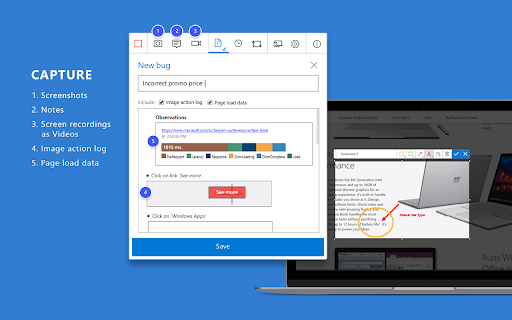
Everyone in the team, be it product owners, developers, testers, UX designers etc., can now test their web-apps and give feedback, all directly from the browser on any platform: Windows, Mac, or Linux. All kinds of teams will now be able to drive quality in 3 easy steps – capture, create & collaborate.

Capture - Take notes, screenshots with annotations, and screen recordings to capture problems. Automatically include rich data like user actions (as an image action log), page load data, and system information.

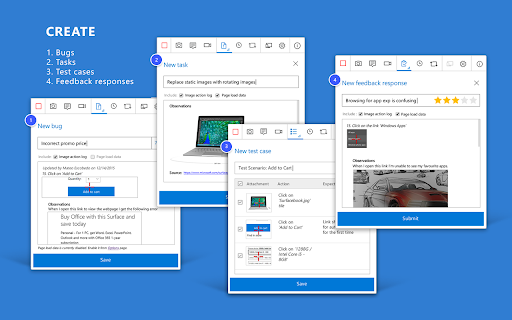
Create - Create bugs, tasks, and feedback response work items to send feedback or report problems. Create test cases quickly based on the image action log while you explore your app. Automatically attach all your captured information.

Collaborate - Work offline in standalone mode, then export your session to share findings with your team. For more integrated experiences with end-to-end traceability, connect to Azure DevOps Services or to Team Foundation Server 2015 or later. For example, you can explore user stories directly from the board, manage all feedback requests received, and easily track bugs, tasks and other work-items. To view completed exploratory sessions and get insights across all completed sessions, for example, details about sessions and work items that are created, explored, and weren’t explored, plus other data, go to your exploratory testing insights page.

You can use the extension for FREE in these modes: Standalone and Connected

Standalone Mode:
Available to everyone. Any team, large or small, can use standalone mode to capture issues using screenshots with inline annotations and notes and then share the results using a session report. No connection to Azure DevOps Services or Team Foundation Server required.

Connected Mode:
Connect to Azure DevOps Services/Team Foundation Server to drive your exploratory testing and feedback flows.
- Users with Basic access: Full capture and create capabilities to submit bugs, tasks and test cases. Includes collaboration capabilities like end-to-end traceability, rich insights across completed exploratory sessions, simplified bug/task tracking & triaging, and so on.
- Users with Stakeholder access: Full capture and create capabilities, except for test cases, to submit feedback and respond to feedback requests from your team. Feedback experiences are available in Team Services and TFS 2017 or later only.

Learn more https://docs.microsoft.com/en-us/azure/devops/test/perform-exploratory-tests?view=vsts
Technical
- Version
- 1.0.276.2
- Manifest
- V3
- Size
- 1.87MiB
- Min Chrome
- 138
- Languages
- 1
- Featured
- No
Metadata
- ID
- gnldpbnocfnlkkicnaplmkaphfdnlplb
- Developer ID
- u790eeb3927fafa46ef91388a4f0f5b87
- Developer Email
- [email protected]
- Created
- Nov 17, 2015
- Last Updated (Store)
- Jun 17, 2026
- Last Scraped
- Jun 20, 2026
- Website
- —
- Privacy Policy
- http://aka.ms/privacy
Similar extensions
Alternatives to Test & Feedback, ranked by description similarity.

Fintest Pro - Your Exploratory test companion with AI
Exploratory software testing tool. Find and share defects. Track your exploratory testing activities. Run tests to find bugs early.
6.0K
★ 4.9

Zephyr Capture for JIRA
Rapid agile testing.
3.0K
★ 1.5

QMetry Test Management Exploratory Testing
Test while you Explore. Save efforts with Automated documentation. Report Bugs with screen shots and reduce streamline communication
590
★ 5.0

QMetry for Jira (QTM4J) - Exploratory Testing
QMetry Test Management for Jira - Exploratory Testing add-on is designed to empower users to carry out Exploratory Testing.
2.0K
★ 4.0

Assistant for qTest Manager
Add extra functionality to qTest Manager.
32

ViewAll - Screenshots, Comments, Team & AI Sharing with Ease
Encrypted web feedback tool for teams. Capture screenshots, code, and accessibility data. Share securely and export for AI.
7
★ 5.0

LaunchNotes Control
Make it simple for your entire team to collect and organize your customer feedback.
21
★ 5.0

Azure DevOps Tasks Extension
View and manage your Azure DevOps tasks and pull requests directly in Chrome
18
Data sourced from the Chrome Web Store · last verified Jun 20, 2026.