
StructFlow
JSON viewer & code formatter in your Chrome side panel. Format, beautify, and save JSON, JS, TS, HTML, CSS, Markdown, and SQL.
As of June 2026, StructFlow has — users in the Developer Tools category.
Usersno change0%
—
—
Ratingno change0%
—
— reviews
Reviewsno change0%
—
Version
1.0.0
Manifest V3
History
1 snapshotsTracking since Jun 21, 2026.
Not enough history yet for this metric — the chart fills in as we collect more snapshots.
View as table
| Date | Users | Rating | Reviews | Version |
|---|---|---|---|---|
| Jun 21, 2026 | — | — | — | 1.0.0 |
| Now | — | — | — | 1.0.0 |
Permissions & access
- Permissions
- sidePanelstoragecontextMenus
- Host access
- None declared
Screenshots




About
StructFlow is a developer's side panel for JSON and code. Paste anything, format it, explore it, snapshot it, and save it — without leaving your browser and without sending your data anywhere.

Everything runs locally. No account, no sign-in, no servers. Your snippets and notes are stored privately in your browser.

━━━━━━━━━━━━━━━━━━━━━━━━━━━━━━━━
WHAT YOU CAN DO
━━━━━━━━━━━━━━━━━━━━━━━━━━━━━━━━

• Format multiple languages — Markdown, Plain Text, TypeScript, JavaScript, JSON, HTML, CSS, and SQL — with clean, VS Code-style defaults. Tune tab width, quotes, semicolons, print width, wrapping, and alphabetical key sorting.

• Explore JSON visually — an interactive, collapsible tree with search across keys and values, copy-path and copy-value, and color-coded types. Prefer text? Switch to a syntax-highlighted view with line numbers.

• Read JSON anywhere — open a raw .json page or API response and StructFlow turns it into a clean, themeable viewer with Formatted, Tree, and Raw modes plus search — right on the page.

• Snapshot your code — turn any formatted output into a polished, shareable PNG. A windowed "code card" with traffic lights, a filename, your chosen syntax theme, backdrop colors, padding, and line numbers. Copy to clipboard or download.

• Take notes — Markdown is the default and comes with a live rendered preview, and Plain Text is a no-reformat scratchpad. Use the side panel as a quick, always-available notebook.

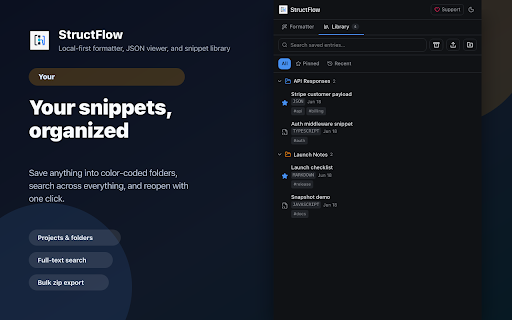
• Build a personal library — save anything you format into projects and folders (rename, recolor, and add items right from a folder), search across everything, and re-open, copy, export, or delete in a click. Export all or selected folders as a single .zip backup whenever you want.

• Make it yours — pick from editor/JSON syntax themes (VS Code, GitHub, Monokai, Dracula, Nord, Solarized, and more) and switch the whole panel between light and dark.

• Open it fast — use the toolbar icon, the right-click menu, or the keyboard shortcut (Alt+Shift+S / Command+Shift+S on macOS).

━━━━━━━━━━━━━━━━━━━━━━━━━━━━━━━━
PRIVACY-FIRST
━━━━━━━━━━━━━━━━━━━━━━━━━━━━━━━━

StructFlow works fully offline. It does not collect, transmit, or sell any data. All formatting happens on your device, and your saved snippets and notes never leave your browser.

━━━━━━━━━━━━━━━━━━━━━━━━━━━━━━━━
PERFECT FOR
━━━━━━━━━━━━━━━━━━━━━━━━━━━━━━━━

• Inspecting and cleaning up API responses while you work
• Sharing good-looking code screenshots in docs, issues, and social posts
• Keeping quick notes and reusable snippets next to whatever you're doing
• Tidying JSON, SQL, and code without pasting it into a random website

Open the side panel, paste, and go.
Technical
- Version
- 1.0.0
- Manifest
- V3
- Size
- 810KiB
- Min Chrome
- 88
- Languages
- 1
- Featured
- No
Metadata
- ID
- gnjabohddgleaghkhglofkepfmadclmj
- Developer ID
- uba409e1fcddb8860f275b8b49b2a25d5
- Developer Email
- [email protected]
- Created
- Jun 20, 2026
- Last Updated (Store)
- Jun 20, 2026
- Last Scraped
- Jun 21, 2026
- Website
- —
Data sourced from the Chrome Web Store · last verified Jun 21, 2026.