
Reader Mode - Focus, Speed & Audio
Premium, distraction-free reading experience for any article.
As of June 2026, Reader Mode - Focus, Speed & Audio has — users in the Developer Tools category.
Usersno change0%
—
—
Ratingno change0%
—
— reviews
Reviewsno change0%
—
Version
1.0
Manifest V3
History
1 snapshotsTracking since Jun 24, 2026.
Not enough history yet for this metric — the chart fills in as we collect more snapshots.
View as table
| Date | Users | Rating | Reviews | Version |
|---|---|---|---|---|
| Jun 24, 2026 | — | — | — | 1.0 |
| Now | — | — | — | 1.0 |
Permissions & access
- Permissions
- activeTabscriptingstorage
- Host access
- None declared
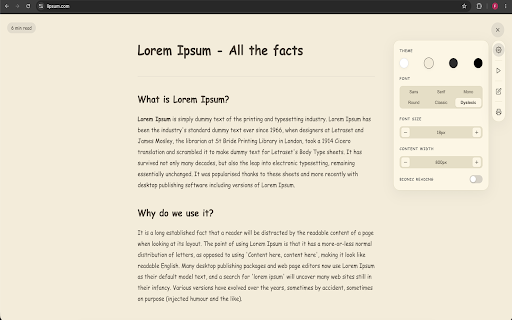
Screenshots




About
Experience the ultimate distraction-free reading environment. Reader Mode (Premium) instantly removes ads, pop-ups, and unnecessary clutter from any article or blog post, leaving you with pure, beautiful typography.

Whether you're studying, researching, or just enjoying a good article, this extension provides a premium, customizable, and accessible reading experience.

KEY FEATURES:
• Premium Themes: Choose between Classic White, Parchment (Sepia), Night Shift (Dark Mode), and OLED Pitch Black.
• Custom Typography: Beautiful, hand-picked fonts including Sans, Serif, Monospace, and Dyslexia-friendly options. Fully adjustable font sizes and page widths.
• Text-to-Speech (Audio Reader): Sit back and listen. High-quality neural voice reading with highlighting support so you can follow along.
• Bionic Reading Mode: Enhance your reading speed and focus by artificially highlighting the first letters of every word.
• Highlights & Notes: Select any text to highlight it in 4 distinct colors. Add your own custom text notes directly to your highlights.
• Export to PDF: Save any clean article directly to your computer as a perfectly formatted PDF for offline reading or printing.

Perfect for students, researchers, journalists, and anyone who loves reading on the web without the noise.

Privacy First: We do not collect or store your browsing data. All highlighting, notes, and reading preferences are saved locally on your device.
Technical
- Version
- 1.0
- Manifest
- V3
- Size
- 1.11MiB
- Min Chrome
- 88
- Languages
- 1
- Featured
- No
Metadata
- ID
- gninoldidhnpohcgbakllgpiglicjnme
- Developer ID
- uadf3613e54fd4ea7c3b378f5eb5ba05a
- Developer Email
- [email protected]
- Created
- Jun 23, 2026
- Last Updated (Store)
- Jun 23, 2026
- Last Scraped
- Jun 24, 2026
- Website
- —
- Support URL
- —
Data sourced from the Chrome Web Store · last verified Jun 24, 2026.