YouTube TimeSlider
Set persistent start and end times for any YouTube video.
As of May 2026, YouTube TimeSlider has 121 users and a 5.00/5 rating from 1 reviews in the Social & Communication category.
Usersup 3.4 percent+3.4%
121
121
Ratingno change0%
5.00
1 reviews
Reviewsno change0%
1
Version
3.3
Manifest V3
History
3 snapshotsTracking since Apr 1, 2026.
View as table
| Date | Users | Rating | Reviews | Version |
|---|---|---|---|---|
| Apr 1, 2026 | 117 | 5.00 | 1 | 3.3 |
| May 1, 2026 | 126 | 5.00 | 1 | 3.3 |
| May 29, 2026 | 116 | 5.00 | 1 | 3.3 |
| Now | 121 | 5.00 | 1 | 3.3 |
Permissions & access
- Permissions
- storage
- Host access
- None declared
Screenshots


About
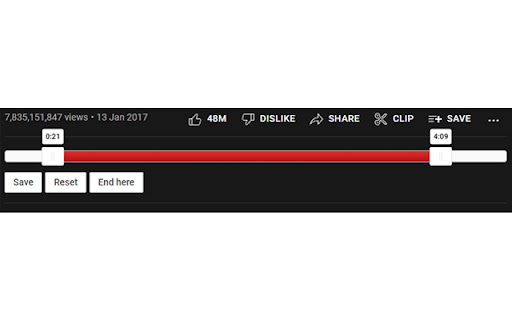
Set start and end times for any YouTube video with a simple slider.

Useful for music videos where you want to skip the beginning/end of the video (annoying intros, outros etc.).

Instructions:
- Drag to set the sliders to the desired positions.
- Click the 'Save' button below the slider to save the positions for the current video.
- Next time you load up the video, it will automatically start and end at the times you specified.
- The 'Reset' button will remove the saved times from that video.
- The 'End here' button will set the end time to the current video time.

Extra Features:
- Automatic syncing of times between devices
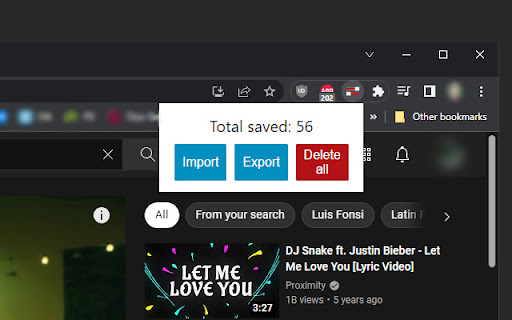
- Optional Import/Export/Delete options in popup menu

Works with:
 - Single videos
 - Playlists
 - Looped videos
 - Autoplay
Technical
- Version
- 3.3
- Manifest
- V3
- Size
- 27.08KiB
- Min Chrome
- 88
- Languages
- 1
- Featured
- Yes
Metadata
- ID
- gmohlfoielefdlnemadaomfpegpengjn
- Developer ID
- u357ed20e46db31b66f7044d649b6804e
- Developer Email
- [email protected]
- Created
- Aug 4, 2016
- Last Updated (Store)
- May 16, 2022
- Last Scraped
- May 29, 2026
- Website
- —
- Support URL
- —
- Privacy Policy
- —
Similar extensions
Alternatives to YouTube TimeSlider, ranked by description similarity.

YouTube Shorts Position Saver
Automatically saves and restores playback positions for YouTube Shorts
2

YouTube Mobile Speed Enhancer
Speed up YouTube videos beyond the 2x limit! Works on mobile devices.
13

YouTube Custom Playback Speed
Set your values for video playback speed. Change the playback speed in 1 click.
22

YouTube SpeedUp Speedometer
Control YouTube playback speed with a beautiful speedometer control - Mouse wheel to adjust, click to reset
32

YouTube Playlist Explorer
Explore playlists containing the current YouTube video, with a focus on distinguishing between the creator's playlists and others.
41
★ 1.0

YouTube Shorts Progress Bar
Adds a video progress bar to YouTube Shorts! Jump ahead, rewind, or simply track your progress through any short with ease.
10.0K
★ 4.6

Youtube Shorts AutoScroll
Premium Auto-Scroller for YouTube Shorts. Scroll on video end, skip long videos, and customize delays.
583
★ 5.0

youTubeify
Create a slideshow, voiceover, GIF or download images from your Pinterest pins or Google image search
692
★ 3.9
Data sourced from the Chrome Web Store · last verified May 29, 2026.