
Image Upscaler
Upscale an image using artificial intelligence or a native HTML5 engine in your browser!
As of June 2026, Image Upscaler has 2,000 users and a 3.00/5 rating from 4 reviews in the art category.
Usersno change0%
2.0K
2,000
Ratingno change0%
3.00
4 reviews
Reviewsno change0%
4
Version
0.1.3
Manifest V3
History
1 snapshotsTracking since Apr 18, 2026.
View as table
| Date | Users | Rating | Reviews | Version |
|---|---|---|---|---|
| Apr 18, 2026 | 2.0K | 3.00 | 4 | 0.1.3 |
| Now | 2.0K | 3.00 | 4 | 0.1.3 |
Permissions & access
- Permissions
- storage
- Host access
- None declared
Screenshots

About
Image Upscaler is an extension that enables you to upscale an image inside your browser.

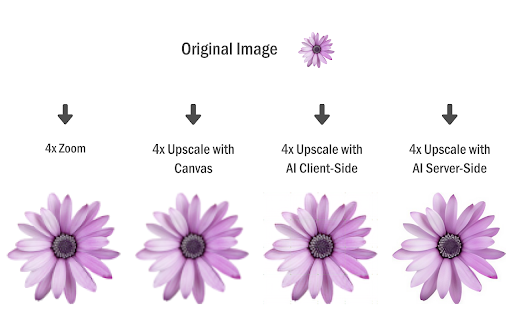
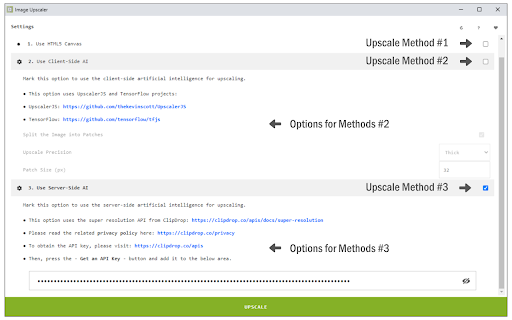
It uses three different techniques to upscale the input image. The first (and the default) method is using the HTML5 Canvas API to upscale the images up to 10 times the original size. The Canvas API has a built-in interpolation method for pixel smoothing. The final result with the HTML5 method is somehow satisfactory but lacks some details and may not be sharp enough. Two other methods use artificial intelligence for upscaling. The first AI is client-side and uses UpscalerJS (https://github.com/thekevinscott/UpscalerJS) & TensorFlow (https://github.com/tensorflow/tfjs) libraries. The second AI is server-side and uses the ClipDrop API (https://clipdrop.co/apis/docs/super-resolution). Please read the privacy policy for this addon here (https://mybrowseraddon.com/privacy-policy/image-upscaler.html).

Note 1: for the canvas method (default engine), the maximum upscale factor is 10x, for the client-side AI it is 8x, and server-side 4x.

Note 2: for both AI methods, it is recommended to use small images as the upscaling process with artificial intelligence is computationally expensive. In server-side AI, an API key is needed; please read the instruction within the extension on how to get the API key.

If you have a feature request or found a bug to report, please fill out the bug report form on the addon homepage (https://mybrowseraddon.com/image-upscaler.html).
Technical
- Version
- 0.1.3
- Manifest
- V3
- Size
- 117MiB
- Min Chrome
- 88
- Languages
- 1
- Featured
- Yes
Metadata
- ID
- gmlpefcldkdncjphjmojnakmphpcjemm
- Developer ID
- u549bcf73afdd28fb220664bb740e9e45
- Developer Email
- [email protected]
- Created
- Feb 23, 2023
- Last Updated (Store)
- Nov 13, 2025
- Last Scraped
- Jun 9, 2026
- Website
- —
- Privacy Policy
- —
Similar extensions
Alternatives to Image Upscaler, ranked by description similarity.

HiRes
Extract high-res images from Google Images and upscale any image with AI.
—

ChromaStudio — AI Image & Video Editor
Right-click any image to edit with 30+ AI tools. Upscale, remove backgrounds, enhance, generate videos & more.
39
★ 5.0
HD Image Downloader - Nero Lens for Chrome
This efficient tool helps you download small photos from the web with 4x larger size and clearer results.
1.0K
★ 3.0

AI Image Generation
Generate images from text or images, or improve their resolutions, thanks to AI.
1.0K
★ 1.5

SmartUpscale
Disables blur for images shown at integer zoom levels.
4.0K
★ 4.8

Image Resizer
🖼️ Resize images, crop images, and compress photos online using Image Resizer. Perfect for social media, web, and bulk resizing.
4.0K
★ 4.8

Stuvio AI Image Tools
Edit, resize, crop & download any image on the web. Generate AI videos from any image with Stuvio.
2
★ 1.0

Image downloader - ImageMaster
Professional tool to browse, filter, and bulk download high-resolution images. Includes image conversion and ZIP packaging.
14
Data sourced from the Chrome Web Store · last verified Jun 9, 2026.