Right Click Calculator
Adds a user-defined percentage to a highlighted number on a webpage.
As of May 2026, Right Click Calculator has 249 users and a 3.33/5 rating from 3 reviews in the Workflow & Planning category.
Usersup 7.8 percent+7.8%
249
249
Ratingno change0%
3.33
3 reviews
Reviewsno change0%
3
Version
1.0
Manifest V3
History
3 snapshotsTracking since Apr 1, 2026.
View as table
| Date | Users | Rating | Reviews | Version |
|---|---|---|---|---|
| Apr 1, 2026 | 231 | 3.33 | 3 | 1.0 |
| May 1, 2026 | 240 | 3.33 | 3 | 1.0 |
| May 29, 2026 | 243 | 3.33 | 3 | 1.0 |
| Now | 249 | 3.33 | 3 | 1.0 |
Permissions & access
- Permissions
- contextMenusstorage
- Host access
- None declared
Screenshots

About
Introducing the Right Click Calculator Chrome Extension, a powerful yet simple tool that enhances your browsing experience by allowing you to calculate percentages quickly and efficiently. With just a few clicks, this extension adds a user-defined percentage to any highlighted number on a website, saving you time and effort in your everyday tasks.

Whether you're a student, professional, or simply someone who frequently works with numbers online, the Right Click Calculator is designed to make your life easier. By eliminating the need to switch between tabs or use external calculators, this handy Chrome extension streamlines your workflow and keeps you focused on the task at hand.

Key Features:

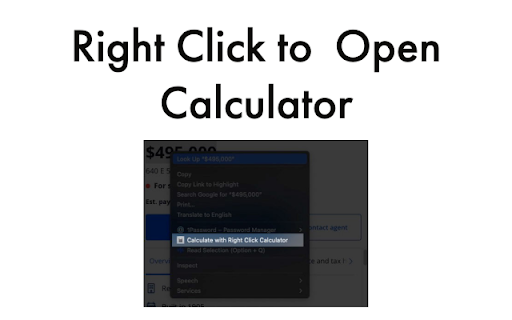
Seamless Integration: The extension easily integrates with your Chrome browser, providing a context menu option when you highlight a number on any website.

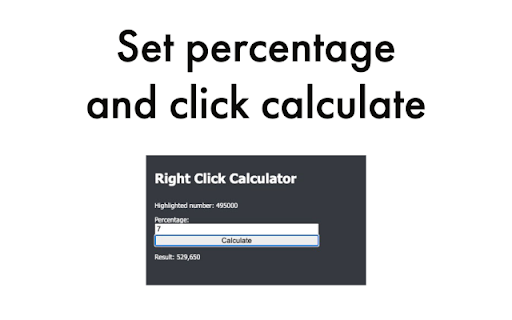
Intuitive Popup Window: With a single click from the context menu, a popup window appears, displaying the highlighted number and an input field for the desired percentage.

User-Friendly Interface: The Right Click Calculator's popup window is designed to resemble the popular Discord application, offering a familiar and easy-to-use interface.

Instant Calculations: Enter the desired percentage, click the "Calculate" button, and instantly receive the result, which is the sum of the highlighted number and the calculated percentage.

Data Storage: The extension remembers the last percentage entered, allowing you to perform multiple calculations without re-entering the same value repeatedly.

Comma Separators: The Right Click Calculator intelligently handles numbers with comma separators, ensuring accurate calculations regardless of the number format.

Error Handling: The extension detects invalid input and displays an appropriate message, guiding you towards providing the correct input for the calculation.

Lightweight and Efficient: The Right Click Calculator is optimized for performance, ensuring it doesn't slow down your browsing experience or consume unnecessary resources.

Regular Updates: The extension is actively maintained, with regular updates to improve functionality, fix bugs, and stay up-to-date with the latest Chrome features.

Top-notch Support: Our dedicated team is here to assist you with any issues or questions you might have, ensuring a seamless and enjoyable user experience.

The Right Click Calculator Chrome Extension is the ultimate productivity booster for anyone who frequently deals with percentages and calculations online. Whether you're comparing prices, calculating tips, analyzing data, or simply crunching numbers, this extension is here to save you time and make your browsing experience more efficient.

Don't miss out on the opportunity to enhance your online workflow with this essential Chrome extension. Download the Right Click Calculator today and discover the convenience and efficiency it brings to your daily tasks.
Technical
- Version
- 1.0
- Manifest
- V3
- Size
- 27.73KiB
- Min Chrome
- 88
- Languages
- 1
- Featured
- No
Metadata
- ID
- gmkamlhgcanhopeipgioebpgiekjojjf
- Developer ID
- u2069b1496504f0927a7db4e227aa8c82
- Developer Email
- [email protected]
- Created
- Mar 30, 2023
- Last Updated (Store)
- Mar 31, 2023
- Last Scraped
- May 29, 2026
- Website
- —
- Support URL
- —
Similar extensions
Alternatives to Right Click Calculator, ranked by description similarity.

Percentage Calculator
An elegant calculator for various percentage calculations with real-time updates and beautiful UI.
18

Percents
Provides a list of percents calculations, in a simple way to understand you percentage calculation needs.
4

Percentage Hero
A handy calculator for percentage-related queries
17

Easy Calculator
A simple calculator extension
46
★ 5.0

Pocket Calc
A simple and clean calculator extension for your browser
68
★ 5.0

Quick Fast Calculator
Chrome browser quick calculator extension
4

Basic Calculator
A clean, modern popup calculator for your browser. Perform quick math without switching tabs via the Bluaz widget.
—
★ 5.0

Easy Calculator
A simple calculator for basic arithmetic operations.
172
★ 4.5
Data sourced from the Chrome Web Store · last verified May 29, 2026.