
The Surpluss Web Capture
User-triggered web capture, interpretation, and contextual follow-up for The Surpluss.
As of June 2026, The Surpluss Web Capture has — users in the Productivity category.
Usersno change0%
—
—
Ratingno change0%
—
— reviews
Reviewsno change0%
—
Version
1.0.0
Manifest V3
History
1 snapshotsTracking since Jun 28, 2026.
Not enough history yet for this metric — the chart fills in as we collect more snapshots.
View as table
| Date | Users | Rating | Reviews | Version |
|---|---|---|---|---|
| Jun 28, 2026 | — | — | — | 1.0.0 |
| Now | — | — | — | 1.0.0 |
Permissions & access
- Permissions
- storageactiveTabscriptingcontextMenussidePaneltabs
- Host access
- https://*.thesurpluss.com/*, https://mail.google.com/*, https://*.linkedin.com/*, https://outlook.office.com/*, https://outlook.office365.com/*, https://outlook.live.com/*
Screenshots



About
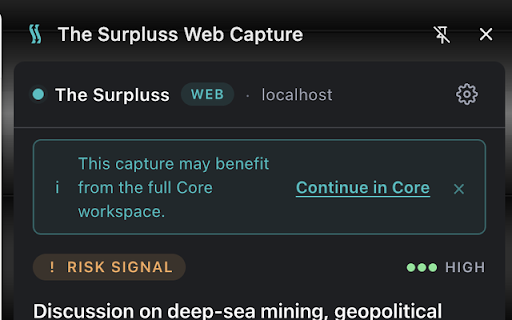
The Surpluss Web Capture is a Chrome side-panel extension for signed-in users of The Surpluss. It helps you capture business signals from the pages you are already reading and turn them into a short, structured interpretation without switching context.

Use it to analyze selected text, visible page content, a pasted snippet, a Gmail or Outlook email thread, or a focused LinkedIn post. The extension opens in Chrome's side panel and reads content only after you explicitly click an analyze action, launcher, or context-menu item.

Results include a concise signal summary, confidence level, relevant entities, suggested follow-up questions, and safe actions such as saving a private note, creating a resource draft, or opening the result in The Surpluss Core web app. The extension does not send emails, reply to messages, schedule meetings, scrape profiles, follow links, or act on your behalf.

Authentication uses your existing The Surpluss web session. Usage telemetry is optional and does not include captured page, email, or post content.
Technical
- Version
- 1.0.0
- Manifest
- V3
- Size
- 124KiB
- Min Chrome
- 114
- Languages
- 1
- Featured
- No
Metadata
- ID
- gmjhlcjghbpeknimaahifgkpeddaeodo
- Developer ID
- u88c21b31260ada77235146ac00866d06
- Developer Email
- [email protected]
- Created
- Jun 27, 2026
- Last Updated (Store)
- Jun 27, 2026
- Last Scraped
- Jun 28, 2026
- Website
- https://thesurpluss.com/
- Support URL
- https://thesurpluss.com/contact
- Privacy Policy
- https://thesurpluss.com/privacy
Data sourced from the Chrome Web Store · last verified Jun 28, 2026.