
SaveDay - AI Bookmark Manager
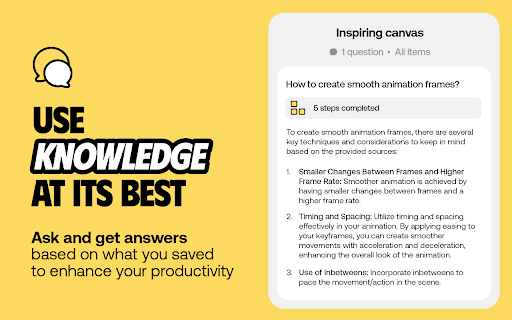
AI knowledge assistant helps you instantly save, highlight web content, annotate and retrieve them
As of May 2026, SaveDay - AI Bookmark Manager has 6,000 users and a 4.68/5 rating from 176 reviews in the Productivity category.
Usersdown 14.3 percent−14.3%
6.0K
6,000
Ratingno change0%
4.68
176 reviews
Reviewsno change0%
176
Version
2.2.2
Manifest V3
90-day change · In the last 90 days this extension lost 1.0K users.
History
1 snapshotsTracking since May 1, 2026.
View as table
| Date | Users | Rating | Reviews | Version |
|---|---|---|---|---|
| May 1, 2026 | 7.0K | 4.68 | 176 | 2.2.2 |
| Now | 6.0K | 4.68 | 176 | 2.2.2 |
Permissions & access
- Permissions
- identitystoragetabsactiveTabcontextMenusscriptingsidePanel
- Host access
- <all_urls>
Screenshots

About
SaveDay is an AI knowledge manager extension. With SaveDay, you can bookmark much more than web links and articles, organize them to make it easy to read them later and find them whenever you need.

Features:
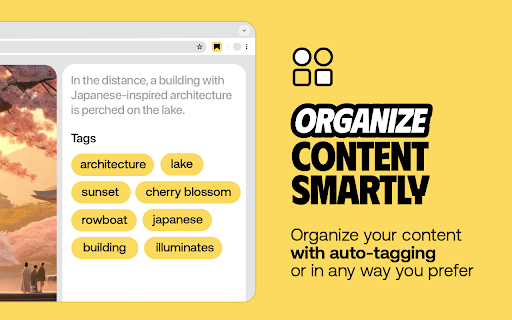
★ Content saving: Save content in any format (web links, images, videos, photos, podcasts, audio...) easily while keeping your content confidential
★ Reminder for saved content: Set reminders for your saved content, ensuring you stay on top of your reading list and never miss out on valuable information
★ Web highlighter and Quoteshots: Easily highlight any web page, social post, and share it with beautiful templates
★ Annotation: Add sticky notes on any place in a webpage, add highlight notes to your highlighted contents and timestamp notes for moments in video
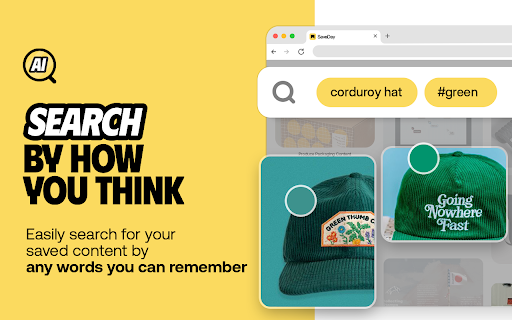
★ Intuitive search: Search by keyword or by the way you think, in any language, for contextual information retrieval
★ Sidebar: Access all your notes, including highlights, AI notes, sticky notes, and highlight notes, in the sidebar.
★ Free to use

Tips:
Use the SaveDay side menu to automatically store the content you've selected, get sticky notes, get key points, and access collections. Here's how to turn it on:

In the menu bar:
Step 1: Click on the SaveDay icon in the top right corner of your browser (ensure it's pinned first)
Step 2: In the ""Settings"" section, switch on the ""SaveDay side menu""
Step 3: The SaveDay side menu will be turned on and visible

In the Settings page:
Step 1: In the Preferences section, navigate to the ""Side menu"" category
Step 2: Click on the ""Deleted"" icon to remove the website you previously turned off. Now, you can use the SaveDay side menu as usual
Alternatively, click to switch on the button for the ""Side menu,"" turning it on for all websites until you decide to turn it off
Use the Highlight button to easily and quickly highlight, annotate and create quoteshots:

In the SaveDay Menu:
Step 1: Click the SaveDay icon in the top right of your browser (ensure it's pinned)
Step 2: In the ""Settings"" section, switch on the ""Highlight button"". The highlight feature will be turned on, ready for use

In the Settings Page:
Step 1: In the Preferences section, choose the ""Highlight button"" category
Step 2: Type the website URL for which you want to turn on the highlight button. Click the ""Delete"" icon next to the website if it was previously turned off
Alternatively, switch on the button for the ""Highlight button"" to turn it on permanently for all websites

Use the SaveDay sidebar to access all your contents:
Step 1: Click on the SaveDay icon in the top right corner of your browser (ensure it's pinned first) or click on the SaveDay side menu
Step 2: Choose ""This content's note""

Check out our privacy policy: https://www.save.day/privacy-policy
Check out our terms of service: https://www.save.day/terms-of-service
Technical
- Version
- 2.2.2
- Manifest
- V3
- Size
- 5.4MiB
- Min Chrome
- 88
- Languages
- 55
- Featured
- Yes
Metadata
- ID
- gmfaoihlkhopieoibopcponemocgbloj
- Developer ID
- u146b42ae0a2fffa641131f4ec7030e7b
- Developer Email
- [email protected]
- Created
- Aug 7, 2023
- Last Updated (Store)
- Mar 5, 2025
- Last Scraped
- May 29, 2026
- Website
- save.day
- Support URL
- https://www.save.day/support
- Privacy Policy
- https://www.save.day/privacy-policy
Similar extensions
Alternatives to SaveDay - AI Bookmark Manager, ranked by description similarity.

Notion Saver
Instantly highlight and save valuable or to-read web content to Notion—build your exclusive knowledge base with just one click.
16
★ 5.0

SnapClipper
Capture, organize, and retrieve contextual web clips with one click.
10
★ 5.0

Stashly - Save Links
Save the current page to your Stashly collection
2

SaveIt.now
Organize nothing. Find everything.
261
★ 5.0

Save Webpages as PDF & Screenshot – PageToSave
Save webpages as PDF or screenshots, capture full scrolling pages, archive articles and AI chats, and search them instantly.
34
★ 5.0

Readgent Saver
Save articles, images and videos for reading and agent
4

Ayuta - Your Knowledge Universe
Save articles, videos, and links to your Ayuta collection. Your knowledge universe awaits.
—

SideNote - Quick save notes in Sidepanel
# SideNote - Your Smart Note-Taking Assistant
## Description
SideNote is a powerful Chrome extension that helps you save and…
48
★ 5.0
Data sourced from the Chrome Web Store · last verified May 29, 2026.