
Force HTTPS (SSL/TLS)
Automatically use HTTPS (SSL/TLS Certificate) on websites.
As of May 2026, Force HTTPS (SSL/TLS) has 3,000 users and a 4.17/5 rating from 6 reviews in the Privacy & Security category.
Usersno change0%
3.0K
3,000
Ratingno change0%
4.17
6 reviews
Reviewsno change0%
6
Version
1.1.7
Manifest V3
History
3 snapshotsTracking since Apr 21, 2026.
View as table
| Date | Users | Rating | Reviews | Version |
|---|---|---|---|---|
| Apr 21, 2026 | 3.0K | 4.17 | 6 | 1.1.7 |
| May 17, 2026 | 3.0K | 4.17 | 6 | 1.1.7 |
| May 31, 2026 | 4.0K | 4.17 | 6 | 1.1.7 |
| Now | 3.0K | 4.17 | 6 | 1.1.7 |
Permissions & access
- Permissions
- tabsstorage
- Host access
- None declared
Screenshots


About
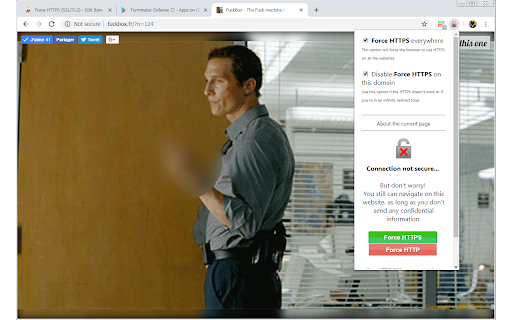
"Force HTTPS (SSL/TLS)" automatically force your web browser to use secure HTTPS (SSL or TLS) instead of the insecure HTTP on every website. HTTPS, also called HTTP over TLS or HTTP over SSL, use the TLS (or SSL, its predecessor) encryption protocol, designed to provide communications security on the network. It protects the data you send and receive through the websites, adding security and keeping your privacy.

By default, "Force HTTPS (SSL/TLS)" will use HTTPS on all the websites, you can disable/enable this easily for any website at anytime, also if you still want to use HTTP on some websites, you can disable HTTPS on a specific hostname or even on a specific page. You can switch from HTTPS to HTTP or HTTP to HTTPS anytime on any page or domain.

You can also access the Hostnames Rules page where you can add hostnames and different rules (Force HTTPS, Force HTTP or Default) for each hostname.

If you have a problem or want me to add some features, feel free to contact me :)
Technical
- Version
- 1.1.7
- Manifest
- V3
- Size
- 100KiB
- Min Chrome
- 88
- Languages
- 2
- Featured
- Yes
Metadata
- ID
- gmcndcpdefigilbgpohccbocjdfeakgl
- Developer ID
- ud1697f2cc138f61f48134f27d14c3706
- Developer Email
- [email protected]
- Created
- Nov 12, 2018
- Last Updated (Store)
- Aug 3, 2025
- Last Scraped
- May 31, 2026
- Website
- —
- Support URL
- —
- Privacy Policy
- https://sites.google.com/view/force-https
Similar extensions
Alternatives to Force HTTPS (SSL/TLS), ranked by description similarity.

HTTPS Everywhere
Automatically redirect to HTTPS version of websites.
30.0K
★ 4.0

CheckMyHTTPS
CheckMyHTTPS ensures that your secured WEB connections (HTTPS) are not intercepted (neither decrypted, nor listened, nor modified).
450
★ 4.3
Block Site
A customizable, password-protected website blocker and redirector.
90.0K
★ 4.4

Trust Redirect
Trust Redirect keeps you safe by redirecting you away from scam websites.
9

TrueDomain
Protect against phishing by verifying links and blocking suspicious domains
—

HistMan - History Manager
Auto-delete browser history matching your domains and keywords. Optional password and 2FA protection.
20
Secure Kit
Make your browser anonymous on the web in 1 click
5.0K
★ 4.7

CRLite Extension
Checks if a certificate is revoked using Bloom filter cascade.
18
★ 5.0
Data sourced from the Chrome Web Store · last verified May 31, 2026.