
TypeFlow Human Typer
Simulate natural human typing into focused fields with speed, pauses, typos, snippets and local history.
As of June 2026, TypeFlow Human Typer has — users in the Productivity category.
Usersno change0%
—
—
Ratingno change0%
—
— reviews
Reviewsno change0%
—
Version
1.1.0
Manifest V3
History
1 snapshotsTracking since Jun 13, 2026.
Not enough history yet for this metric — the chart fills in as we collect more snapshots.
View as table
| Date | Users | Rating | Reviews | Version |
|---|---|---|---|---|
| Jun 13, 2026 | — | — | — | 1.1.0 |
| Now | — | — | — | 1.1.0 |
Permissions & access
- Permissions
- activeTabtabsstoragescriptingcontextMenusnotificationsdownloads
- Host access
- http://*/*, https://*/*, https://api.reforgeextensions.com/*, https://reforgeextensions.com/*, https://*.reforgeextensions.com/*
Screenshots



About
TypeFlow Human Typer turns pasted text into natural, human-like typing inside the field you already selected. It is built for support replies, form testing, demos, writing practice, CRM notes, web apps and any workflow where instant paste feels too abrupt or gets rejected by fragile input widgets.

✨ What you can do
• Click any text field, paste your message in TypeFlow and start typing
• Choose slow, natural, fast or ultra-fast typing speeds
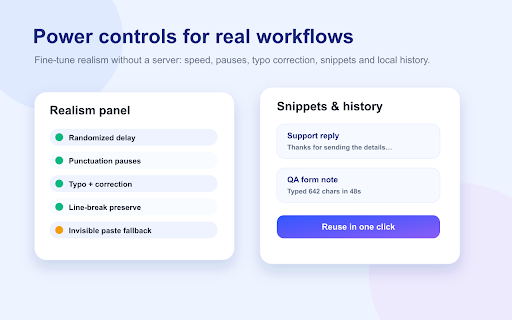
• Add randomized delays and punctuation pauses for a realistic flow
• Preserve line breaks for multi-paragraph messages
• Simulate occasional typo-and-correction behavior
• Save reusable snippets for common replies
• Review recent local sessions and export history when needed

🔒 Privacy-first by design
Your text is processed locally in your browser. TypeFlow stores draft text, snippets and history in Chrome storage so you can reuse them, and you can clear them at any time. No account is required.

Best for customer support teams, QA testers, creators, recruiters, sales operators, students and anyone who wants a safer alternative to raw copy-paste.

Need help or want to request a feature? Email: [email protected]
Technical
- Version
- 1.1.0
- Manifest
- V3
- Size
- 199KiB
- Min Chrome
- 116
- Languages
- 10
- Featured
- No
Metadata
- ID
- gmakgidchpnabaodakhdiioelonihdnk
- Developer ID
- u7341c9ead210963be277c3c89564e1fa
- Developer Email
- [email protected]
- Created
- Jun 12, 2026
- Last Updated (Store)
- Jun 12, 2026
- Last Scraped
- Jun 13, 2026
- Support URL
- https://reforgeextensions.com/
- Privacy Policy
- https://reforgeextensions.com/privacy
Data sourced from the Chrome Web Store · last verified Jun 13, 2026.