Clear Code
Syntax highlighting and beautifiers for embedded code examples.
As of May 2026, Clear Code has 628 users and a 3.57/5 rating from 7 reviews in the Developer Tools category.
Usersdown 1.3 percent−1.3%
628
628
Ratingno change0%
3.57
7 reviews
Reviewsno change0%
7
Version
1.2.0
Manifest V3
History
3 snapshotsTracking since Apr 1, 2026.
View as table
| Date | Users | Rating | Reviews | Version |
|---|---|---|---|---|
| Apr 1, 2026 | 636 | 3.57 | 7 | 1.2.0 |
| May 1, 2026 | 623 | 3.57 | 7 | 1.2.0 |
| May 29, 2026 | 631 | 3.57 | 7 | 1.2.0 |
| Now | 628 | 3.57 | 7 | 1.2.0 |
Permissions & access
- Permissions
- activeTabstoragescriptingcontextMenus
- Host access
- None declared
Screenshots


About
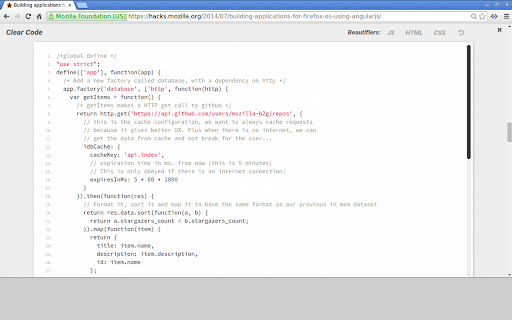
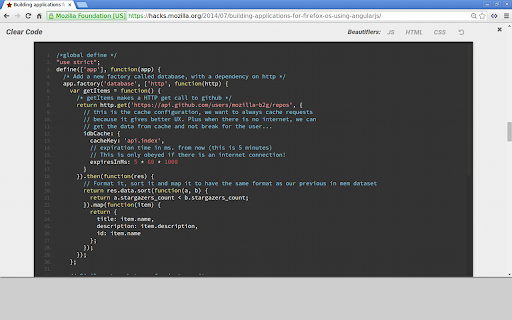
Clear Code allows you to grab any code examples online from blogs, tutorials or forums, and open them in a distraction free viewer.

Great for working with code examples with small fonts, low contrast syntax highlighting, excessive text wrapping or horizontal scrolling.

Easily customise the fonts and syntax highlighter scheme to suit your needs.

Includes HTML, JS and CSS beautifiers to quickly reformat any condensed or poorly formatted examples.

USAGE:

Click the Clear Code icon in the browser bar to add a quick open button to any properly formatted <pre> code blocks on the page.

Alternatively:

1. Select the text you want to show in Clear Code.

2. Right click to show the context menu.

3. Select 'Open in Clear Code'.

OPTIONS:

Customise the syntax highlighter theme, font styles and beautifiers from the options page. Right click the Clear Code icon in the browser bar, or access via the chrome extensions page.

NOTE:

In edge cases where code examples have been badly/wrongly formatted, it may not be possible to grab the main text of an example without including the embedded line numbers.

ALSO:

Whilst Clear Code works pretty much anywhere you can select text, you cannot view the content of pages opened with 'view source'. This is a feature of Chrome as of this time. You can however view the content of any linked CSS or JS pages, just not the direct source of the main HTML file.
Technical
- Version
- 1.2.0
- Manifest
- V3
- Size
- 1.2MiB
- Min Chrome
- 88
- Languages
- 1
- Featured
- Yes
Metadata
- ID
- glnikohjhmkofkfcphgbdlmhjdjffcmg
- Developer ID
- u616eab2ba5ba090f5dc1d0945960515f
- Developer Email
- [email protected]
- Created
- Sep 14, 2014
- Last Updated (Store)
- Jun 27, 2024
- Last Scraped
- May 29, 2026
- Website
- —
- Support URL
- —
- Privacy Policy
- —
Similar extensions
Alternatives to Clear Code, ranked by description similarity.

Code Formatter - JSON, CSS & JavaScript
Code Formatter – all-in-one extension offering sophisticated syntax highlighting for CSS, JSON, and JavaScript.
4.0K
★ 3.9

Quick source viewer
View current page sources: HTML + Javascript + CSS
20.0K
★ 3.6

Reddit Syntax Highlighting
Enhance Your Reddit Browsing Experience with Code Syntax Highlighting!
14
★ 5.0

CodeQuick
Code Quick allows you to quickly test and preview custom HTML and CSS directly in your browser.
7

CodeCanvas
A lightweight code editor for quick HTML, CSS, and JavaScript testing
9
★ 5.0

Selection Highlighter
Highlight occurrences of selected text, with or without a keypress.
8.0K
★ 4.6

Hey World Code Blocks Enhancer
A cross-browser web extension that enhances and facilitates interaction with code blocks on https://world.hey.com/.
32

HTML/CSS Extractor
Extract HTML & CSS from any element with live preview, smart selector simplification, and syntax-highlighted editor
115
★ 5.0
Data sourced from the Chrome Web Store · last verified May 29, 2026.