
History Recall
A personal Wayback Machine that saves snapshots of pages you visit
As of June 2026, History Recall has 2 users in the Accessibility category.
Usersno change0%
2
2
Ratingno change0%
—
— reviews
Reviewsno change0%
—
Version
2.0
Manifest V3
History
5 snapshotsTracking since May 7, 2026.
View as table
| Date | Users | Rating | Reviews | Version |
|---|---|---|---|---|
| May 7, 2026 | — | — | — | 2.0 |
| May 11, 2026 | — | — | — | 2.0 |
| May 17, 2026 | 3 | — | — | 2.0 |
| May 23, 2026 | 2 | — | — | 2.0 |
| May 30, 2026 | 3 | — | — | 2.0 |
| Now | 2 | — | — | 2.0 |
Permissions & access
- Permissions
- tabsstoragecontextMenusunlimitedStoragesidePanelalarmsscripting
- Host access
- <all_urls>
Screenshots
About
🕰️ History Recall — Visualize Your Web Journey

Your personal Wayback Machine for the modern browser.

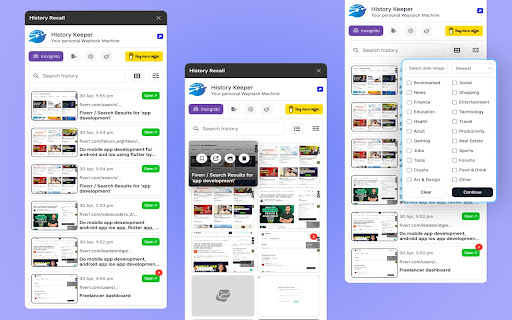
History Recall is a smart, privacy-focused Chrome extension that automatically captures and stores visual snapshots of the websites you visit. Designed to be lightweight and efficient, it helps you rediscover, organize, and revisit your digital trail like never before — not just as links, but as memories.

📸 Automatically Snapshots Pages
Capture up to 3 unique versions per domain with built-in change detection to avoid redundant images.

🧠 Smarter, Not Longer
Stores titles, favicons, descriptions, and categories — and even recommends similar sites you haven’t visited.

💾 Lightweight Yet Powerful
Choose storage limits (100MB to 800MB), retention durations (7–28 days), and adjust compression for optimal performance.

🧭 Navigate Like a Pro
Filter and search snapshots by date, category, or frequency. Export your visual history as JSON or ZIP for safekeeping or migration.

🔒 Privacy Built-In
Pause tracking anytime with "Private Time", exclude domains, and toggle offline mode — all under your control.

🖥️ Beautiful UI, Built for Focus
Enjoy a clean, responsive interface with light/dark mode, custom hotkeys, notifications, and a fluid snapshot feed.

🔧 Easy Setup, Full Control
Install in seconds via chrome://extensions. Use the intuitive popup and settings panel to tailor the experience to your needs.

☕ Like it? Support the project via Buy Me a Coffee.

📬 Powered by Tomorrowbyte | [[email protected]](mailto:[email protected])
🌐 Learn more: [https://www.tomorrowbyte.com](https://www.tomorrowbyte.com)
Technical
- Version
- 2.0
- Manifest
- V3
- Size
- 7.1MiB
- Min Chrome
- 88
- Languages
- 1
- Featured
- No
Metadata
- ID
- glmfncbomcgpfnagchpaickdfomceijn
- Developer ID
- uf62f4270bf8d345d694970b7db62564e
- Developer Email
- [email protected]
- Created
- May 6, 2026
- Last Updated (Store)
- May 6, 2026
- Last Scraped
- Jun 13, 2026
- Website
- https://tomorrowbyte.com/
- Support URL
- https://www.tomorrowbyte.com
- Privacy Policy
- https://tomorrowbyte.com/products/history-recall/privacy
Data sourced from the Chrome Web Store · last verified Jun 13, 2026.