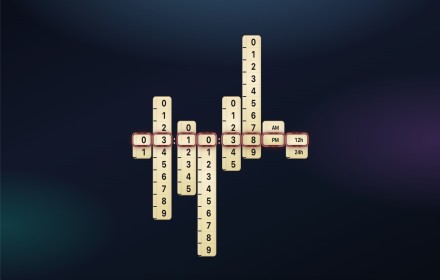
Ruler Clock
Ruler clock New Tab: sliding columns, 12h/24h, saved theme, Google apps open in this tab. Runs locally—no data sent.
As of June 2026, Ruler Clock has 5 users and a 5.00/5 rating from 1 reviews in the fun category.
Usersno change0%
5
5
Ratingno change0%
5.00
1 reviews
Reviewsno change0%
1
Version
1.0.2
Manifest V3
90-day change · In the last 90 days this extension 1 version update.
History
8 snapshotsTracking since Apr 9, 2026.
View as table
| Date | Users | Rating | Reviews | Version |
|---|---|---|---|---|
| Apr 9, 2026 | — | — | — | 1.0.1 |
| Apr 20, 2026 | — | — | — | 1.0.1 |
| Apr 25, 2026 | — | 5.00 | 1 | 1.0.1 |
| May 2, 2026 | — | 5.00 | 1 | 1.0.1 |
| May 9, 2026 | — | 5.00 | 1 | 1.0.2 |
| May 20, 2026 | 2 | 5.00 | 1 | 1.0.2 |
| Jun 2, 2026 | 3 | 5.00 | 1 | 1.0.2 |
| Jun 8, 2026 | 2 | 5.00 | 1 | 1.0.2 |
| Now | 5 | 5.00 | 1 | 1.0.2 |
Changelog
- May 2, 2026short_description
A vertical ruler-style clock: sliding scales align the current time with a selector. Light/dark theme follows your system.
Ruler clock New Tab: sliding columns, 12h/24h, saved theme, Google apps open in this tab. Runs locally—no data sent.
Permissions & access
- Permissions
- None declared
- Host access
- None declared
Screenshots


About
Ruler Clock turns the current time into a set of vertical “ruler” strips—numbers slide so the active digits sit under a fixed maroon frame, like reading a real scale.

Features

Hours, minutes, and seconds on separate sliding columns
AM/PM and a 12h / 24h toggle (your choice is saved on this device)
UI that follows light or dark theme via your system/browser setting
No accounts, no cloud—time comes only from your device’s clock
Open the popup from the toolbar or use it on the new tab page (if enabled).
Privacy: no personal data is collected; see the privacy policy linked from the store listing.
Technical
- Version
- 1.0.2
- Manifest
- V3
- Size
- 39.32KiB
- Min Chrome
- 88
- Languages
- 1
- Featured
- No
Metadata
- ID
- glholmlepmklplllbdkfibhcbnnlmoio
- Developer ID
- u983a71b95ffdea1bd36586d5f2042954
- Developer Email
- [email protected]
- Created
- Apr 9, 2026
- Last Updated (Store)
- May 1, 2026
- Last Scraped
- Jun 8, 2026
- Website
- —
Data sourced from the Chrome Web Store · last verified Jun 8, 2026.