
Usero
Report a bug on any website, even one Usero isn't installed on. Captures DOM, console, and network for the Usero inbox.
As of June 2026, Usero has — users in the Workflow & Planning category.
Usersno change0%
—
—
Ratingno change0%
—
— reviews
Reviewsno change0%
—
Version
1.0.0
Manifest V3
History
1 snapshotsTracking since Jun 13, 2026.
Not enough history yet for this metric — the chart fills in as we collect more snapshots.
View as table
| Date | Users | Rating | Reviews | Version |
|---|---|---|---|---|
| Jun 13, 2026 | — | — | — | 1.0.0 |
| Now | — | — | — | 1.0.0 |
Permissions & access
- Permissions
- activeTabstoragescriptingcontextMenusnotifications
- Host access
- https://*.usero.io/*, https://usero.io/*
Screenshots




About
Report a bug on any website, even one you do not own. Click the Usero icon, describe what broke, hit send. The report lands in your Usero inbox with a screenshot of the visible page, the last 50 console entries, and a sanitized HTML snapshot attached.

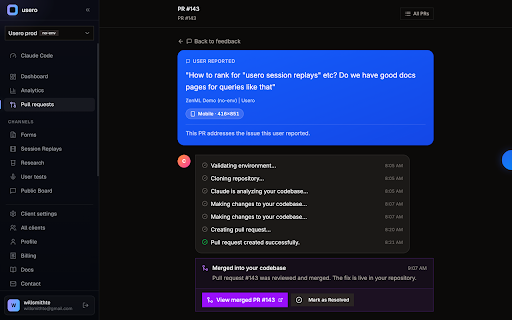
Then the part nobody else does: Usero reads that bundle and opens a pull request against your repo. The console errors and DOM state give it the exact page the user saw, so the fix targets the real bug. You review the diff, you merge. Usero has a 96% success rate on targeted bugs like typos, broken links, and UI glitches.

WHAT IT CAPTURES, AND WHEN

Nothing runs in the background. The extension reads a page in exactly two cases, both started by you:

1. You click the Usero icon and hit Capture. We grab the visible-viewport screenshot, the page URL, the console tail, and the page HTML (scripts and inline event handlers stripped) from that tab only, at that moment only.

2. You select text on a page, right-click, and choose "Send to Usero". We send the selected text plus the page URL and title. Useful for forwarding what users say about your product on Reddit, support threads, or review sites straight into your feedback inbox.

We cannot read any other tab. We cannot read the active tab when you have not clicked. Full details: https://usero.io/privacy

WHERE IT GOES

Reports land in your Usero workspace inbox next to feedback from your in-app widget, Slack, and email. Each Chrome capture shows the screenshot inline, the console tail, and a downloadable bundle with the full DOM snapshot. If the workspace has a repo connected, one click opens the pull request.

WHO IT IS FOR

Built for startup PMs, founders, and small product teams. Works on staging URLs, internal tools, and client preview sites where no feedback widget is installed. No script tag required on the target site.

GETTING STARTED

Install, click the icon, sign in with a magic link (no password). First capture takes under a minute. Free tier includes 5 AI-authored PRs a month; see https://usero.io for plans.

Questions: https://usero.io/contact?subject=Chrome%20extension
Privacy: https://usero.io/privacy
Technical
- Version
- 1.0.0
- Manifest
- V3
- Size
- 146KiB
- Min Chrome
- 88
- Languages
- 1
- Featured
- No
Metadata
- ID
- glhlmncdamohmcoknmkaaeeieelnmmkd
- Developer ID
- u07cc707a723dad824edda23d02364a4b
- Developer Email
- [email protected]
- Created
- Jun 12, 2026
- Last Updated (Store)
- Jun 12, 2026
- Last Scraped
- Jun 13, 2026
- Website
- usero.io
- Support URL
- —
- Privacy Policy
- https://usero.io/privacy
Data sourced from the Chrome Web Store · last verified Jun 13, 2026.