
DayMatters
A simple commemorative date display built with React
As of June 2026, DayMatters has 9 users in the Productivity category.
Usersdown 40.0 percent−40.0%
9
9
Ratingno change0%
—
— reviews
Reviewsno change0%
—
Version
1.1
Manifest V3
History
3 snapshotsTracking since Apr 1, 2026.
View as table
| Date | Users | Rating | Reviews | Version |
|---|---|---|---|---|
| Apr 1, 2026 | 15 | — | — | 1.1 |
| May 3, 2026 | 14 | — | — | 1.1 |
| Jun 2, 2026 | 15 | — | — | 1.1 |
| Now | 9 | — | — | 1.1 |
Permissions & access
- Permissions
- storage
- Host access
- None declared
Screenshots
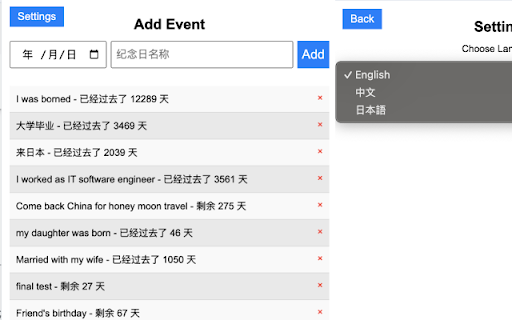
About
# DayMatters - 纪念日管理应用 / 記念日管理アプリ / Anniversary Management App

[English](#english) | [中文](#中文) | [日本語](#日本語)

## English

### Overview

DayMatters is a Chrome extension that helps you track and manage important dates and anniversaries. It provides a clean, intuitive interface for organizing your special moments.

### Core Features

- **Anniversary Management**: Create and manage important dates and anniversaries
- **Category Organization**: Organize anniversaries with custom categories
- **Search Functionality**: Quickly find specific anniversaries
- **Theme Support**: Light and dark mode for comfortable viewing
- **Multi-language Support**: Available in English, Chinese, and Japanese
- **Responsive Design**: Works seamlessly on both desktop and mobile devices

### How to Use

1. **Adding an Anniversary**

   - Click the "+" button in the top right corner
   - Fill in the anniversary details (date, title, category)
   - Click "Save" to create the anniversary

2. **Managing Categories**

   - Click the "+" button next to the category bar
   - Enter a new category name
   - Categories can be deleted by clicking the "×" button

3. **Searching**

   - Click the search icon in the top left
   - Type to search through your anniversaries
   - Results will update in real-time

4. **Theme Switching**

   - Click the settings icon in the top right
   - Choose between light and dark mode
   - Changes take effect immediately

5. **Language Selection**
   - Click the settings icon
   - Select your preferred language
   - Interface will update instantly

## 中文

### 概述

DayMatters 是一个 Chrome 扩展程序,帮助您追踪和管理重要的日期和纪念日。它提供了一个简洁直观的界面来组织您的特殊时刻。

### 核心功能

- **纪念日管理**:创建和管理重要日期和纪念日
- **分类组织**:使用自定义分类组织纪念日
- **搜索功能**:快速查找特定纪念日
- **主题支持**:支持浅色和深色模式
- **多语言支持**:支持中文、英文和日文
- **响应式设计**:在桌面和移动设备上都能完美运行

### 使用方法

1. **添加纪念日**

   - 点击右上角的 "+" 按钮
   - 填写纪念日详情(日期、标题、分类)
   - 点击 "保存" 创建纪念日

2. **管理分类**

   - 点击分类栏旁边的 "+" 按钮
   - 输入新的分类名称
   - 点击 "×" 按钮可以删除分类

3. **搜索功能**

   - 点击左上角的搜索图标
   - 输入关键词搜索纪念日
   - 结果会实时更新

4. **切换主题**

   - 点击右上角的设置图标
   - 选择浅色或深色模式
   - 更改立即生效

5. **语言选择**
   - 点击设置图标
   - 选择您偏好的语言
   - 界面会立即更新

## 日本語

### 概要

DayMatters は、重要な日付や記念日を追跡・管理するための Chrome 拡張機能です。シンプルで直感的なインターフェースで、特別な瞬間を整理できます。

### 主要機能

- **記念日管理**:重要な日付や記念日の作成と管理
- **カテゴリー整理**:カスタムカテゴリーで記念日を整理
- **検索機能**:特定の記念日を素早く検索
- **テーマ対応**:ライトモードとダークモードに対応
- **多言語対応**:英語、中国語、日本語に対応
- **レスポンシブデザイン**:デスクトップとモバイルの両方で完璧に動作

### 使用方法

1. **記念日の追加**

   - 右上の "+" ボタンをクリック
   - 記念日の詳細(日付、タイトル、カテゴリー)を入力
   - "保存" をクリックして記念日を作成

2. **カテゴリー管理**

   - カテゴリーバーの横の "+" ボタンをクリック
   - 新しいカテゴリー名を入力
   - "×" ボタンでカテゴリーを削除可能

3. **検索機能**

   - 左上の検索アイコンをクリック
   - キーワードを入力して記念日を検索
   - 結果はリアルタイムで更新

4. **テーマ切り替え**

   - 右上の設定アイコンをクリック
   - ライトモードまたはダークモードを選択
   - 変更は即座に反映

5. **言語選択**
   - 設定アイコンをクリック
   - 希望の言語を選択
   - インターフェースが即座に更新
Technical
- Version
- 1.1
- Manifest
- V3
- Size
- 217KiB
- Min Chrome
- 88
- Languages
- 1
- Featured
- No
Metadata
- ID
- gkoaonolghgebffnpnpidepmbkjpfaag
- Developer ID
- u1bd4d66456c54d287be379ea4a64c5d2
- Developer Email
- [email protected]
- Created
- Mar 4, 2025
- Last Updated (Store)
- Mar 5, 2025
- Last Scraped
- Jun 2, 2026
- Website
- —
- Support URL
- —
- Privacy Policy
- —
Similar extensions
Alternatives to DayMatters, ranked by description similarity.

时刻助理
时刻助理微信小程序官方插件。您可以自定义新 Tab 页面的布局和内容,与微信小程序账号同步事件,管理。新增、编辑和删除事件。
149
★ 5.0

Easy Todo
一个简单高效的待办事项管理扩展
5

Sticky Notes EX
Googleアカウント連携で複数デバイス同期可能な高機能メモアプリ。装飾、期限設定、重要度設定など。
9

Auto Tab Cleaner
一定時間放置されたタブを自動で閉じる
5

诸事大吉
日历插件:弹窗与侧边栏,月/周/日视图,事件管理与未来一个月汇总。
1
★ 5.0

Simple Private Bookmark
A simple password protected bookmark manager that just works.
2.0K
★ 4.4

Search Immersion
新しいタブを『スマートディスプレイ』に変える拡張機能。
2.0K
★ 4.4

BuoyNote
Drop note-carrying buoys on specific websites and manage them all in one place.
—
★ 5.0
Data sourced from the Chrome Web Store · last verified Jun 2, 2026.