
Peek History
A simple and minimal extension for quickly peeking and managing history.
As of June 2026, Peek History has 253 users and a 5.00/5 rating from 5 reviews in the Workflow & Planning category.
Usersup 10.5 percent+10.5%
253
253
Ratingno change0%
5.00
5 reviews
Reviewsno change0%
5
Version
2.0.1
Manifest V3
History
3 snapshotsTracking since Apr 1, 2026.
View as table
| Date | Users | Rating | Reviews | Version |
|---|---|---|---|---|
| Apr 1, 2026 | 229 | 5.00 | 5 | 2.0.1 |
| May 3, 2026 | 222 | 5.00 | 5 | 2.0.1 |
| Jun 2, 2026 | 230 | 5.00 | 5 | 2.0.1 |
| Now | 253 | 5.00 | 5 | 2.0.1 |
Permissions & access
- Permissions
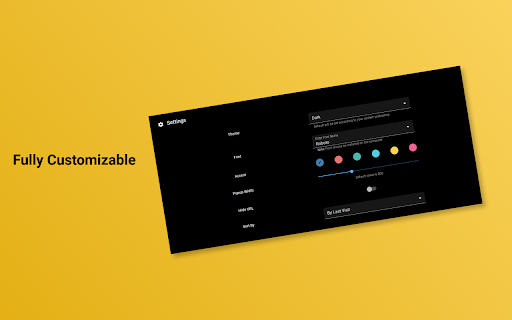
- fontSettingstabshistorystoragesessionsfavicon
- Host access
- None declared
Screenshots


About
🔔 Heads Up: I worked on this project in my initial days just to learn extension development. It's time to call it a day. The functionality it offered is now a default feature in the Chrome browser, making this project obsolete. Unfortunately, I won't be making any more updates.


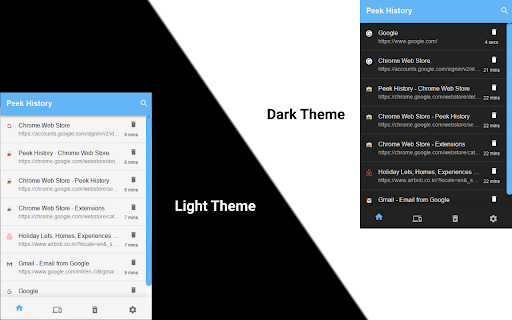
This extension helps you to quickly peek at history in the popup that helps you view, search, and delete your history without distracting you from your work. It also lets you restore your sessions across devices (Reopen recently closed tabs/windows or tabs/windows on other devices).

✨ Features

- Quickly Peek History in popup
- Delete specific or all history
- Reopen closed tabs (Full session)
- Restore sessions from other devices
- Fully controllable by keyboard
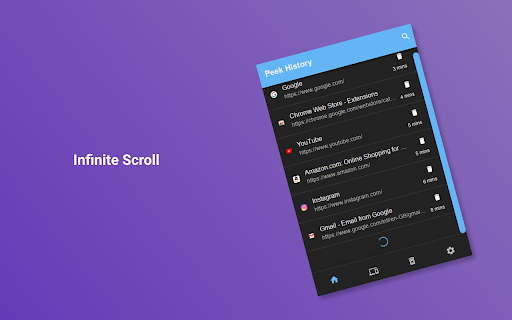
- Infinite scroll

⌨ Keyboard Shortcuts

- 🔵  Toggle Peek History (Open/Close extension popup) - Ctrl + Shift + H
- 🔍  Quickly Search in History - Alt + S (After opening popup)
- ⚙️  Open Extension Options/Settings - Alt + O (After opening popup)
- 📑  See Recently Closed Tabs/Other Tabs - Alt + ➡️  Right Arrow (After opening popup)
- 🔢  Open nth number of history link or the recently closed tab - Alt + (1 - 9) Number Keys


🔒 PRIVACY NOTICE

This extension does not collect any of your personal data.

Please provide feedback if you like this extension.
Thanks 😄
Technical
- Version
- 2.0.1
- Manifest
- V3
- Size
- 199KiB
- Min Chrome
- 88
- Languages
- 1
- Featured
- Yes
Metadata
- ID
- gknodemjjckmkncijnedcpogffimkmbm
- Developer ID
- u4e055cf87cc351e94b87d8ebf9a93aa6
- Developer Email
- [email protected]
- Created
- Nov 30, 2019
- Last Updated (Store)
- Feb 26, 2024
- Last Scraped
- Jun 2, 2026
- Website
- —
- Support URL
- —
- Privacy Policy
- —
Similar extensions
Alternatives to Peek History, ranked by description similarity.

History Assistant
This extension may replace Chrome's default history to make it easier to view and may quickly open the tabs you just closed.
33
★ 5.0

Extended History | 90+ days of history
Unlimited history retention, session management, time tracking, bookmarks, multi-device.
43
★ 5.0

Tabs History
Organize your browsing history by tabs, not time, for a clearer, smarter way to retrace your steps.
236
★ 4.8

Recover Closed Tab
🚀 Recover closed tabs with one click! Works in incognito mode. Right-click icon or webpage to show history.
10.0K
★ 4.5

View Chrome History
You can easily delete, edit your history on Chrome browser
40.0K
★ 3.8

Off The Record History
Track your browsing history in incognito mode. Maintain your history for up to 7 days.
50.0K
★ 3.3

History
Opens History tab in single click from toolbar and context menu. Options available to change icon, open history2, remove menu item
3.0K
★ 4.4

History Trimmer (Cleaner)
Chrome extension to automatically trim and clean your browsing history
214
★ 5.0
Data sourced from the Chrome Web Store · last verified Jun 2, 2026.