
Hashpass
A simple password manager with a twist.
As of June 2026, Hashpass has 697 users and a 4.50/5 rating from 8 reviews in the Productivity category.
Usersup 201.7 percent+201.7%
697
697
Ratingno change0%
4.50
8 reviews
Reviewsno change0%
8
Version
2.1.7
Manifest V3
History
3 snapshotsTracking since Apr 1, 2026.
View as table
| Date | Users | Rating | Reviews | Version |
|---|---|---|---|---|
| Apr 1, 2026 | 231 | 4.50 | 8 | 2.1.7 |
| May 3, 2026 | 234 | 4.50 | 8 | 2.1.7 |
| Jun 2, 2026 | 238 | 4.50 | 8 | 2.1.7 |
| Now | 697 | 4.50 | 8 | 2.1.7 |
Permissions & access
- Permissions
- activeTabscripting
- Host access
- None declared
Screenshots
About
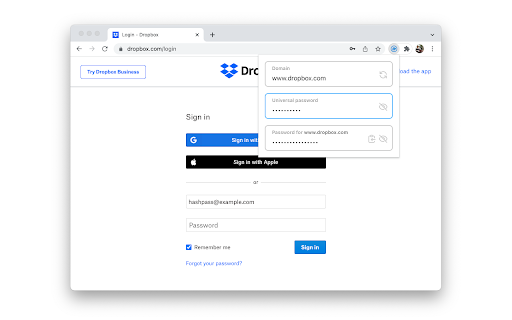
Hashpass is a password manager which doesn't store any passwords. Instead, it generates passwords on the fly using a cryptographic hash function of the domain of the website you're visiting and a single universal password that you memorize. This gives you (a) the security of having a unique password for each website, (b) the convenience of only having to memorize one password, and (c) the comfort of knowing that neither you nor any third party can lose or leak your passwords.

Suppose your universal password is "correcthorsebatterystaple", and you want to sign up for or log into example.com. Hashpass combines your universal password with the website domain as follows: "example.com/correcthorsebatterystaple". It then computes the SHA-256 hash of that string. It hashes it again and again, 2^16 times in total. Finally, it outputs the first 96 bits of the result, encoded as 16 characters in Base64. For this example, the final output is "CqYHklMMg9/GTL0g". That's your password for example.com.

Once installed, you can find the Hashpass button next to your address bar or in the extensions dropdown. By default, you can also open Hashpass with Ctrl+Shift+P (Cmd+Shift+P on macOS).
Technical
- Version
- 2.1.7
- Manifest
- V3
- Size
- 222KiB
- Min Chrome
- 88
- Languages
- 1
- Featured
- Yes
Metadata
- ID
- gkmegkoiplibopkmieofaaeloldidnko
- Developer ID
- udef2256ef53ece57462f8a8d551aafd3
- Developer Email
- [email protected]
- Created
- Dec 27, 2014
- Last Updated (Store)
- Jan 8, 2024
- Last Scraped
- Jun 2, 2026
- Website
- —
- Support URL
- https://github.com/stepchowfun/hashpass
- Privacy Policy
- —
Similar extensions
Alternatives to Hashpass, ranked by description similarity.

Hawk Pass
Local Password Generator
—

SecurePass - Random Password Generator🔐
Generate secure passwords with custom options and a clean UI.
3

FileHash
Use files as passwords! Drag and drop a file to autofill password fields securely, without storing any data.
2

Hyperpass
A modern, unified password manager.
100

SecurePass Generator
Generate secure passwords and manage security settings with advanced encryption options
1

Secure Password Generator
Generate secure, random passwords instantly.
3
★ 5.0

TinyPass
TinyPass - Generate secure random passwords with customizable rules and history tracking
7

Hardcore
Generate strong passwords without leaving your webpages
2
Data sourced from the Chrome Web Store · last verified Jun 2, 2026.