
Two-Finger Gesture Navigation
Navigate forward/backward with two-finger swipe gestures, just like on macOS
As of June 2026, Two-Finger Gesture Navigation has 16 users and a 5.00/5 rating from 1 reviews in the Productivity category.
Usersno change0%
16
16
Ratingno change0%
5.00
1 reviews
Reviewsno change0%
1
Version
1.0.0
Manifest V3
History
9 snapshotsTracking since Apr 8, 2026.
View as table
| Date | Users | Rating | Reviews | Version |
|---|---|---|---|---|
| Apr 8, 2026 | — | — | — | 1.0.0 |
| Apr 19, 2026 | — | — | — | 1.0.0 |
| Apr 25, 2026 | 2 | 5.00 | 1 | 1.0.0 |
| May 9, 2026 | — | 5.00 | 1 | 1.0.0 |
| May 13, 2026 | 8 | 5.00 | 1 | 1.0.0 |
| May 19, 2026 | 7 | 5.00 | 1 | 1.0.0 |
| May 25, 2026 | 8 | 5.00 | 1 | 1.0.0 |
| Jun 1, 2026 | 11 | 5.00 | 1 | 1.0.0 |
| Jun 7, 2026 | 13 | 5.00 | 1 | 1.0.0 |
| Now | 16 | 5.00 | 1 | 1.0.0 |
Permissions & access
- Permissions
- storageactiveTab
- Host access
- None declared
Screenshots

About
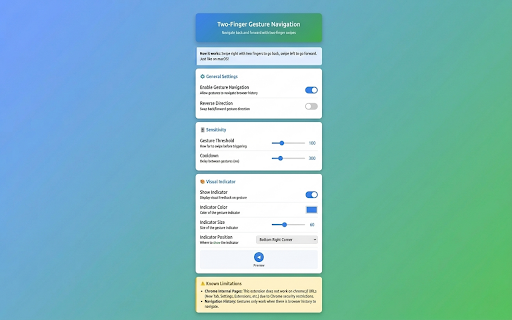
Navigate through browser history with natural two-finger swipe gestures, just like on macOS!

  🌟 FEATURES:
  • Two-finger swipe gestures for back/forward navigation
  • Customizable sensitivity settings
  • Optional visual indicator for gesture feedback
  • Smart detection - ignores text inputs and editable areas
  • 8 indicator position options (corners, center, sides)
  • Adjustable cooldown to prevent accidental triggers

  📋 USAGE:
  - Swipe Right → Go Forward (or Back if reversed)
  - Swipe Left → Go Back (or Forward if reversed)
  - Reverse direction enabled by default for natural feel

  ⚙️ CUSTOMIZATION:
  Access settings via extension icon → Settings:
  • Adjust gesture sensitivity
  • Change indicator position, color, and size
  • Toggle reverse direction
  • Enable/disable visual feedback

  🎯 PERFECT FOR:
  • MacBook users who want consistent gesture navigation
  • Windows/Linux laptop users with trackpads
  • Anyone who prefers swipe gestures over clicking

  ⚠️ NOTE:
  This extension uses the wheel event to detect horizontal trackpad swipes. Works best on websites with regular navigation history.

  Download now and navigate the web with intuitive gestures!
Technical
- Version
- 1.0.0
- Manifest
- V3
- Size
- 3.14MiB
- Min Chrome
- 88
- Languages
- 1
- Featured
- No
Metadata
- ID
- gkjmhkekgfahedjajjallabnnjpibgdh
- Developer ID
- u1de63e2dea59fe05d4c17e83ade4b5ed
- Developer Email
- [email protected]
- Created
- Apr 8, 2026
- Last Updated (Store)
- Apr 8, 2026
- Last Scraped
- Jun 7, 2026
- Website
- https://jamilxt.com/
Data sourced from the Chrome Web Store · last verified Jun 7, 2026.