
Developer Command Handbook
Instantly browse and copy commands from an organized collection.
As of June 2026, Developer Command Handbook has — users in the Productivity category.
Usersno change0%
—
—
Ratingno change0%
—
— reviews
Reviewsno change0%
—
Version
1.0
Manifest V3
History
1 snapshotsTracking since Jun 22, 2026.
Not enough history yet for this metric — the chart fills in as we collect more snapshots.
View as table
| Date | Users | Rating | Reviews | Version |
|---|---|---|---|---|
| Jun 22, 2026 | — | — | — | 1.0 |
| Now | — | — | — | 1.0 |
Permissions & access
- Permissions
- storageclipboardWrite
- Host access
- None declared
Screenshots



About
Developer Command Handbook — Your Offline, Ultra-Fast Command Reference

Stop breaking your coding flow! Never search Google, Stack Overflow, or messy notepad files for standard terminal commands again. The Developer Command Handbook Chrome Extension brings an extensive, beautifully categorized database of essential developer commands right to your browser toolbar.

Whether you are setting up a Docker container, debugging a Kubernetes cluster, modifying Nginx configs, or stashing Git changes, find what you need in under two seconds.

KEY FEATURES:

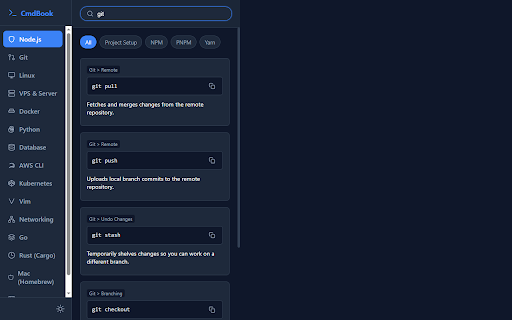
▸ Blazing Fast Instant Search: Find commands instantly as you type. Search by command name, description, category, or note keywords.

▸ One-Click Copy-to-Clipboard: Click any command to copy it instantly. Enjoy seamless visual confirmation feedback with custom micro-interaction toast notifications.

▸ Stunning Glassmorphic UI: A gorgeous, modern design built with dark mode in mind, featuring glassmorphism, responsive sidebar navigation, and clean layout structures.

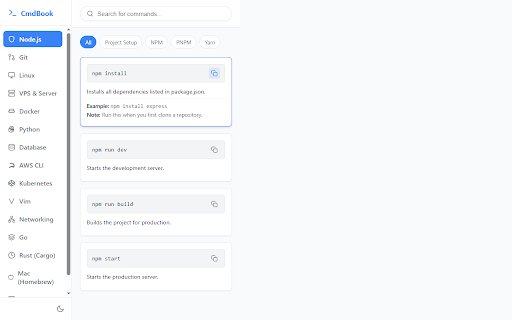
▸ Instant Theme Toggle: Switch between light and dark modes with a single click to match your IDE or browser theme.

▸ Curated Categorization: Clean, hierarchical sidebar grouping of commands by technology and specific domain (e.g., branching, containers, packages).

▸ Pro-Tip Documentation: Hover over commands to reveal important usage parameters, examples, and warnings (such as destructive reset commands).

▸ 100% Offline & Private: Works completely locally. No internet connection required, zero tracker script execution, and absolute privacy for your dev environment.

SUPPORTED TECHNOLOGIES & MODULES:

▸ Node.js Ecosystem: Full reference for project setup, NPM, PNPM, and Yarn package managers.

▸ Git & Version Control: Crucial workflows for branch operations, remote syncs, stashes, and safety resets.

▸ Linux Terminal: Quick lookups for navigation, file handling, access permissions (chmod, chown), and networking tools.

▸ VPS & Production Servers: Commands for SSH tunnels, Nginx configuration reloads, PM2 process management, and core services.

▸ Docker & Compose: Manage containers, images, build stages, docker-compose systems, and logs troubleshooting.

▸ Python Ecosystem: Commands for venv creation, pip installations, script runs, and freeze setups.

▸ Databases: Common utilities for PostgreSQL backups, MySQL shells, and MongoDB exports.

▸ AWS CLI: Configuration commands, S3 data synchronization, and EC2 instance management.

▸ Kubernetes: Master commands for pod monitoring, deployment YAML application, log tracking, and service port-forwarding.

▸ Vim Editor: Quick exits, edits, saves, search patterns, and navigation keys.

▸ Networking: Test API endpoints using curl, check DNS records via dig, and perform ping troubleshooting.

▸ Go (Golang): Manage modules, tidy dependencies, compile binaries, and execute package unit tests.

▸ Rust (Cargo): Commands for project initialization, cargo builds/runs, and package dependency modifications.

▸ macOS Homebrew: Formula installation commands, desktop Casks, and Homebrew upkeep.

▸ FFmpeg: Video conversion codecs, audio extractions, scale resizes, and multi-format processing.

PRIVACY & COMPLIANCE NOTE:

The Developer Command Handbook respects your privacy. It requires no user accounts, collects no personal identification information, and does not track your network traffic. All storage state (such as your preferred dark/light theme) is kept entirely inside your browser's local sandbox storage.


Simplify your workflow and keep your focus on writing code, not reading documentation. Install the Developer Command Handbook today.
Technical
- Version
- 1.0
- Manifest
- V3
- Size
- 31.51KiB
- Min Chrome
- 88
- Languages
- 1
- Featured
- No
Metadata
- ID
- gkgegfeocbojllpllagckejooegamkhl
- Developer ID
- u15b466fd3b7340ba47cb7215bf50d72a
- Developer Email
- [email protected]
- Created
- Jun 21, 2026
- Last Updated (Store)
- Jun 21, 2026
- Last Scraped
- Jun 22, 2026
- Website
- weesoft.dev
- Support URL
- —
Data sourced from the Chrome Web Store · last verified Jun 22, 2026.