
UIDrop
Extract any website's colors, fonts, spacing & components in one click. Send the design brief to Claude, Cursor or ChatGPT instantly
As of June 2026, UIDrop has 20 users and a 5.00/5 rating from 3 reviews in the Developer Tools category.
Usersno change0%
20
20
Ratingno change0%
5.00
3 reviews
Reviewsno change0%
3
Version
1.0.2
Manifest V3
90-day change · In the last 90 days this extension 1 version update.
History
3 snapshotsTracking since May 28, 2026.
View as table
| Date | Users | Rating | Reviews | Version |
|---|---|---|---|---|
| May 28, 2026 | — | — | — | 1.0.1 |
| Jun 4, 2026 | — | — | — | 1.0.1 |
| Jun 9, 2026 | 18 | 5.00 | 3 | 1.0.2 |
| Now | 20 | 5.00 | 3 | 1.0.2 |
Changelog
- Jun 4, 2026description
UIDrop reads any webpage's design system in one click and sends it
straight to your AI coding assistant.

HOW IT WORKS
1. Click "Snap this page" on any website
2. UIDrop extracts fonts, colours, spacing, border radius, shadows,
   gradients and component styles directly from the live CSS
3. The values are organised into a clean, structured design brief
   formatted for AI consumption
4. Send the brief directly to Claude or ChatGPT (Codex), copy it to
   the clipboard for Cursor, or drag the captured screenshot into
   any AI chat as a visual reference

WHY UIDROP
- One-click workflow — no manual copying of values or screenshots
- Three send-to targets built in: Claude, Cursor, ChatGPT (Codex)
- Pure JavaScript heuristics, runs in your browser, no servers, no
  external APIs, no API keys, no accounts, no setup
- Works on any website with publicly visible CSS

PERFECT FOR
- Frontend developers matching or replicating a design they like
- Designers briefing AI tools on a brand's visual style
- Anyone building UI who wants a real starting point instead of a
  vague prompt

PRIVACY
Everything runs in your browser. UIDrop doesn't collect, store, or
transmit data to any server. When you choose to send the brief to
Claude or ChatGPT, the brief is sent to that AI service (governed by
their own privacy policy). See the full privacy policy for details.
UIDrop extracts the complete design system from any website — colors, fonts, spacing, border radius, shadows, gradients, and component styles — and sends a structured design brief directly to your AI coding assistant. One click. No setup.

━━━━━━━━━━━━━━━━━━━━━━

🎯 WHAT IT DOES

Click "Snap this page" on any website. UIDrop reads the live CSS of every visible element and extracts:

• Color palette — primary, accent, surface, elevated, text, and muted colors detected from actual interactive elements (buttons, links, CTAs), not guesses
• Typography — heading and body font families, weights, and a full type scale (hero, mid, body sizes)
• Spacing & border radius — the radius scale and spacing patterns used across real components
• Shadows & elevation — shadow scale sorted by visual weight (subtle → medium → strong)
• Gradients — brand gradients captured from hero text, CTA buttons, and accent surfaces
• Component styles — button, card, input, and link specs including background, border, radius, padding, font weight, and text transform

Everything is organized into a clean, AI-ready design brief with exact token values — not vague descriptions.

━━━━━━━━━━━━━━━━━━━━━━

⚡ HOW IT WORKS

1. Visit any website you find inspiring
2. Click the UIDrop icon in your toolbar
3. Hit "Snap this page" — extraction takes under 1 second
4. Choose where to send:
   → Claude — opens claude.ai with the full brief and screenshot pre-pasted
   → ChatGPT (Codex) — opens chatgpt.com with brief and screenshot injected
   → Cursor — copies the brief to your clipboard, ready to paste into Composer
   → Clipboard — copy the brief text and drag the screenshot into any AI chat

━━━━━━━━━━━━━━━━━━━━━━

🔧 WHO IT'S FOR

• Frontend developers who want exact CSS tokens from a site they're referencing
• Web designers extracting color palettes, type scales, and spacing from live pages
• UI/UX engineers reverse-engineering design systems from production products
• Vibe coders who see a site they like and want to build something similar with AI
• Graphic designers pulling brand colors and typography without manual eyedropping
• Anyone briefing AI tools on a visual style — UIDrop gives your AI a real starting point instead of a vague prompt

━━━━━━━━━━━━━━━━━━━━━━

🔒 PRIVACY

UIDrop runs 100% in your browser. No servers, no analytics, no data collection, no accounts, no API keys, no external requests. Your design briefs never leave your machine unless you choose to send them to an AI service (which is governed by that service's own privacy policy).

━━━━━━━━━━━━━━━━━━━━━━

✨ KEY FEATURES

✓ One-click design system extraction from any website
✓ Reads live rendered CSS — not source stylesheets, not class names
✓ Full color palette with semantic roles (primary, accent, surface, text)
✓ Typography extraction with font families, weights, and size scale
✓ Shadow, gradient, and border radius token detection
✓ Button, card, and input component style capture
✓ Automatic light/dark mode detection
✓ Screenshot capture with drag-and-drop into any chat
✓ Three built-in send targets: Claude, Cursor, ChatGPT
✓ Pure JavaScript — no external APIs, no servers, no setup
✓ Works on any website with publicly visible CSS
✓ Free forever. No premium tier. No limits.

━━━━━━━━━━━━━━━━━━━━━━

UIDrop doesn't clone brands — it extracts design patterns. Your AI gets the tokens, the type scale, and the spatial rhythm to build something original inspired by what works.
- Jun 4, 2026short_description
Snap any site's design system and drop it straight into Claude, Cursor or ChatGPT — instant, private, free.
Extract any website's colors, fonts, spacing & components in one click. Send the design brief to Claude, Cursor or ChatGPT instantly
Permissions & access
- Permissions
- activeTabscriptingstorageclipboardWrite
- Host access
- https://claude.ai/*, https://chatgpt.com/*
Screenshots
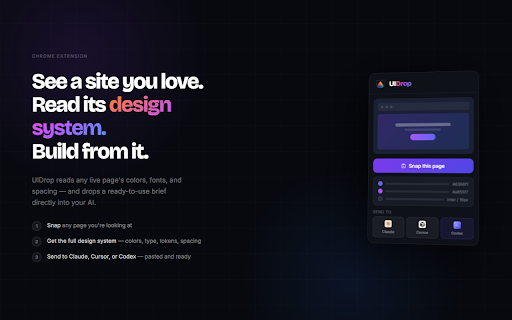


About
UIDrop extracts the complete design system from any website — colors, fonts, spacing, border radius, shadows, gradients, and component styles — and sends a structured design brief directly to your AI coding assistant. One click. No setup.

━━━━━━━━━━━━━━━━━━━━━━

🎯 WHAT IT DOES

Click "Snap this page" on any website. UIDrop reads the live CSS of every visible element and extracts:

• Color palette — primary, accent, surface, elevated, text, and muted colors detected from actual interactive elements (buttons, links, CTAs), not guesses
• Typography — heading and body font families, weights, and a full type scale (hero, mid, body sizes)
• Spacing & border radius — the radius scale and spacing patterns used across real components
• Shadows & elevation — shadow scale sorted by visual weight (subtle → medium → strong)
• Gradients — brand gradients captured from hero text, CTA buttons, and accent surfaces
• Component styles — button, card, input, and link specs including background, border, radius, padding, font weight, and text transform

Everything is organized into a clean, AI-ready design brief with exact token values — not vague descriptions.

━━━━━━━━━━━━━━━━━━━━━━

⚡ HOW IT WORKS

1. Visit any website you find inspiring
2. Click the UIDrop icon in your toolbar
3. Hit "Snap this page" — extraction takes under 1 second
4. Choose where to send:
   → Claude — opens claude.ai with the full brief and screenshot pre-pasted
   → ChatGPT (Codex) — opens chatgpt.com with brief and screenshot injected
   → Cursor — copies the brief to your clipboard, ready to paste into Composer
   → Clipboard — copy the brief text and drag the screenshot into any AI chat

━━━━━━━━━━━━━━━━━━━━━━

🔧 WHO IT'S FOR

• Frontend developers who want exact CSS tokens from a site they're referencing
• Web designers extracting color palettes, type scales, and spacing from live pages
• UI/UX engineers reverse-engineering design systems from production products
• Vibe coders who see a site they like and want to build something similar with AI
• Graphic designers pulling brand colors and typography without manual eyedropping
• Anyone briefing AI tools on a visual style — UIDrop gives your AI a real starting point instead of a vague prompt

━━━━━━━━━━━━━━━━━━━━━━

🔒 PRIVACY

UIDrop runs 100% in your browser. No servers, no analytics, no data collection, no accounts, no API keys, no external requests. Your design briefs never leave your machine unless you choose to send them to an AI service (which is governed by that service's own privacy policy).

━━━━━━━━━━━━━━━━━━━━━━

✨ KEY FEATURES

✓ One-click design system extraction from any website
✓ Reads live rendered CSS — not source stylesheets, not class names
✓ Full color palette with semantic roles (primary, accent, surface, text)
✓ Typography extraction with font families, weights, and size scale
✓ Shadow, gradient, and border radius token detection
✓ Button, card, and input component style capture
✓ Automatic light/dark mode detection
✓ Screenshot capture with drag-and-drop into any chat
✓ Three built-in send targets: Claude, Cursor, ChatGPT
✓ Pure JavaScript — no external APIs, no servers, no setup
✓ Works on any website with publicly visible CSS
✓ Free forever. No premium tier. No limits.

━━━━━━━━━━━━━━━━━━━━━━

UIDrop doesn't clone brands — it extracts design patterns. Your AI gets the tokens, the type scale, and the spatial rhythm to build something original inspired by what works.
Technical
- Version
- 1.0.2
- Manifest
- V3
- Size
- 225KiB
- Min Chrome
- 88
- Languages
- 1
- Featured
- No
Metadata
- ID
- gkeiedoojhdmlaimiookeaoppgfpemij
- Developer ID
- u76bd4e25210a76d8e5611d07c750497b
- Developer Email
- [email protected]
- Created
- May 27, 2026
- Last Updated (Store)
- Jun 2, 2026
- Last Scraped
- Jun 9, 2026
- Support URL
- —
Data sourced from the Chrome Web Store · last verified Jun 9, 2026.