
AutopilotSBC | FC26 SBC Solver
Automation tool for SBC solving in the FC26 Web App || 100% FREE UNLIMITED USAGE.
As of June 2026, AutopilotSBC | FC26 SBC Solver has 959 users and a 4.90/5 rating from 10 reviews in the Games category.
Usersup 2031.1 percent+2031.1%
959
959
Ratingdown 2.0 percent−2.0%
4.90
10 reviews
Reviewsup 900.0 percent+900.0%
10
Version
1.10
Manifest V3
90-day change · In the last 90 days this extension 5 version updates, changed permissions.
History
11 snapshotsTracking since Apr 1, 2026.
View as table
| Date | Users | Rating | Reviews | Version |
|---|---|---|---|---|
| Apr 1, 2026 | 45 | 5.00 | 1 | 1.7.1 |
| Apr 17, 2026 | 55 | 5.00 | 1 | 1.8 |
| Apr 22, 2026 | 167 | 5.00 | 1 | 1.8 |
| Apr 27, 2026 | 237 | 5.00 | 2 | 1.9.1 |
| May 4, 2026 | 326 | 5.00 | 3 | 1.9.2 |
| May 10, 2026 | 429 | 5.00 | 3 | 1.9.2 |
| May 15, 2026 | 503 | 5.00 | 4 | 1.9.3 |
| May 21, 2026 | 579 | 5.00 | 6 | 1.9.3 |
| May 28, 2026 | 719 | 5.00 | 7 | 1.10 |
| Jun 4, 2026 | 777 | 5.00 | 8 | 1.10 |
| Jun 9, 2026 | 887 | 5.00 | 8 | 1.10 |
| Now | 959 | 4.90 | 10 | 1.10 |
Changelog
- May 21, 2026description
AutopilotSBC helps you complete SBCs faster in the EA SPORTS FC Ultimate Team Web App.

What AutopilotSBC does
• Builds a valid squad for the current challenge
• Repeats solves in one flow with Multi Solve
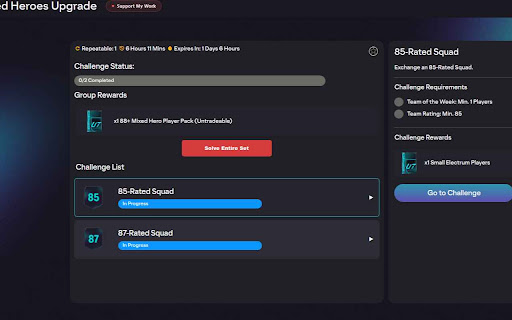
• Solves open challenges in an SBC set with Solve Entire Set
• Gives you simple player-pool controls before solving

Main features
• Solve Squad for one challenge.
• Multi for multiple runs of the same challenge.
• Solve Entire Set for set-level automation.
• Sequence Solver for cross-challenge and cross-set runs.
• Built-in Changelog notes menu.

Optional filters and controls
• Include unassigned duplicates
• Use storage players only
• Exclude tradable players
• Exclude special cards
• Use TOTW players
• Exclude specific Leagues/Nations
• Player rating range (min/max OVR)

Settings
Save global defaults in the EA app Settings tab under SBC Solver, and adjust challenge specific or run specific

Multiple runs
1. Open a challenge
2. Click Multi Solve
3. Choose number of runs
4. Start the run

Full set
1. Open an SBC set page
2. Click Solve Entire Set
3. Select challenges and start

Sequence Plans
1. Open the SBC hub page.
2. Click Sequence Solver.
3. Add the SBCs you want to run in order.
4. Save the plan and start the sequence.
AutopilotSBC helps you complete SBCs faster in the EA SPORTS FC Ultimate Team Web App.

What AutopilotSBC does
• Builds a valid squad for the current challenge
• Repeats solves in one flow with Multi Solve
• Solves open challenges in an SBC set with Solve Entire Set
• Gives you simple player-pool controls before solving

Main features
• Solve Squad for one challenge.
• Multi for multiple runs of the same challenge.
• Solve Entire Set for set-level automation.
• Sequence Solver for cross-challenge and cross-set runs.
• Built-in Changelog notes menu.

Optional filters and controls
• Include unassigned duplicates
• Use storage players only
• Exclude tradable players
• Exclude special cards
• Use TOTW players
• Exclude specific Leagues/Nations
• Player rating range (min/max OVR)
• Player card type configuring

Settings
Save global defaults in the EA app Settings tab under SBC Solver, and adjust challenge specific or run specific

Multiple runs
1. Open a challenge
2. Click Multi Solve
3. Choose number of runs
4. Start the run

Full set
1. Open an SBC set page
2. Click Solve Entire Set
3. Select challenges and start

Sequence Plans
1. Open the SBC hub page.
2. Click Sequence Solver.
3. Add the SBCs you want to run in order.
4. Save the plan and start the sequence.
- May 21, 2026host_permissions
(empty)
https://www.fut.gg/*
- Apr 1, 2026short_description
automation tool for solving SBCs in the EA SPORTS FC Web App.
Automation tool for SBC solving in the FC26 Web App || 100% FREE UNLIMITED USAGE.
Permissions & access
- Permissions
- storagescripting
- Host access
- https://www.fut.gg/*
Screenshots


About
AutopilotSBC helps you complete SBCs faster in the EA SPORTS FC Ultimate Team Web App.

What AutopilotSBC does
• Builds a valid squad for the current challenge
• Repeats solves in one flow with Multi Solve
• Solves open challenges in an SBC set with Solve Entire Set
• Gives you simple player-pool controls before solving

Main features
• Solve Squad for one challenge.
• Multi for multiple runs of the same challenge.
• Solve Entire Set for set-level automation.
• Sequence Solver for cross-challenge and cross-set runs.
• Built-in Changelog notes menu.

Optional filters and controls
• Include unassigned duplicates
• Use storage players only
• Exclude tradable players
• Exclude special cards
• Use TOTW players
• Exclude specific Leagues/Nations
• Player rating range (min/max OVR)
• Player card type configuring

Settings
Save global defaults in the EA app Settings tab under SBC Solver, and adjust challenge specific or run specific

Multiple runs
1. Open a challenge
2. Click Multi Solve
3. Choose number of runs
4. Start the run

Full set
1. Open an SBC set page
2. Click Solve Entire Set
3. Select challenges and start

Sequence Plans
1. Open the SBC hub page.
2. Click Sequence Solver.
3. Add the SBCs you want to run in order.
4. Save the plan and start the sequence.
Technical
- Version
- 1.10
- Manifest
- V3
- Size
- 469KiB
- Min Chrome
- 88
- Languages
- 1
- Featured
- No
Metadata
- ID
- gkcjhdebgfhdbkecahbnpmcaobapcfbh
- Developer ID
- u53cb4103e1de5fd634adf5ecabc8aa7d
- Developer Email
- [email protected]
- Created
- Feb 28, 2026
- Last Updated (Store)
- May 18, 2026
- Last Scraped
- Jun 9, 2026
- Support URL
- —
- Privacy Policy
- —
Similar extensions
Alternatives to AutopilotSBC | FC26 SBC Solver, ranked by description similarity.

AutoSBC
The AutoSBC extension for Chrome
200.0K
★ 4.3

Rad SBC Auto Solver
Automatically solve FIFA Ultimate Team SBC challenges with optimal squad building
31

Solva - FC26 AI SBC Solver, Market Sniper & Meta Squad Builder
AI-powered SBC solver for FC 26 Ultimate Team. Market sniper, meta squad builder, club sync. Save coins & time, try free now!
657
★ 4.6

FC Helper | AI SBC Solver for EA FC FUT
One-click AI SBC solver for EA FC FUT. Auto-complete daily SBCs, batch solve, open packs, manage fodder. Free for Chrome & Firefox.
192
★ 5.0

Fut Easy
An extension that makes life easier for active users of EA FC 26 Ultimate Team. Snipe/Grind tools and more...
2.0K
★ 4.6

FUT Automation Extension
Automates FIFA Ultimate Team pack opening and SBC completion cycles by interfacing with paletools
507

Braza SBC
Solve EA FC 26 SBCs automatically. Find optimal solutions that minimize cost and maximize club player usage.
1

SAP Scout (Tab Monitor)
Monitors network traffic on the Super Auto Pets tab and parses battle reponse to send to SAP Calculator.
1
Data sourced from the Chrome Web Store · last verified Jun 9, 2026.