
TU Score Input Helper
Copy scores from CSV files or spreadsheet to web application for Triam Udom Suksa School
As of June 2026, TU Score Input Helper has 19 users and a 5.00/5 rating from 7 reviews in the Education category.
Usersup 18.8 percent+18.8%
19
19
Ratingno change0%
5.00
7 reviews
Reviewsno change0%
7
Version
3.2
Manifest V3
History
5 snapshotsTracking since Apr 1, 2026.
View as table
| Date | Users | Rating | Reviews | Version |
|---|---|---|---|---|
| Apr 1, 2026 | 16 | 5.00 | 7 | 3.2 |
| Apr 21, 2026 | 17 | 5.00 | 7 | 3.2 |
| May 7, 2026 | 17 | 5.00 | 7 | 3.2 |
| May 18, 2026 | 17 | 5.00 | 7 | 3.2 |
| Jun 1, 2026 | 22 | 5.00 | 7 | 3.2 |
| Now | 19 | 5.00 | 7 | 3.2 |
Permissions & access
- Permissions
- activeTabstoragescripting
- Host access
- None declared
Screenshots

About
TU Score Input Helper v3.2

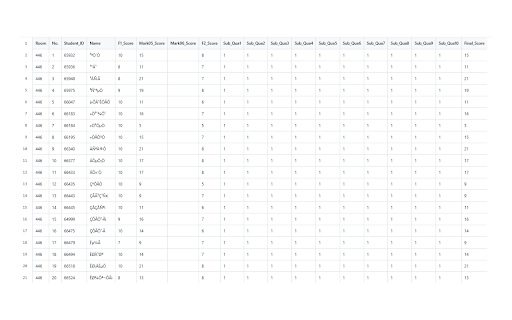
An educational tool designed specifically for Triam Udom Suksa School teachers to streamline the grading process. This extension allows you to efficiently transfer student scores from spreadsheets to the school's web-based grading system with multiple input methods and automatic matching capabilities.

Key Features:
Multiple Input Methods:
- CSV File Upload with multi-column processing
- Student ID Matching for precise data placement
- Manual copy-paste from any spreadsheet (Google Sheets, Excel, etc.)
- Auto-fill functionality for คุณลักษณะ 1-10 fields

Smart Processing:
- Automatic student ID detection and matching
- Process multiple columns simultaneously
- Template format support for bulk operations
- Individual or batch paste operations

Comprehensive Field Support:
- F1 (formal) and F2 (forma2) scores
- SUM ได้ (mark05) and SUM แก้ตัว (mark06)
- คุณลักษณะ 1-10 (sub_qua1-10) with one-click auto-fill
ปลายภาค (mfin) scores
- Individual clear buttons for each field type

Simple Workflow:
- Upload CSV file or copy data from spreadsheet
- Select columns to process (or use auto-paste with template format)
- Paste to target fields with dedicated buttons
- Or use auto-fill for คุณลักษณะ fields

Enhanced Capabilities:
- Student ID matching ensures scores reach correct students
- Multi-column selection and processing
- CSV template provided for consistent formatting
- Preview data before pasting
- Sequential processing for reliability
- Compact interface with Thai language support

Perfect for Triam Udom Suksa School:
- Teachers entering scores for multiple students
- Bulk score input with ID verification
- Reduced manual data entry errors
- Support for all TU score categories
- Efficient handling of large class sizes

Privacy & Security:
- No personal data collection or transmission
- All data processing happens locally on your device
- Temporary local storage only
- No external server communication

Developed by Nonnakorn v3.2 for TU educational use.
Technical
- Version
- 3.2
- Manifest
- V3
- Size
- 90.61KiB
- Min Chrome
- 88
- Languages
- 1
- Featured
- No
Metadata
- ID
- gkcekiikabjdbemokddmnnggmppiappj
- Developer ID
- ue53809e389f84d33e2dbebd81d21aa24
- Developer Email
- [email protected]
- Created
- Aug 13, 2025
- Last Updated (Store)
- Sep 30, 2025
- Last Scraped
- Jun 1, 2026
- Website
- —
- Support URL
- —
Similar extensions
Alternatives to TU Score Input Helper, ranked by description similarity.

SMS Portal Helper (Banglar Sikhsha SMS Portal Assistance)
Auto-fill grades and remarks for LPCD/HPRC report cards on Banglar Sikhsha SMS Portal. Saves teachers valuable time.
26
★ 5.0

NUB TER Filler
Automatically fill TER form for Northern University Bangladesh with selected feedback options
32
★ 5.0

Dr_RKC Autofill
Autofill a web form using data from a CSV file.
170
★ 5.0

QU Student Grades Importer
Import and fill student grades from CSV/XLSX files on QU Student Gate pages
—

CSV → Marks Entry by Partho Sutra Dhor
Adds a CSV uploader to the final mark entry page and fills marks into the form based on your CSV.
50
★ 5.0

GradeCal
Grade calculator extension for FEU Tech solar portal.
66
★ 5.0

GradeTransferer - Transfer, Scale & Sort Grades | Save Time, Reduce Errors
Transfer, scale, and sort grades between 40+ LMS platforms and gradebooks. Automate grade entry, reduce errors, and save hours.
40.0K
★ 4.8

SKILLUP ACADEMIA HUB SUPPORTER
Tiện ích hỗ trợ Giảng Viên - Trường Cao đẳng FPT Polytechnic.
20
Data sourced from the Chrome Web Store · last verified Jun 1, 2026.