
Copy Markdown Link
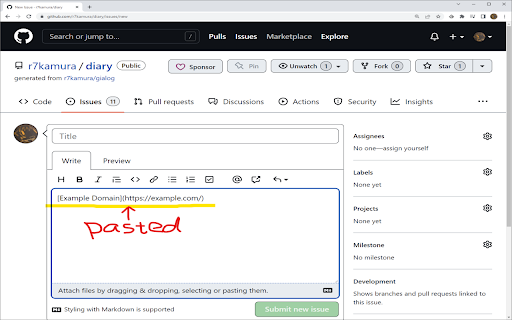
Copy link in Markdown format.
As of June 2026, Copy Markdown Link has 365 users and a 5.00/5 rating from 1 reviews in the Workflow & Planning category.
Usersup 8.6 percent+8.6%
365
365
Ratingno change0%
5.00
1 reviews
Reviewsno change0%
1
Version
0.1.0
Manifest V3
History
3 snapshotsTracking since Apr 1, 2026.
View as table
| Date | Users | Rating | Reviews | Version |
|---|---|---|---|---|
| Apr 1, 2026 | 336 | 5.00 | 1 | 0.1.0 |
| May 3, 2026 | 341 | 5.00 | 1 | 0.1.0 |
| Jun 3, 2026 | 356 | 5.00 | 1 | 0.1.0 |
| Now | 365 | 5.00 | 1 | 0.1.0 |
Permissions & access
- Permissions
- activeTabclipboardWrite
- Host access
- None declared
Screenshots

About
Click the extension icon or press the keyboard shortcut to copy link in Markdown format.

The default keyboard shortcut is Ctrl + M.
This can be changed from the browser's extension settings.
Technical
- Version
- 0.1.0
- Manifest
- V3
- Size
- 9.93KiB
- Min Chrome
- 88
- Languages
- 1
- Featured
- Yes
Metadata
- ID
- gkceaaphhbeanfciglgpffnncfpipjpa
- Developer ID
- u1b6f43a340b30092874c6bc5edfd7dac
- Developer Email
- [email protected]
- Created
- May 19, 2022
- Last Updated (Store)
- May 19, 2022
- Last Scraped
- Jun 3, 2026
- Website
- —
- Support URL
- —
- Privacy Policy
- —
Similar extensions
Alternatives to Copy Markdown Link, ranked by description similarity.

Markdown Link Copier
A Chrome extension that copies links to clipboard in markdown format.
26

Copy URL Extension
Copies the current tab's URL when the icon is clicked and shows a notification.
6

Panopto URL Copier
Copy Panopto URL of current playing time
25

Copy Rich Link
Copy the page title and URL as rich text.
4.0K
★ 5.0

Copy HTML Link
Copy link to the current page (with page title) to the clipboard.
264
★ 4.8

Copy Titled Link
Copies the title and URL of the current page to the clipboard
342
★ 5.0

Link-Md
Create a markdown link of the current page with quoted text.
359
★ 5.0

Markdown Linker
A simple utility that allows you to copy text as a markdown hyperlinked to the source using the hotkeys Shift⇧ + Command⌘ + Period.
4
Data sourced from the Chrome Web Store · last verified Jun 3, 2026.