
MedioAI: Enhance Udio
Write lyrics with Song Studio, Tag Builder, AI Radio, AI Co-Writer, 13k+ Tags, Audio Tools, Lyric Commands & More!
As of June 2026, MedioAI: Enhance Udio has 579 users and a 4.29/5 rating from 7 reviews in the Productivity category.
Usersdown 5.2 percent−5.2%
579
579
Ratingno change0%
4.29
7 reviews
Reviewsno change0%
7
Version
2.0
Manifest V3
History
5 snapshotsTracking since Apr 1, 2026.
View as table
| Date | Users | Rating | Reviews | Version |
|---|---|---|---|---|
| Apr 1, 2026 | 611 | 4.29 | 7 | 2.0 |
| Apr 21, 2026 | 627 | 4.29 | 7 | 2.0 |
| May 7, 2026 | 595 | 4.29 | 7 | 2.0 |
| May 18, 2026 | 590 | 4.29 | 7 | 2.0 |
| Jun 1, 2026 | 591 | 4.29 | 7 | 2.0 |
| Now | 579 | 4.29 | 7 | 2.0 |
Permissions & access
- Permissions
- storageunlimitedStorage
- Host access
- None declared
Screenshots



About
A free (unofficial) Chrome extension for Udio.com!

Access a variety of features made specifically for AI music creators:

ALL NEW: Updated to fit the new Udio UI

New: You can now use selected lyrics and tags without copying them. Based on feedback.

This version may contain bugs and will get them fixed asap.

1. AI Co-Writer - Built in chat to write songs or get instant feedback

Start from scratch by filling out the Theme, Emotion, Structure and other bits about your song and let the AI write the first draft. You can then use the chat window to tweak the lyrics and once you are happy copy them to the Song Studio lyric editor.

You can also ask the AI for any feedback using one of 100+ premade questions or ask anything you want!

2. Song Studio - Write, save and manage lyrics + huge library of commands.

Write your lyrics in a large easy to use editor. All command tags are highlight with any color you want so you can focus on your lyrics. You can browse from the thousands of command tags and instrument tags to add the perfect solo just where you need.

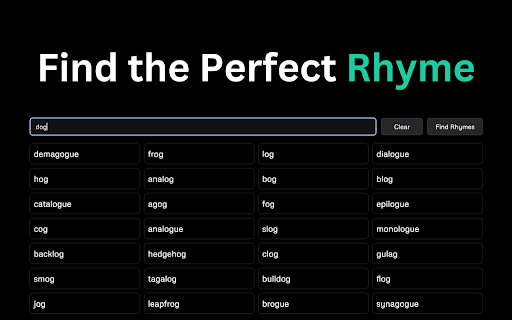
Looking for a Rhyme? Use the built-in search to find the perfect rhyme powered by Datamuse.

3. Tag Builder - Create, save and manage tag groups to re-use!

Create, save and manage your tag library. Find new tags using the thousands of premade genres, artists and more. Save them to your library to keep the jams flowing! You'll never forget a tag group again.

All your tags, lyrics, chats are stored locally for easy access any time you need it.

4. Audio Notification - Get notified when your Udio queue is ready

Choose from a variety of sounds that can play when your Udio queue is ready, this way you can be notified when your generations are ready to listen to!

5. Audio Tools & More - Convert MP3 to WAV and much more

Use the MedioAI tools to convert MP3 to WAV and create your own visualizers using the MedioAI visualizer tool (coming soon).

6. Count Credits Per Track

You can now check out the exact amount of credits you used for any track you made. Just visit any of your tracks and you will see new button and you can count your credits in seconds!

Go to https://www.MedioAI.com to learn more about the chrome extension.

Updates for v1.3:

Changed 2 sidebar links to just 1 as "MedioAI".
Fixed position of playlist in sidebar.
Added playlist expand button with popup.
Added MP3 Metadata Editor.
Added 4,000+ new tags to the database.
Added "Challenge me" button with 500+ songwriting prompts.
Keep Seed & Quality settings (toggle on/off).
Seedbank manager (save, edit, select, random, delete).
Preview sound in audio settings.
Display waveform after .WAV conversion.
Manual Mode as default on (toggle on/off).
Save track covers to library.
Lyric edit "Insert Attribution" button.
Syllable Counter (for highlighted text).
OpenRouter API.
Advanced: System prompts & edit tag library.
Added "dynaudnorm" FFMPEG to Convert to WAV.

If you are interested in contributing to the open-source code on Github, please check it out here: https://github.com/WynterJones/MedioAI-for-Udio

Add your bug/issue reports here: https://github.com/WynterJones/MedioAI-for-Udio/issues

Thank you so much for checking it out!
- Wynter Jones
 @AI.MASSIVE

P.S.

Looking to listen to some AI music? MedioAI is free to everyone, my only request is that you like, comment and subscribe to my YouTube channel: http://www.youtube.com/@AI.MASSIVE
Technical
- Version
- 2.0
- Manifest
- V3
- Size
- 13.29MiB
- Min Chrome
- 88
- Languages
- 1
- Featured
- No
Metadata
- ID
- gkajdljokjallnlfkibjoiolndccinoi
- Developer ID
- u87cf643dfac7dfdae90af8deef035962
- Developer Email
- [email protected]
- Created
- May 25, 2024
- Last Updated (Store)
- Jul 19, 2025
- Last Scraped
- Jun 1, 2026
- Website
- —
- Privacy Policy
- https://www.wynter.ai/privacy-policy
Similar extensions
Alternatives to MedioAI: Enhance Udio, ranked by description similarity.

Udio AI Music Generator
Udio AI Music Generator by UdioAI: Instantly create and download unique MP3 songs
500
★ 5.0

Udio AI Music Generator
Udio AI Music Generator by UdioAI, Instantly create and download distinctive MP3 songs.
5.0K
★ 3.7

YouTube Summary, Transcripts powered by ChatGPT & Claude AI | uListen
High quality summaries for YouTube videos & podcasts. Accurate transcripts to search & find moments. Powered by ChatGPT & Claude AI.
74
★ 5.0

YouTube Audio Analyst
Analyze YouTube audio using Gemini 2.5 Flash (Ink Edition)
18

SongSmith AI
Generate song concepts with AI and send them to Suno
107

Suno Prompt Generator
Assist with the input of Suno style music, supporting Suno style, genres, types, and artists.
426
★ 1.0

Trymusic AI
Create music with AI — fast, simple, royalty-free. Open Trymusic AI in your browser.
45
★ 5.0

AI Star Songs
A helpful tool for generating songs Lyrics by your favorite artists and sync to Suno
24
Data sourced from the Chrome Web Store · last verified Jun 1, 2026.