
DevHexLab FlowLens AI
Screen-aware AI troubleshooting companion for Power Automate and Power Automate Desktop makers.
As of June 2026, DevHexLab FlowLens AI has 3 users and a 5.00/5 rating from 1 reviews in the Developer Tools category.
Usersno change0%
3
3
Ratingno change0%
5.00
1 reviews
Reviewsno change0%
1
Version
3.1.1
Manifest V3
History
3 snapshotsTracking since May 24, 2026.
View as table
| Date | Users | Rating | Reviews | Version |
|---|---|---|---|---|
| May 24, 2026 | — | — | — | 3.1.1 |
| May 30, 2026 | — | — | — | 3.1.1 |
| Jun 6, 2026 | 2 | — | — | 3.1.1 |
| Now | 3 | 5.00 | 1 | 3.1.1 |
Permissions & access
- Permissions
- activeTabscriptingstorage
- Host access
- https://api.openai.com/*, https://generativelanguage.googleapis.com/*, https://make.powerautomate.com/*, https://make.preview.powerautomate.com/*, https://*.powerautomate.com/*, https://*.flow.microsoft.com/*, https://make.powerapps.com/*
Screenshots



About
DevHexLab FlowLens AI helps makers understand and troubleshoot Power Automate, Power Automate Desktop, Power Platform, Microsoft 365, and browser-based business tool screens using AI chat and optional screen analysis.

Use normal chat when you want quick guidance. Use Send with screen when you want FlowLens to inspect the visible browser screen and explain what it sees.

FlowLens is built for real makers who need practical help with flow errors, expressions, connectors, loops, conditions, PAD issues, and beginner-friendly explanations.

Key features:
- Screen-aware troubleshooting for visible browser pages
- Right-side FlowLens chat panel
- Normal chat without screenshots
- Send with screen for screenshot-aware help
- Power Automate and Power Platform focused prompts
- Beginner-friendly explanations
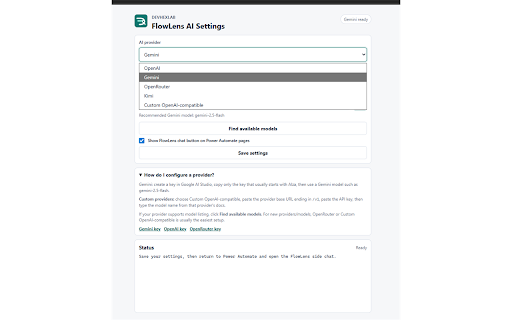
- Supports OpenAI, Gemini, OpenRouter, Kimi, and custom OpenAI-compatible providers
- Uses the user's own API key
Technical
- Version
- 3.1.1
- Manifest
- V3
- Size
- 29.23KiB
- Min Chrome
- 88
- Languages
- 1
- Featured
- No
Metadata
- ID
- gjpkilcfdojkepcbdgkgaidnbbakohoi
- Developer ID
- ua546cc096dc6f8bccc0fec9b99f5eee8
- Developer Email
- [email protected]
- Created
- May 23, 2026
- Last Updated (Store)
- May 23, 2026
- Last Scraped
- Jun 15, 2026
- Website
- —
- Support URL
- https://devhexlab.com/contact
- Privacy Policy
- https://devhexlab.com/flowlensai/privacy
Data sourced from the Chrome Web Store · last verified Jun 15, 2026.