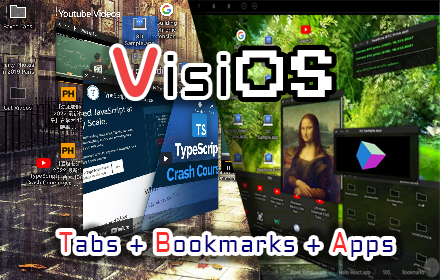
VisiOS - Tab / Bookmark Manager OS
The Legendary Tab/Bookmark Manager OS
As of June 2026, VisiOS - Tab / Bookmark Manager OS has 10,000 users and a 4.65/5 rating from 23 reviews in the Productivity category.
Usersno change0%
10.0K
10,000
Ratingno change0%
4.65
23 reviews
Reviewsno change0%
23
Version
1.3.4
Manifest V3
History
2 snapshotsTracking since Apr 19, 2026.
View as table
| Date | Users | Rating | Reviews | Version |
|---|---|---|---|---|
| Apr 19, 2026 | 10.0K | 4.65 | 23 | 1.3.4 |
| Apr 29, 2026 | 10.0K | 4.65 | 23 | 1.3.4 |
| Now | 10.0K | 4.65 | 23 | 1.3.4 |
Permissions & access
- Permissions
- storagetabstabGroupsunlimitedStoragebookmarkssessionssidePaneldeclarativeNetRequest
- Host access
- <all_urls>, http://*/, https://*/, *://*/
Screenshots


About
🚀 VisiOS offers two main features: 🚀
A tab manager of epic proportions and an OS that legends are made of.


🟢 Main functions of the tab manager:
 ✅  Sort tabs and tab groups
 ✅  Search tab titles and copy tab links
 ✅  Directly restore 404 tabs with Internet Archive
 ✅  YouTube top mode


🟢 Main functions of the OS
 ✅ 20+ languages available
 ✅ 9 desktops (toggle between 2D and 3D modes)
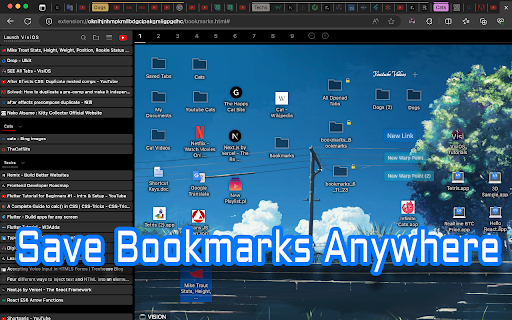
 ✅ Save bookmarks from the tab list, toolbar, and HTML files
 ✅ Generate bookmark HTML files for all browsers
 ✅ Sync, add, and merge bookmarks to your browser
 ✅ Create folders that maintain the hierarchy of all currently open tabs or all bookmarks
 ✅ Password-lock desktops and folders
 ✅ Built-in video player (37 video sites supported, including YouTube, TED, and Spotify)
 ✅ Create video playlists (supports YouTube playlist URLs)
 ✅ Playlist lets YouTube work like an iPod, with shuffle support
 ✅ Free App Store (download various apps to your OS for free)
 ✅ Draw on desktops, apps, and folders with 2D painting functionality
 ✅ Code editor for developing your own apps on the OS
 ✅ Quicklook like on MacOS
 ✅ Hypersearch (search across all 9 desktops at once)
 ✅ Robo-sort (sort folder hierarchies all at once)
 ✅ Word processor (supports LaTeX for advanced formula editing)
 ✅ Fully customizable fonts and icons
 ✅ Wide range of backup and reset options
 ✅ Add texts and lists anywhere on your desktops and folders
 ✅ Infinite scrolling (desktops behave almost like Google Maps)
 ✅ ChatGPT and various AIs will be more easier to use
 ✅ Warp points (navigate directly to specific coordinates across all desktops)
 ✅ Sidebar OS

You can save bookmarks anywhere on the 9 desktops.
It's really easy to import, export, sync, and merge bookmarks.

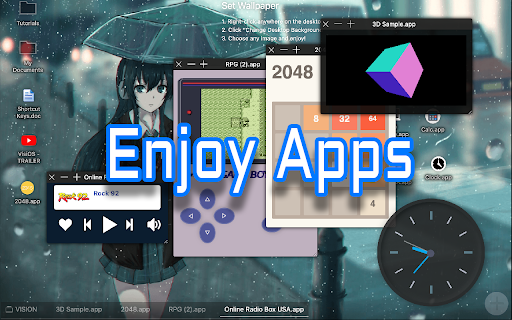
You can also install various VisiOS apps for free, including games, utilities, language learning apps, cryptocurrency tools, and more.


  <VisiOS Official Tutorials:>
   https://beta-japan.com/tutorials


🚀 Usage Instructions (VisiOS): 🚀

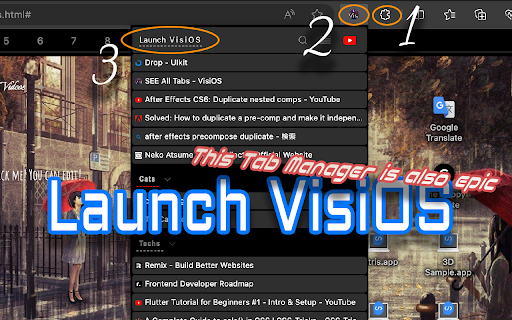
When you first install the extension, click on the extension icon, and then select "Launch VisiOS" in the pop-up menu. (NOTE: Recommended to pin the VisiOS extension)


🚀 How to change your preferred language: 🚀
Right-click anywhere on any desktop and select “Settings” to change your preferred language.
Technical
- Version
- 1.3.4
- Manifest
- V3
- Size
- 781KiB
- Min Chrome
- 88
- Languages
- 21
- Featured
- No
Metadata
- ID
- gjoimbbkllocghfkbjdfjeakcgnkglgd
- Developer ID
- u529b229a25b6114847bd82dd5ea391eb
- Developer Email
- [email protected]
- Created
- Sep 20, 2023
- Last Updated (Store)
- Dec 2, 2025
- Last Scraped
- Jun 4, 2026
- Website
- beta-japan.com
- Support URL
- —
- Privacy Policy
- —
Similar extensions
Alternatives to VisiOS - Tab / Bookmark Manager OS, ranked by description similarity.

Island Launcher with Tab controller
A powerful, highly customizable site launcher with Islands, Groups, Cloud Sync, and vertical tab management (full version only).
14
★ 5.0

Bookmark UniSync - Cross-Platform Browser Bookmark Sync
a tool for Safari&Chrome/Edge/Brave with two-way sync,native bookmark bar,multi-device sync,search,for cross-browser management.
540
★ 3.2

Sidebar for Tabs/Bookmarks
Arc-style sidebar: tabs, bookmarks & reading list + local AI (grouping, cleanup, summary, search), Workspaces. No API key.
444
★ 4.4

Split Screen in Tab - TradingView
Split View in One Tab! Multitask with TradingView!
2.0K
★ 4.1

TabBoost
TabBoost is a Chrome extension that helps you manage your tabs more efficiently.
1.0K
★ 5.0

Island Launcher Lite
A powerful, highly customizable site launcher with Islands, Groups, Cloud Sync, and vertical tab management (full version only).
—

start tooolo | Bookmarks and reminders, simplified
Your personal dashboard for bookmarks, upcoming events, and days that matter. Make every new tab yours with start tooolo!
9

Save to Bookmark OS
Save bookmarks easily to Bookmark OS
5.0K
★ 4.2
Data sourced from the Chrome Web Store · last verified Jun 4, 2026.