
Double-click to page lock
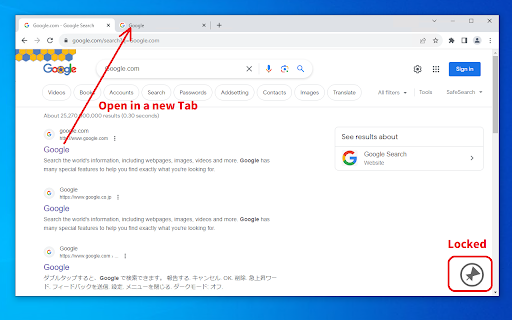
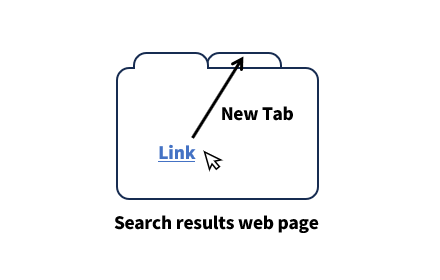
Double-clicking on the margins of a web page toggles the locked state. If locked, open the link in a new tab.
As of June 2026, Double-click to page lock has 63 users in the Workflow & Planning category.
Usersdown 3.1 percent−3.1%
63
63
Ratingno change0%
—
— reviews
Reviewsno change0%
—
Version
1.0.3
Manifest V3
History
3 snapshotsTracking since Apr 1, 2026.
View as table
| Date | Users | Rating | Reviews | Version |
|---|---|---|---|---|
| Apr 1, 2026 | 65 | — | — | 1.0.3 |
| May 3, 2026 | 67 | — | — | 1.0.3 |
| Jun 3, 2026 | 70 | — | — | 1.0.3 |
| Now | 63 | — | — | 1.0.3 |
Permissions & access
- Permissions
- None declared
- Host access
- None declared
Screenshots
About
1. Double-click on the margins of the web page.
2. A lock symbol appears in the lower right corner.
3. Click on the link.
4. The link will open in a new tab.

* It may not work on some web pages.

The new tab opens inactive. This is useful when you want to open all the sites you want to see first, for example on a search results page.

This software is released under the MIT License.
https://github.com/nekotadon/double-click-to-page-lock/blob/master/LICENSE
Technical
- Version
- 1.0.3
- Manifest
- V3
- Size
- 30.91KiB
- Min Chrome
- 88
- Languages
- 2
- Featured
- Yes
Metadata
- ID
- gjlolepdgcfnhdmmbmjhpencplafagpe
- Developer ID
- u50399f2a022de0189ef696698072a380
- Developer Email
- [email protected]
- Created
- Aug 1, 2023
- Last Updated (Store)
- Feb 24, 2024
- Last Scraped
- Jun 3, 2026
- Website
- —
- Support URL
- —
- Privacy Policy
- —
Similar extensions
Alternatives to Double-click to page lock, ranked by description similarity.
New tab from search results
Open the Google search results link in a new tab.
340
★ 5.0

Open page in new tab
Add a context menu item to load a new tab of the current page URL.
9

Open Link In New Tab
Forces all standard links (<a> tags) on a webpage to open in a new browser tab.
65

Always Open in New Tab
Automatically opens all links in new tabs in the background, keeping you on your current page for better browsing control.
453
★ 5.0
Close Tab by Double Right Click
Close tab by double right clicking anywhere on the page. Inspired by "Rights To Close" legacy extension for Mozilla Firefox.
9.0K
★ 3.0

Link Blanker
Open link in new tab.
20.0K
★ 4.2

Link Tab Checker
Checks if a link opens in a new tab.
39
★ 5.0

Retroactive New Tab
Opens Link in a New Tab, after you already clicked on it.
2
Data sourced from the Chrome Web Store · last verified Jun 3, 2026.