
ZONN — AI Image Detector
Detect AI-generated images directly from your browser. Right-click any image to scan with ZONN.ai.
As of June 2026, ZONN — AI Image Detector has — users and a 5.00/5 rating from 4 reviews in the Productivity category.
Usersno change0%
—
—
Ratingno change0%
5.00
4 reviews
Reviewsno change0%
4
Version
1.0.2
Manifest V3
90-day change · In the last 90 days this extension 2 version updates, changed permissions.
History
4 snapshotsTracking since May 20, 2026.
View as table
| Date | Users | Rating | Reviews | Version |
|---|---|---|---|---|
| May 20, 2026 | — | — | — | 1.0.0 |
| May 26, 2026 | — | — | — | 1.0.0 |
| Jun 2, 2026 | 30 | 5.00 | 4 | 1.0.1 |
| Jun 8, 2026 | 42 | 5.00 | 4 | 1.0.1 |
| Now | — | 5.00 | 4 | 1.0.2 |
Changelog
- Jun 8, 2026description
FEATURES:
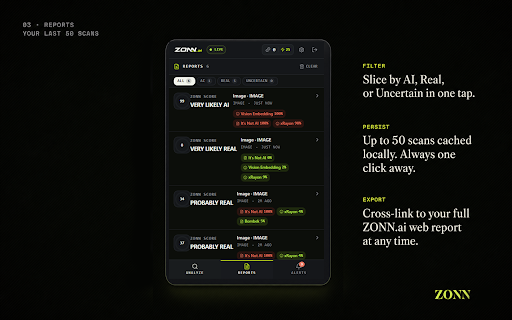
- Check any image for AI generation artifacts with ML-powered analysis
- Right-click any image or link to instantly analyze
- View detailed signal breakdowns from ML models and forensic methods
- Track your analysis history locally
- Integrated with your ZONN.ai account for seamless detection

HOW IT WORKS:
1. Right-click any image and select "Zonn It — Check Image"
2. Or open the popup and upload an image or paste a URL
3. Get an instant Zonn Score (0-100) with AI/Real/Uncertain verdict
4. View detailed breakdowns of individual detection signals

DETECTION METHODS:
- Modern ML image detectors (SigLIP, ItsNotAI v2, xRayon ConvNeXt, Bombek-1, CommFor)
- Forensic analysis (ELA, noise pattern, FFT frequency, edge consistency)
- Provenance signals (C2PA, metadata, ICC profile, watermark)
- Manipulation maps (IML-ViT)

PRIVACY:
- Your content is sent to zonn.ai servers for analysis only
- No browsing data is collected or stored
- Analysis history is stored locally on your device
- You control what gets analyzed — nothing is automatic

PERMISSIONS EXPLAINED:
- Storage: Save your analysis history and settings locally
- Active Tab: Resolve image URLs on the current page when you trigger a scan
- Context Menus: Add "Zonn It" option to right-click menu
- Scripting: Read image elements for analysis when you request it
- Alarms: Keep your session active
- Notifications: Show analysis results from right-click actions

Requires a ZONN.ai account. Create one free at https://zonn.ai
FEATURES:
- Check any image for AI generation artifacts with ML-powered analysis
- Right-click any image or link to instantly analyze
- View detailed signal breakdowns from ML models and forensic methods
- Track your analysis history locally
- Integrated with your ZONN.ai account for seamless detection

HOW IT WORKS:
1. Right-click any image and select "Zonn It — Check Image"
2. Or open the popup and upload an image or paste a URL
3. Get an instant Zonn Score (0-100) with AI/Real/Uncertain verdict
4. View detailed breakdowns of individual detection signals

DETECTION METHODS:
- Modern ML image detectors (SigLIP, ItsNotAI v2, xRayon ConvNeXt, Bombek-1, CommFor)
- Forensic analysis (ELA, noise pattern, FFT frequency, edge consistency)
- Provenance signals (C2PA, metadata, ICC profile, watermark)
- Manipulation maps (IML-ViT)

PRIVACY:
- Your content is sent to zonn.ai servers for analysis only
- No browsing data is collected or stored
- Analysis history is stored locally on your device
- You control what gets analyzed — nothing is automatic

PERMISSIONS EXPLAINED:
- Storage: Save your analysis history and settings locally
- Active Tab: Resolve image URLs on the current page when you trigger a scan
- Context Menus: Add "Zonn It" option to right-click menu
- Scripting: Read image elements for analysis when you request it
- Alarms: Keep your session active
- Notifications: Show analysis results from right-click actions
- Identity: Open the zonn.ai OAuth consent screen when you click "Connect" — never reads passwords or cookies, only receives a revocable access token

Requires a ZONN.ai account. Create one free at https://zonn.ai, then click "Connect" in the popup to authorize the extension via OAuth 2.0.
- Jun 8, 2026permissions
storage, activeTab, contextMenus, scripting, alarms, notifications
storage, activeTab, contextMenus, scripting, alarms, notifications, identity
Permissions & access
- Permissions
- storageactiveTabcontextMenusscriptingalarmsnotificationsidentity
- Host access
- https://zonn.ai/*, https://*.zonn.ai/*
Screenshots




About
FEATURES:
- Check any image for AI generation artifacts with ML-powered analysis
- Right-click any image or link to instantly analyze
- View detailed signal breakdowns from ML models and forensic methods
- Track your analysis history locally
- Integrated with your ZONN.ai account for seamless detection

HOW IT WORKS:
1. Right-click any image and select "Zonn It — Check Image"
2. Or open the popup and upload an image or paste a URL
3. Get an instant Zonn Score (0-100) with AI/Real/Uncertain verdict
4. View detailed breakdowns of individual detection signals

DETECTION METHODS:
- Modern ML image detectors (SigLIP, ItsNotAI v2, xRayon ConvNeXt, Bombek-1, CommFor)
- Forensic analysis (ELA, noise pattern, FFT frequency, edge consistency)
- Provenance signals (C2PA, metadata, ICC profile, watermark)
- Manipulation maps (IML-ViT)

PRIVACY:
- Your content is sent to zonn.ai servers for analysis only
- No browsing data is collected or stored
- Analysis history is stored locally on your device
- You control what gets analyzed — nothing is automatic

PERMISSIONS EXPLAINED:
- Storage: Save your analysis history and settings locally
- Active Tab: Resolve image URLs on the current page when you trigger a scan
- Context Menus: Add "Zonn It" option to right-click menu
- Scripting: Read image elements for analysis when you request it
- Alarms: Keep your session active
- Notifications: Show analysis results from right-click actions
- Identity: Open the zonn.ai OAuth consent screen when you click "Connect" — never reads passwords or cookies, only receives a revocable access token

Requires a ZONN.ai account. Create one free at https://zonn.ai, then click "Connect" in the popup to authorize the extension via OAuth 2.0.
Technical
- Version
- 1.0.2
- Manifest
- V3
- Size
- 164KiB
- Min Chrome
- 88
- Languages
- 1
- Featured
- No
Metadata
- ID
- gjinllbbgpgjkdgmcllbkcbndeoaofpo
- Developer ID
- u7b153ec52db1e837dc769700ad2923ec
- Developer Email
- [email protected]
- Created
- May 19, 2026
- Last Updated (Store)
- Jun 3, 2026
- Last Scraped
- Jun 8, 2026
- Website
- zonn.ai
- Support URL
- https://zonn.ai/contact
- Privacy Policy
- https://zonn.ai/privacy/extension
Data sourced from the Chrome Web Store · last verified Jun 8, 2026.