Removed from the Chrome Web Store — detected missing on May 7, 2026. The data below is the last known snapshot.

SAML Tracer
Use SAML Tracer to track Security Assertion Markup Language (SAML) and WS-Federation requests and responses.
As of May 2026, SAML Tracer has 20,000 users and a 4.74/5 rating from 23 reviews in the Developer Tools category.
Usersno change0%
20.0K
20,000
Ratingup 0.6 percent+0.6%
4.74
23 reviews
Reviewsup 9.5 percent+9.5%
23
Version
1.10
Manifest V3
History
3 snapshotsTracking since Apr 1, 2026.
View as table
| Date | Users | Rating | Reviews | Version |
|---|---|---|---|---|
| Apr 1, 2026 | 20.0K | 4.71 | 21 | 1.10 |
| Apr 16, 2026 | 20.0K | 4.73 | 22 | 1.10 |
| Apr 26, 2026 | 20.0K | 4.73 | 22 | 1.10 |
| Now | 20.0K | 4.74 | 23 | 1.10 |
Permissions & access
- Permissions
- webRequestdownloadsstorage
- Host access
- http://*/*, https://*/*
Screenshots
About
It your SAML Tools for Tracking SAML and WS-Federation Requests.

Discover the power of SAML Tracer, a robust Chrome extension designed to help you effortlessly monitor and analyze Security Assertion Markup Language and WS-Federation requests and responses. This indispensable tool is essential for anyone working with SAML SSO, ensuring you have the insights needed to streamline your single sign-on processes.

💎 Why Use SAML Tracer Chrome?
This extension is built to simplify the complex world of SAML single sign-on (SSO) and WS-Federation. Whether you are a developer, IT professional, or security analyst, our extension offers an intuitive interface to track and troubleshoot SAML and WS Federation activities in real-time.

⏰ Key Features SAML Tracer Chrome
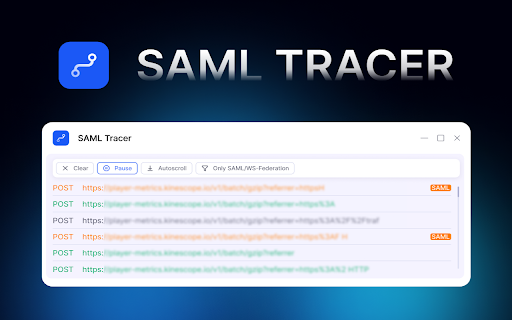
1️⃣ Real-Time Monitoring: Instantly capture SAML and WS Federation requests and responses as they happen.
2️⃣ Detailed Analysis: Break down the elements of SAML responses to understand the authentication process better.
3️⃣ User-Friendly Interface: Navigate effortlessly through your SAML traces with our easy-to-use design.
4️⃣ Filtering: Focus on SAML responses or WS Federation activities using powerful filtering options.

🌟 Benefits of Using SAML Tracer Chrome Extension
📌 Enhanced Visibility: Gain a clear view of your SAML SSO and WS Federation transactions, ensuring all details are captured.
📌 Improved Security: Identify and resolve security issues swiftly by analyzing SAML responses.
📌 Time-Saving: Quickly pinpoint and debug problems in your SSO using SAML without sifting through endless logs.
📌 Detailed Logging: Access comprehensive logs of your SSO activities, helping in thorough analysis and troubleshooting.
📌 Educational Resource: Ideal for learning and understanding SAML and WS Federation protocols, making it a valuable tool for both beginners and experts.

📈 Perfect for Various Use Cases
➤ Developers: Test and validate SAML implementations with ease, ensuring your applications are SSO-ready.
➤ IT Professionals: Monitor the health of your SAML SSO integrations and identify issues before they impact users.
➤ Security Analysts: Investigate and audit SAML and WS Federation communications to maintain high-security standards.

🚀 How to Get Started
🌐 Install SAML Tracer Chrome: Add the extension to your browser from the Chrome Web Store.
🌐 Start Tracking: Open the extension and begin capturing SAML and WS-Federation requests and responses.
🌐 Analyze and Troubleshoot: Use the detailed views to dissect your SAML traces.

🔝 Why Choose SAML Tracer Chrome?
◆ Comprehensive Monitoring: Track every detail of your SAML and WS-Federation communications.
◆ Enhanced Troubleshooting: Quickly identify and resolve issues with SSO implementations, reducing downtime and improving user experience.
◆ User-Friendly Interface: Enjoy a straightforward and intuitive interface that simplifies the monitoring and analysis of SSO transactions.
◆ Cost-Effective Solution: Access a powerful tool without the need for expensive licenses or subscriptions.

📶 Tips for Using Chrome SAML Tracer Effectively
🔹Regular Monitoring: Keep SAML Tracker Chrome active during critical SSO sessions to capture all relevant data.
🔹Stay Updated: Ensure that is always up-to-date for the latest features and security enhancements.
🔹Analyze Headers: Pay close attention to request and response headers for additional insights into the authentication process.
🔹Filter Requests: Use filters to narrow down specific requests or responses, making it easier to identify issues quickly.

🧐 Frequently Asked Questions
❓What is it?
💡 SAML Tracer is a Chrome extension designed to monitor and analyze Security Assertion Markup Language and WS-Federation requests and responses.
❓How does this extension help with SSO?
💡 It provides detailed insights into SAML responses, helping you identify and fix issues in your SAML SSO implementations.
❓Can I use Chrome SAML Tracer for WS-Federation?
💡 Yes, our extension fully supports tracking and analyzing WS Federation requests and responses.
❓How does it work?
💡 When the page loads, the extension checks the protocol of the requests. If it detects a SAML or WS-Federation request, the extension marks it.

📑 Conclusion
SAML Tracer Chrome extension is your go-to tool for managing and troubleshooting SAML SSO and WS-Federation. With its powerful features and user-friendly interface, you can ensure your SSO is always running smoothly. Install it today and take control of your  Security Assertion Markup Language and WS Federation communications.
Technical
- Version
- 1.10
- Manifest
- V3
- Size
- 209KiB
- Min Chrome
- 88
- Languages
- 44
- Featured
- Yes
Metadata
- ID
- gjhodfmodljmmndflcilhkbikpcclkjn
- Developer ID
- uc2484146813086f7da83b97689ddd1c9
- Developer Email
- [email protected]
- Created
- Aug 20, 2024
- Last Updated (Store)
- Mar 15, 2026
- Last Scraped
- May 1, 2026
- Website
- —
- Support URL
- —
Data sourced from the Chrome Web Store · last verified May 1, 2026.