
Mailsie – Automatic Email & Social Media Extractor
Automatically extract emails and social media profiles from most websites while you browse
As of June 2026, Mailsie – Automatic Email & Social Media Extractor has 635 users and a 3.67/5 rating from 3 reviews in the Productivity category.
Usersup 1.1 percent+1.1%
635
635
Ratingno change0%
3.67
3 reviews
Reviewsno change0%
3
Version
2.0.1
Manifest V3
90-day change · In the last 90 days this extension 1 version update, changed permissions.
History
7 snapshotsTracking since Apr 1, 2026.
View as table
| Date | Users | Rating | Reviews | Version |
|---|---|---|---|---|
| Apr 1, 2026 | 628 | 3.67 | 3 | 1.3 |
| May 3, 2026 | 642 | 3.67 | 3 | 1.3 |
| May 9, 2026 | 643 | 3.67 | 3 | 2.0.1 |
| May 14, 2026 | 659 | 3.67 | 3 | 2.0.1 |
| May 27, 2026 | 671 | 3.67 | 3 | 2.0.1 |
| Jun 3, 2026 | 665 | 3.67 | 3 | 2.0.1 |
| Jun 8, 2026 | 603 | 3.67 | 3 | 2.0.1 |
| Now | 635 | 3.67 | 3 | 2.0.1 |
Changelog
- May 3, 2026description
Tired of manually searching for contact emails and social media profiles while browsing? In this tutorial, I'll show you how to use Mailsie, a powerful Chrome extension that automatically extracts emails and social media links (Instagram, LinkedIn, Facebook, etc.) from any website you visit.

Learn how to effortlessly gather contact information in seconds and export everything into a CSV file with just one click. Perfect for sales, lead generation, and research!

💼 Best for: Marketers, sales professionals, researchers, and anyone who needs quick access to contact info.
Free. Installs in 3 seconds. Your first leads in 30.

You just spent 10 minutes reading a company's website. Their team page, their blog, their contact page. Mailsie found 47 emails before you finished the About section.

That's what it does. You browse. Leads appear.

Here's how it actually works.

Install Mailsie. Sign up with Google. Flip one switch. From that point on, every website you visit is quietly scanned for publicly available email addresses and social profiles. They're organized by domain, waiting in your dashboard whenever you're ready.

Not every website will surface results — and that's by design. Mailsie only captures emails that are openly published on the page, which means every lead in your dashboard was legally and ethically obtained. No scraping behind logins, no guessing, no gray areas.

No new workflow. No tab switching. No "prospecting sessions." Just your normal research, now producing a pipeline.

Need more than one site at a time?
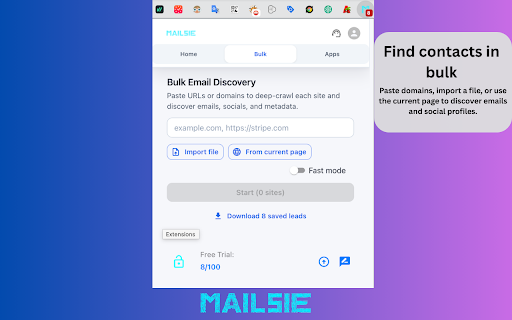
Drop in a list — 10 domains or 10,000. Mailsie crawls every one and comes back with emails, social profiles, and a quality score for each. Import a file, paste URLs, or pull every link from the page you're on right now. Some domains will return dozens of contacts, others may return none — it all depends on what's publicly available.

Your pipeline fills itself.
Connect your CRM once. Salesforce, HubSpot, or Pipedrive. From then on, push any batch of leads with one click. Or wire up Zapier and Make so leads flow into your sequences the moment they're found — no manual step in between.

Verified emails. Real contacts. Ready to reach.
Every email can be verified before it hits your CRM or your outbound sequence. No bounces burning your sender reputation. No ghost addresses inflating your list.

Trusted by 12,000+ sales teams.

What makes Mailsie different:
• Passive capture — finds leads from pages you're already visiting, not just pages you search for
• 100% public data — only collects emails that are openly visible on the page, keeping you fully compliant
• Bulk discovery that actually scales — 10,000 domains in one run, with pause and resume
• CRM sync that pushes verified leads, not raw scrape dumps
• Webhook-native — trigger Zapier/Make sequences the instant a lead is found
• Google Maps extraction built in — pull every business from a Maps search into your pipeline

Free plan. No credit card. No trial clock.

Start finding leads right now. Upgrade when your pipeline tells you to.
- May 3, 2026short_description
Automatically extract emails and social media profiles from any website while you browse
Automatically extract emails and social media profiles from most websites while you browse
- May 3, 2026permissions
notifications, storage, identity
notifications, storage, scripting, alarms, sidePanel, cookies
- May 3, 2026host_permissions
http://*/*, *://*/*
http://*/*, *://*/*, https://login.salesforce.com/*, https://*.salesforce.com/*, https://api.hubapi.com/*, https://oauth.pipedrive.com/*, https://*.pipedrive.com/*, https://www.mailsie.eu/*, https://blast.mailsie.eu/*, https://hooks.zapier.com/*, https://hook.eu1.make.com/*
Permissions & access
- Permissions
- notificationsstoragescriptingalarmssidePanelcookies
- Host access
- http://*/*, *://*/*, https://login.salesforce.com/*, https://*.salesforce.com/*, https://api.hubapi.com/*, https://oauth.pipedrive.com/*, https://*.pipedrive.com/*, https://www.mailsie.eu/*, https://blast.mailsie.eu/*, https://hooks.zapier.com/*, https://hook.eu1.make.com/*
Screenshots


About
Free. Installs in 3 seconds. Your first leads in 30.

You just spent 10 minutes reading a company's website. Their team page, their blog, their contact page. Mailsie found 47 emails before you finished the About section.

That's what it does. You browse. Leads appear.

Here's how it actually works.

Install Mailsie. Sign up with Google. Flip one switch. From that point on, every website you visit is quietly scanned for publicly available email addresses and social profiles. They're organized by domain, waiting in your dashboard whenever you're ready.

Not every website will surface results — and that's by design. Mailsie only captures emails that are openly published on the page, which means every lead in your dashboard was legally and ethically obtained. No scraping behind logins, no guessing, no gray areas.

No new workflow. No tab switching. No "prospecting sessions." Just your normal research, now producing a pipeline.

Need more than one site at a time?
Drop in a list — 10 domains or 10,000. Mailsie crawls every one and comes back with emails, social profiles, and a quality score for each. Import a file, paste URLs, or pull every link from the page you're on right now. Some domains will return dozens of contacts, others may return none — it all depends on what's publicly available.

Your pipeline fills itself.
Connect your CRM once. Salesforce, HubSpot, or Pipedrive. From then on, push any batch of leads with one click. Or wire up Zapier and Make so leads flow into your sequences the moment they're found — no manual step in between.

Verified emails. Real contacts. Ready to reach.
Every email can be verified before it hits your CRM or your outbound sequence. No bounces burning your sender reputation. No ghost addresses inflating your list.

Trusted by 12,000+ sales teams.

What makes Mailsie different:
• Passive capture — finds leads from pages you're already visiting, not just pages you search for
• 100% public data — only collects emails that are openly visible on the page, keeping you fully compliant
• Bulk discovery that actually scales — 10,000 domains in one run, with pause and resume
• CRM sync that pushes verified leads, not raw scrape dumps
• Webhook-native — trigger Zapier/Make sequences the instant a lead is found
• Google Maps extraction built in — pull every business from a Maps search into your pipeline

Free plan. No credit card. No trial clock.

Start finding leads right now. Upgrade when your pipeline tells you to.
Technical
- Version
- 2.0.1
- Manifest
- V3
- Size
- 7.39MiB
- Min Chrome
- 114
- Languages
- 1
- Featured
- No
Metadata
- ID
- gjgpgmnngheliejjpmnmbiedakgjlnhj
- Developer ID
- ub8bcd949c5e1b1cbeb497a8c5bfbb49e
- Developer Email
- [email protected]
- Created
- Sep 24, 2024
- Last Updated (Store)
- May 1, 2026
- Last Scraped
- Jun 8, 2026
- Website
- mailsie.eu
- Privacy Policy
- https://mailsie.eu/emailExtract/privacy-policy/
Similar extensions
Alternatives to Mailsie – Automatic Email & Social Media Extractor, ranked by description similarity.

Mail Flow
A Chrome extension for lead generation that extracts emails from search results
19

Email Scraper
Smart email scraper that collects and copies emails from websites. Includes an email extractor and powerful mail finder tools
398
★ 5.0

Email Extractor
Powerful Extension To Extract E-Mail ID's Automatically From Web Pages.
5

Get Email and Phone Number From Any LinkedIn Profile — SupportFinity
Unlock Contacts. Summarize Profiles. Hire Smarter.
99
★ 5.0

Copy Emails
Detects every email on the current page and copies them to your clipboard with one click.
21

Find Email Address
Extract email addresses from web pages.
5

Email Catcher
Advanced email extraction tool - Collect and manage email addresses from web pages efficiently and securely.
—

Email Extractor By-SS
Extracts email addresses from web pages
60
★ 5.0
Data sourced from the Chrome Web Store · last verified Jun 8, 2026.