
Universal Select: Copy, Paste & Right Click
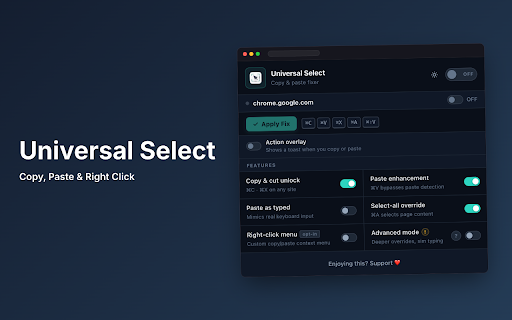
Restores copy, paste, cut, and text selection on websites that disable them. Helps you access web content more efficiently.
As of June 2026, Universal Select: Copy, Paste & Right Click has 106 users and a 5.00/5 rating from 2 reviews in the Accessibility category.
Usersno change0%
106
106
Ratingno change0%
5.00
2 reviews
Reviewsno change0%
2
Version
5.0
Manifest V3
History
8 snapshotsTracking since Apr 23, 2026.
View as table
| Date | Users | Rating | Reviews | Version |
|---|---|---|---|---|
| Apr 23, 2026 | — | — | — | 5.0 |
| Apr 28, 2026 | — | — | — | 5.0 |
| May 5, 2026 | 6 | 5.00 | 1 | 5.0 |
| May 11, 2026 | 10 | 5.00 | 1 | 5.0 |
| May 16, 2026 | 19 | 5.00 | 1 | 5.0 |
| May 22, 2026 | 37 | 5.00 | 2 | 5.0 |
| May 29, 2026 | 87 | 5.00 | 2 | 5.0 |
| Jun 11, 2026 | 93 | 5.00 | 2 | 5.0 |
| Now | 106 | 5.00 | 2 | 5.0 |
Changelog
- May 11, 2026description
Universal Select is the ultimate, privacy-first accessibility tool that forcibly restores all standard browser behaviors on restrictive, heavily-monitored websites.

Have you ever tried to paste your own notes into a form, or select a string of text for reference, only to find the website has completely disabled your keyboard shortcuts, mouse clicks, and right-click menus? Or perhaps a site prevents you from highlighting text or using Inspect Element? Universal Select overrides these restrictions completely natively and instantly, giving you back full control of your browser.

COMPREHENSIVE FEATURE LIST

Mouse & Selection Unlocking:
- Enable Text Selection: Strips away CSS restrictions like user-select: none so you can highlight any text, anywhere.
- Restore Dragging: Re-enables the ability to click and drag to select paragraphs or lines of text.
- Enable Double Click: Restores the ability to double-click words to instantly highlight them.

Keyboard Shortcut Restoration:
- Enable Copy Ctrl+C / Cmd+C: Instantly copies any selected text, even on sites that actively block the clipboard.
- Enable Cut Ctrl+X / Cmd+X: Restores the ability to cut text from input fields.
- Enable Paste Ctrl+V / Cmd+V: Forces stubborn web forms to natively accept your pasted text.
- Select All Override Ctrl+A / Cmd+A: Re-enables your ability to instantly select the entire pages contents.

The Paste As Typed Engine:
- Human Typing Simulation: Some highly restrictive forms do not just block the clipboard they actively monitor keypresses. Universal Select includes a powerful Paste As Typed engine that simulates individual human keystrokes to output your clipboard text, perfectly bypassing sophisticated anti-paste monitors.

Right-Click & Context Menus:
- Restore Right-Click Context Menus: Re-enables the native browser right-click menu, allowing you to Inspect Element, open links in new tabs, or use standard browser tools that websites try to hide.

Advanced Technical Capabilities Under the Hood:
- Clears Hostile JavaScript Events: Deeply scans and removes aggressive DOM listener scripts designed to block you e.g. overriding oncopy, onpaste, oncut, oncontextmenu, onselectstart, onmousedown, and onkeydown.
- Modern Framework Support: Works flawlessly without breaking modern single-page applications built on React, Angular, or Vue, and does not interfere with complex code editors like Monaco or CodeMirror.
- Absolute DOM Execution: Operates deeply using a MAIN world IIFE injection to ensure the highest level of privilege against sites trying to sandbox accessibility tools.

Per-Site Opt-In Switch:
- Dormant by Default: Universal Select does not arbitrarily inject code into every tab you open. You explicitly use the toggle switch to whitelist exactly which domains are allowed to run the extension, ensuring peak browser performance.

Beautiful Customization:
- Fully respects your UI preferences with a beautifully designed, lightweight Popup interface.
- Built-in Light, Dark, and System Default theme support that persists across your sessions.

100% PRIVACY FIRST & OFFLINE:
- Zero Analytics, Zero Tracking: There is absolutely no external code, telemetry, or data collection.
- Runs Completely Offline: The extension operates entirely within your local browser environment.
- No Clipboard Snooping: We do not require the dangerous clipboardRead background permission, keeping your personal clipboard history completely out of reach.
- Local Storage: All your extension preferences and enabled sites are saved securely to your browsers local storage.
Enable Copy Paste, Right Click and Text Selection on Any Website

Universal Select fixes copy paste not working, enables right click, and allows text selection on any website that blocks it.

Fix copy paste issues instantly and take full control of your browser.

Fix Copy Paste Not Working

Many websites disable copy paste, right click, text selection, and Inspect Element.

Universal Select removes these restrictions and restores copy paste, right click, and full browser functionality instantly.

Core Features

Enable Copy Paste Everywhere
Copy text from any blocked website
Paste into restricted input fields
Works even on protected and monitored forms

Allow Text Selection
Select text even with user-select: none
Click and drag to highlight content
Double-click to select words

Enable Right Click and Inspect
Restore right-click context menu
Enable Inspect Element on blocked websites
Open links in new tabs

Advanced Bypass Technology

Paste As Typed Engine

Some websites block paste using advanced detection systems.

Universal Select simulates real human typing to bypass anti-paste protection, keypress tracking, and input restrictions.

Deep Compatibility

Works on modern websites built with React, Angular, and Vue.
Supports editors like Monaco and CodeMirror without breaking functionality.

Smart and Controlled Usage

Enable the extension only on selected websites.
No unnecessary background activity.
Lightweight and performance-friendly.

Privacy First

No tracking
No analytics
No data collection
Works completely offline
No clipboard access

Advanced Capabilities

Removes blocking scripts such as oncopy, onpaste, oncut, oncontextmenu, and onselectstart.
Restores normal browser behavior even on heavily restricted websites.

Best For

Fixing copy paste not working
Enabling right click on websites
Allowing text selection anywhere
Students, developers, and professionals

Why Choose Universal Select

Works instantly with one click
Simple and clean interface
No setup required
Reliable across most websites

Install Universal Select and restore copy paste, right click, and full browser control.
- May 5, 2026description
Universal Select is the ultimate, privacy-first accessibility tool that forcibly restores all standard browser behaviors on restrictive, heavily-monitored websites.

Have you ever tried to paste your own notes into a form, or select a string of text for reference, only to find the website has completely disabled your keyboard shortcuts, mouse clicks, and right-click menus? Or perhaps a site prevents you from highlighting text or using Inspect Element? Universal Select overrides these restrictions completely natively and instantly, giving you back full control of your browser.

COMPREHENSIVE FEATURE LIST

Mouse & Selection Unlocking:
- Enable Text Selection: Strips away CSS restrictions like user-select: none so you can highlight any text, anywhere.
- Restore Dragging: Re-enables the ability to click and drag to select paragraphs or lines of text.
- Enable Double Click: Restores the ability to double-click words to instantly highlight them.

Keyboard Shortcut Restoration:
- Enable Copy Ctrl+C / Cmd+C: Instantly copies any selected text, even on sites that actively block the clipboard.
- Enable Cut Ctrl+X / Cmd+X: Restores the ability to cut text from input fields.
- Enable Paste Ctrl+V / Cmd+V: Forces stubborn web forms to natively accept your pasted text.
- Select All Override Ctrl+A / Cmd+A: Re-enables your ability to instantly select the entire pages contents.

The Paste As Typed Engine:
- Human Typing Simulation: Some highly restrictive forms do not just block the clipboard they actively monitor keypresses. Universal Select includes a powerful Paste As Typed engine that simulates individual human keystrokes to output your clipboard text, perfectly bypassing sophisticated anti-paste monitors.

Right-Click & Context Menus:
- Restore Right-Click Context Menus: Re-enables the native browser right-click menu, allowing you to Inspect Element, open links in new tabs, or use standard browser tools that websites try to hide.

Advanced Technical Capabilities Under the Hood:
- Clears Hostile JavaScript Events: Deeply scans and removes aggressive DOM listener scripts designed to block you e.g. overriding oncopy, onpaste, oncut, oncontextmenu, onselectstart, onmousedown, and onkeydown.
- Modern Framework Support: Works flawlessly without breaking modern single-page applications built on React, Angular, or Vue, and does not interfere with complex code editors like Monaco or CodeMirror.
- Absolute DOM Execution: Operates deeply using a MAIN world IIFE injection to ensure the highest level of privilege against sites trying to sandbox accessibility tools.

Per-Site Opt-In Switch:
- Dormant by Default: Universal Select does not arbitrarily inject code into every tab you open. You explicitly use the toggle switch to whitelist exactly which domains are allowed to run the extension, ensuring peak browser performance.

Beautiful Customization:
- Fully respects your UI preferences with a beautifully designed, lightweight Popup interface.
- Built-in Light, Dark, and System Default theme support that persists across your sessions.

100% PRIVACY FIRST & OFFLINE:
- Zero Analytics, Zero Tracking: There is absolutely no external code, telemetry, or data collection.
- Runs Completely Offline: The extension operates entirely within your local browser environment.
- No Clipboard Snooping: We do not require the dangerous clipboardRead background permission, keeping your personal clipboard history completely out of reach.
- Local Storage: All your extension preferences and enabled sites are saved securely to your browsers local storage.
Universal Select is the ultimate, privacy-first accessibility tool that forcibly restores all standard browser behaviors on restrictive, heavily-monitored websites.

Have you ever tried to paste your own notes into a form, or select a string of text for reference, only to find the website has completely disabled your keyboard shortcuts, mouse clicks, and right-click menus? Or perhaps a site prevents you from highlighting text or using Inspect Element? Universal Select overrides these restrictions completely natively and instantly, giving you back full control of your browser.

COMPREHENSIVE FEATURE LIST

Mouse & Selection Unlocking:
- Enable Text Selection: Strips away CSS restrictions like user-select: none so you can highlight any text, anywhere.
- Restore Dragging: Re-enables the ability to click and drag to select paragraphs or lines of text.
- Enable Double Click: Restores the ability to double-click words to instantly highlight them.

Keyboard Shortcut Restoration:
- Enable Copy Ctrl+C / Cmd+C: Instantly copies any selected text, even on sites that actively block the clipboard.
- Enable Cut Ctrl+X / Cmd+X: Restores the ability to cut text from input fields.
- Enable Paste Ctrl+V / Cmd+V: Forces stubborn web forms to natively accept your pasted text.
- Select All Override Ctrl+A / Cmd+A: Re-enables your ability to instantly select the entire pages contents.

The Paste As Typed Engine:
- Human Typing Simulation: Some highly restrictive forms do not just block the clipboard they actively monitor keypresses. Universal Select includes a powerful Paste As Typed engine that simulates individual human keystrokes to output your clipboard text, perfectly bypassing sophisticated anti-paste monitors.

Right-Click & Context Menus:
- Restore Right-Click Context Menus: Re-enables the native browser right-click menu, allowing you to Inspect Element, open links in new tabs, or use standard browser tools that websites try to hide.

Advanced Technical Capabilities Under the Hood:
- Clears Hostile JavaScript Events: Deeply scans and removes aggressive DOM listener scripts designed to block you e.g. overriding oncopy, onpaste, oncut, oncontextmenu, onselectstart, onmousedown, and onkeydown.
- Modern Framework Support: Works flawlessly without breaking modern single-page applications built on React, Angular, or Vue, and does not interfere with complex code editors like Monaco or CodeMirror.
- Absolute DOM Execution: Operates deeply using a MAIN world IIFE injection to ensure the highest level of privilege against sites trying to sandbox accessibility tools.

Per-Site Opt-In Switch:
- Dormant by Default: Universal Select does not arbitrarily inject code into every tab you open. You explicitly use the toggle switch to whitelist exactly which domains are allowed to run the extension, ensuring peak browser performance.

Beautiful Customization:
- Fully respects your UI preferences with a beautifully designed, lightweight Popup interface.
- Built-in Light, Dark, and System Default theme support that persists across your sessions.

100% PRIVACY FIRST & OFFLINE:
- Zero Analytics, Zero Tracking: There is absolutely no external code, telemetry, or data collection.
- Runs Completely Offline: The extension operates entirely within your local browser environment.
- No Clipboard Snooping: We do not require the dangerous clipboardRead background permission, keeping your personal clipboard history completely out of reach.
- Local Storage: All your extension preferences and enabled sites are saved securely to your browsers local storage.
Permissions & access
- Permissions
- activeTabscriptingstorage
- Host access
- <all_urls>
Screenshots


About
Enable Copy Paste, Right Click and Text Selection on Any Website

Universal Select fixes copy paste not working, enables right click, and allows text selection on any website that blocks it.

Fix copy paste issues instantly and take full control of your browser.

Fix Copy Paste Not Working

Many websites disable copy paste, right click, text selection, and Inspect Element.

Universal Select removes these restrictions and restores copy paste, right click, and full browser functionality instantly.

Core Features

Enable Copy Paste Everywhere
Copy text from any blocked website
Paste into restricted input fields
Works even on protected and monitored forms

Allow Text Selection
Select text even with user-select: none
Click and drag to highlight content
Double-click to select words

Enable Right Click and Inspect
Restore right-click context menu
Enable Inspect Element on blocked websites
Open links in new tabs

Advanced Bypass Technology

Paste As Typed Engine

Some websites block paste using advanced detection systems.

Universal Select simulates real human typing to bypass anti-paste protection, keypress tracking, and input restrictions.

Deep Compatibility

Works on modern websites built with React, Angular, and Vue.
Supports editors like Monaco and CodeMirror without breaking functionality.

Smart and Controlled Usage

Enable the extension only on selected websites.
No unnecessary background activity.
Lightweight and performance-friendly.

Privacy First

No tracking
No analytics
No data collection
Works completely offline
No clipboard access

Advanced Capabilities

Removes blocking scripts such as oncopy, onpaste, oncut, oncontextmenu, and onselectstart.
Restores normal browser behavior even on heavily restricted websites.

Best For

Fixing copy paste not working
Enabling right click on websites
Allowing text selection anywhere
Students, developers, and professionals

Why Choose Universal Select

Works instantly with one click
Simple and clean interface
No setup required
Reliable across most websites

Install Universal Select and restore copy paste, right click, and full browser control.
Technical
- Version
- 5.0
- Manifest
- V3
- Size
- 48.56KiB
- Min Chrome
- 116
- Languages
- 1
- Featured
- No
Metadata
- ID
- gjggkgofabnkfcnpnhkfbcglfodbmobk
- Developer ID
- u1d306098e07e42705f7596f11b316766
- Developer Email
- [email protected]
- Created
- Apr 22, 2026
- Last Updated (Store)
- May 23, 2026
- Last Scraped
- Jun 11, 2026
- Website
- —
- Support URL
- —
- Privacy Policy
- —
Data sourced from the Chrome Web Store · last verified Jun 11, 2026.